Calendar view broken again after R66.18 update

I was upgraded to the R 66.18 Build 27.1.66.18 this evening and found that my calendar view is broken again. It's malfunctioning exactly as it had been 10 months ago, when I first posted about it. Later on in 2025, the issue was resolved, and it had worked fine up until the latest update.
The problem description is the same and is as follows:
As soon as I click on a transaction within the calendar view in order to edit or skip it, the circle spins, and it never resolves. I cannot close the Calendar view or click on any other transactions, and I'm forced to end task on Quicken in order to reopen it. It's a big issue for me. Additionally, this time around, the transaction I'm posting from the calendar view is not posted into my register.
[Edited - Readability]
Comments
-
Hello @Bill Neilan,
Thank you for letting us know you're seeing this issue. To clarify, is this happening on the Bills & Income tab, using Calendar View, when you click the Show Full Calendar button, or when you view the Calendar using Tools>Calendar?
I tried to replicate the issue in my own file, but couldn't get it to misbehave the way you describe. To troubleshoot potential file-specific issues, I suggest you start by validating your data file. Please save a backup file prior to performing these steps.
Validate:
- File
- Validate and Repair File...
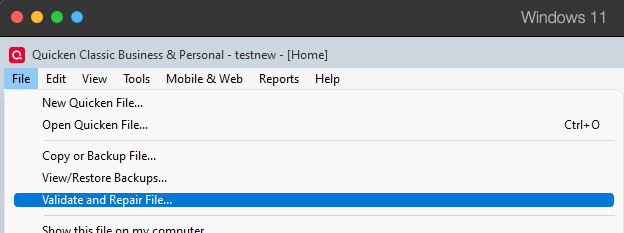
- Validate File
- Click OK
- Close the Data Log
- Close Quicken (leave it closed for at least 5 secs)
- Reopen Quicken and see if the issue persists.
I look forward to your response!
Quicken Kristina
Make sure to sign up for the email digest to see a round up of your top posts.
0 -
I ran the Validate/Repair. It read it found /fixed 2 scheduled transactions. The Calender View worked—but just once. Today I went in, the same thing repeated. I couldn't make one edit before it stopped responding. I had to end task again. I ran Super validate.. Same results. Calendar view worked. It's not a permanent fix though. Same symptoms/same process run last year. The only way it was resolved last year was there was another update sent out in the last qtr of 2025 which somehow fixed it.
0 -
I had to run Super validate and repair twice today because whatever benefit it provides doesn't last at all.
0 -
Thank you for your reply,
Since the validation is only a temporary fix, the next step is to restore a backup from before the problem started, then verify if the issue is resolved in the newly restored file.
Thank you!
Quicken Kristina
Make sure to sign up for the email digest to see a round up of your top posts.
-1 -
I received another update R66.23. Now the calendar is working again. It's a program issue—not a data issue.
[Edited - Readability]
0 -
Thank you for the follow-up,
I'm glad to hear that updating to R66.23 corrected the issue!
Quicken Kristina
Make sure to sign up for the email digest to see a round up of your top posts.
0
