Bug in Bill Reminders (Add / Edit) - can't tab into "Details", can't go to all fields with keyboard

In Quicken Windows Classic, latest release, there's a bug in the Edit/Add reminder dialog that prevent all fields from being accessed using only the TAB key of the keyboard. This bug has existed for a long time, I'm finally reporting it and hope it can be fixed by actually eliminating the "Details" pop-up dialog and moving all fields inline into the form.
If not, please at least address navigation by TAB so ALL fields are accessible by keyboard, even the Details fields.
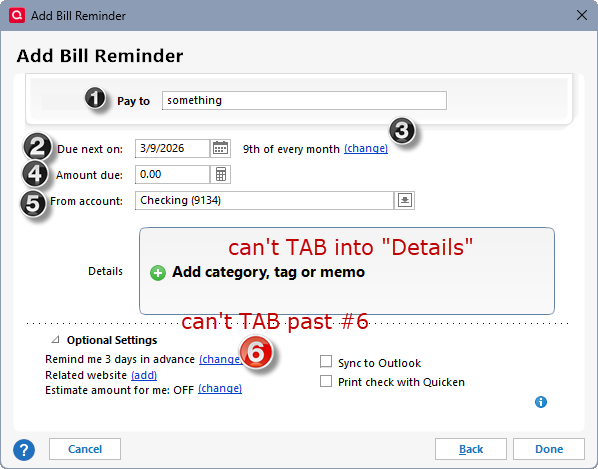
BUG 1: When adding a bill reminder, there's no way using the keyboard to edit the fields shown in the "Details" box - clicking TAB moves from (1) Pay to to (2) Due next to (3) change frequency to (4) Amount due to (5) From to (6) change reminder, bypassing the Details fields. In addition there's no way to TAB past #6 - it stops there, with TAB having no effect. Note there are no "shortcut" keys shown (ex: ALT+A to jump to Amount field) - compare with EDIT dialog below.
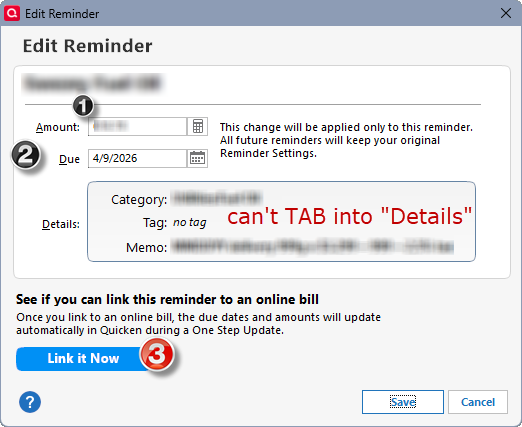
BUG 2: When editing a bill reminder, same as above - there's no way using the keyboard to edit the fields isolated in the "Details" box. Clicking TAB from (2) DUE field bypasses the Details and jumps to (3) LINK IT NOW. Note also there are "shortcut" keys shown, ex: ALT+A should jump to Amount, Alt+D should jump to Due - but a "D" is also underlined on Details yet has no effect. ALT+D only goes to the DUE field. In addition, there are no "shortcut" keys in the ADD dialog, so behavior and usability is inconsistent between these two dialogs (ADD vs EDIT).
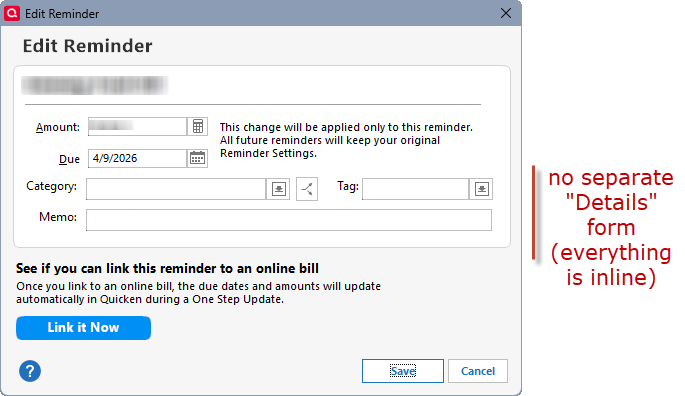
PROPOSED FIX: For years I've wondered why these 3 very important fields (Category, Tag, Memo) are isolated behind an additional click to activate them, and then edit them in yet another dialog box. While fixing the TAB navigation issues can you merge these3 fields directly inline with the Amount and Due date fields, etc., in Reminder Edit and Add dialogs? It would simplify keyboard navigation and usability to have all fields immediately accessible in the same dialog. Here's a mockup for consideration:
Quicken Classic Deluxe
Version: R66.23
Build: 27.166.23
OS: Windows 11 Enterprise
Comments
-
Hello @drew2u,
Thank you for taking the time to visit the Community to report this issue, though we apologize that you are experiencing this.
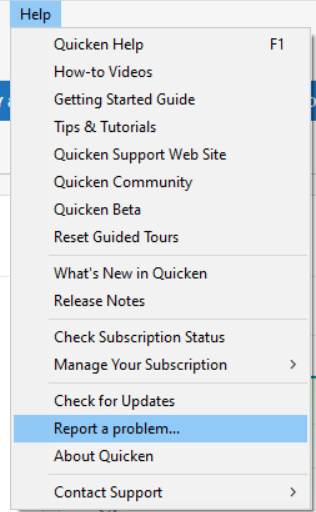
We have forwarded this issue to the proper channels to have this further investigated. In the meantime, we request that you please navigate to Help > Report a problem and submit a problem report with log files attached in order to contribute to the investigation.
While you will not receive a response through this submission, these reports will help our teams in further investigating the issue. The more problem reports we receive, the better.
We apologize for any inconvenience! Thank you.
(CTP-16589)
Quicken Kristina
Make sure to sign up for the email digest to see a round up of your top posts.
0 -
@Quicken Kristina Report submitted via Quicken HELP menu, as requested. Thank you!
1 -
Thank you for your reply and for sending the problem report.
It will help our teams investigate the issue!
Quicken Kristina
Make sure to sign up for the email digest to see a round up of your top posts.
0

Categories
- All Categories
- 6 Product Ideas
- 34 Announcements
- 249 Alerts, Online Banking & Known Product Issues
- 19 Product Alerts
- 266 Welcome to the Community!
- 301 Before you Buy
- 1.5K Product Ideas
- 55.8K Quicken Classic for Windows
- 16.9K Quicken Classic for Mac
- 1K Quicken Mobile
- 834 Quicken on the Web
- 129 Quicken LifeHub