Quicken fails to connect to my Morgan Stanley At Work Account

I have tried to add Web Connect to my manually created Morgan Stanley At Work account in Quicken.
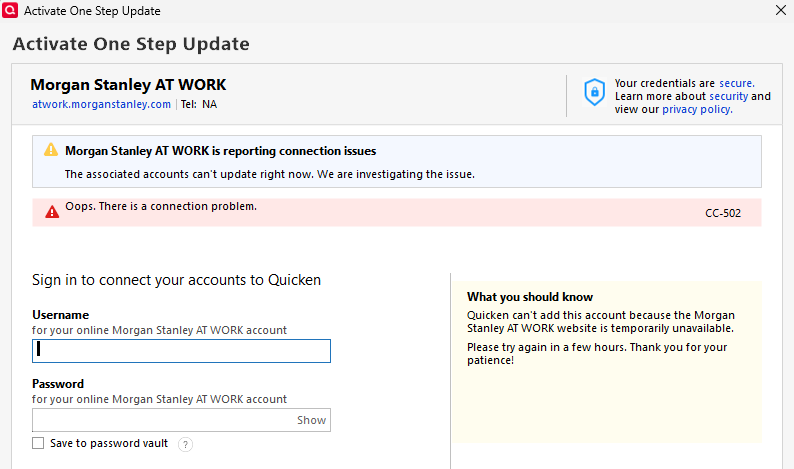
I am able to log into my Morgan Stanley At Work account without issue. So is this a problem between Quicken and Morgan Stanley?
Answers
-
Hello @ranger75230,
Thank you for letting us know you're encountering this issue. To clarify, when you say you're trying to add Web Connect, do you mean you're trying to connect using Express Web Connect, or do you mean you're trying to import a QFX/Web Connect file into your Quicken?
To troubleshoot the CC-502 error, please follow these instructions from our article on CC-502 errors:
Refresh your account information
- Open the transaction register for the account with the error message.
- Click the Gear Icon in the upper right of the register and select Update Now.
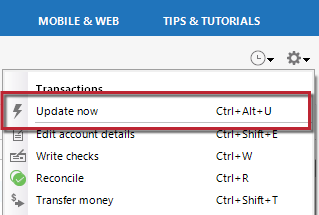
- Follow the on-screen instructions to complete the update.
- Repeat these steps for each account with this error.
If refreshing your accounts does not resolve the issue
Try waiting one business day. This error message is typically caused by maintenance on your bank's website. You can try updating again in a few hours or the next business day. If the issue still occurs after one business day, try the steps above again.
If the issue persists
Please Contact Us so we can help you fix this issue.
I hope this helps!
Quicken Kristina
Make sure to sign up for the email digest to see a round up of your top posts.
0 -
Hello @ranger75230,
We haven't heard back from you in a while. Do you still need assistance?
Check back and let us know! Thank you.
Quicken Kristina
Make sure to sign up for the email digest to see a round up of your top posts.
0
