Registry changes when I backup or do a One Step Update [Edited]

I have my credit cards set up so that it automatically enters for the month things that are monthly, but when I purchase something, I enter it for this instance, so it is not affecting my monthly number. When I do a backup or One Step Update, it erases the entry but not the dollar value. I don't even have these cards set up on any Quicken updates. How do I have Quicken leave the registry alone?
[Edited - Readability]
Answers
-
Hi @bpapo,
Thank you for providing the details about this issue. I’ll be happy to help you troubleshoot it further.
To better understand what may be happening, could you please clarify a few things?
- When did you first notice the issue?
- Are your transactions currently being sorted by date?
- To confirm that the Sort Order in your account register is by Date, just click the top of the Date column in your account register. It's likely the transactions are in your register, just not where you expected them to be.
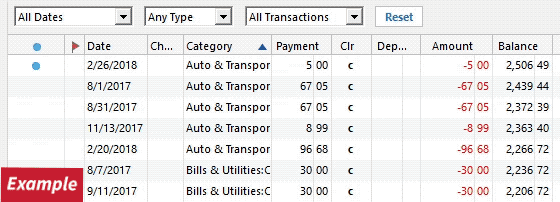
- To confirm that the Sort Order in your account register is by Date, just click the top of the Date column in your account register. It's likely the transactions are in your register, just not where you expected them to be.
- Are any filters applied to the account register?
- Click the Reset button at the top of the register. This will confirm that there's no filtering in your account register.
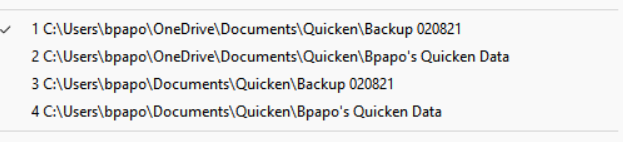
- Where is your Quicken data file located?
- To check, please open Quicken and go to File. At the bottom of the menu under Recent Files, the file with the check mark next to it is the one currently open. Please let me know the full file path shown there.
Also, when you mentioned that “when you make a backup or run a One Step Update, the entry is deleted but not the dollar value,” could you clarify what you mean?
- Are the payee and category/memo fields being cleared while the amount remains?
- Or does the entire transaction disappear, but the account balance stays the same?
Your response will help define the problem.
I look forward to your answer!
Quicken Laura
Make sure to sign up for the email digest to see a round up of your top posts.
0 -
I have been using Quicken for about 16 years, and about the last year, this change occurred. What I do for my CC is I put recurring charges in and add, for this instance, extra monthly charges. When I update or back up, the transaction disappears, but the total balance will stay the same. So if I entered 100 dollars in this instance, it will erase what it was for and the category, but leave the dollar value and total. This happens with all my add for this instance. I am surprised people arent complaining about it . Below is the path you requested. I don't get a notification when you respond, and I thought I would.
[Edited - Readability]
0 -
@bpapo here is another recent post where the person is having trouble getting the changes to next instance of a reminder to save:
Quicken user since Q1999. Currently using QW2017.
Questions? Check out the Quicken Windows FAQ list0 -
Hi @bpapo,
Thank you for getting back to us. I appreciate the time you took to answer the questions. It's true; other users have recently reported a similar issue with bill reminders.
I haven’t been able to replicate the issue on my end. Could you please attach screenshots of the reminder before and after the issue occurs? For instructions on attaching a screenshot, you can refer to this Community FAQ. Alternatively, you can also drag and drop screenshots directly into your response if the option to attach a file isn’t available.
It’s also worth noting that saving the Quicken data file to a cloud server, such as OneDrive, can sometimes lead to file corruption. To rule this out, I suggest moving the file to a local, recommended location:
Default Recommended Location
C:\Users\username\Documents\QuickenSteps to Move Your File
- Close Quicken if it’s open.
- Open File Explorer and locate your current Quicken data file (
.QDF). - Right-click the file and select Copy (or Cut if you prefer to move it).
- Navigate to
C:\Users\username\Documents\Quicken. - Right-click inside the folder and select Paste.
- Once copied, double-click the file in its new location to open it in Quicken.
Validate the File
Validating the file helps clear errors and fix possible file corruption:
- Go to File > Validate and Repair File.
- Select Validate File.
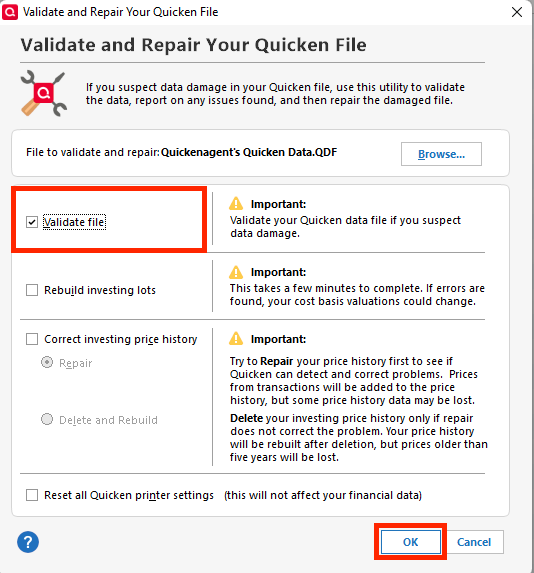
- Click OK.
After completing these steps, please check whether the issue persists and let me know the results.
If you would like to be automatically notified of any responses in this thread, you can bookmark it by clicking the bookmark ribbon in the upper right corner.
I look forward to your response!
Quicken Laura
Make sure to sign up for the email digest to see a round up of your top posts.
0 -
Hello Laura
Attached are the files before and after a Onestep. This happens to all the For this instance every time I do a Onestep . Although the amount is correct it erases all my entrees for that Instance and reverts back to the regular entree. I also have to use one drive since I travel and use two computers to manage my Quicken. Quicken doesnt allow multiple computers . So when I switch computers I pull up the last saved.
0 -
Hi @bpapo,
Thank you for following up and for providing the screenshots. As mentioned, we’ve recently received a few additional reports from users experiencing similar behavior with split transactions in income reminders.
Would you be able to send your log files so we can forward them to the appropriate team for further investigation?
To send your logs:
- Open Quicken
- Click Help
- Select Report a Problem
- Click Send to Quicken
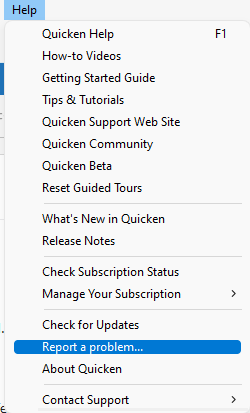
Once submitted, please let us know. I look forward to your response!
Quicken Laura
Make sure to sign up for the email digest to see a round up of your top posts.
0




Categories
- All Categories
- 18 Product Ideas
- 34 Announcements
- 246 Alerts, Online Banking & Known Product Issues
- 19 Product Alerts
- 517 Welcome to the Community!
- 682 Before you Buy
- 1.5K Product Ideas
- 55.7K Quicken Classic for Windows
- 16.8K Quicken Classic for Mac
- 1K Quicken Mobile
- 834 Quicken on the Web
- 127 Quicken LifeHub