Bank Account Shows Negative Balance When Not Displaying Savings Goal

Attached is a PDF document with two screenshots…
I have deleted all Quicken accounts and transactions in the attached screenshots except one savings goal transaction. This transaction was contributed from the bank account displayed. When the savings goal is not displayed, the bank account shows a -1,320 balance even though there are no transactions. When the savings goal display is checked, balances are correct. How can I correct the bank account balance when the savings goal is not checked?
Answers
-
Hi @bensojw,
Thank you for reaching out. I’d be happy to help with this.
This behavior is not typical and may indicate possible file or account corruption. I recommend running a Validate and Repair on the data file to check for and correct any issues.
To run a validation:
- Go to File.
- Select Validate and Repair File.
- Choose the Validate file.
- Click OK.
Once the process is complete, a log file (validate.txt) will open in Notepad. Please review it for any errors or unrecoverable transactions that may require manual correction.
Let me know how it goes!
Quicken Laura
Make sure to sign up for the email digest to see a round up of your top posts.
0 -
I ran the validate. No changes to the data. I've attached a screen shot of the results.
0 -
-
0
-
Hi @bensojw,
Thank you for following up. I really appreciate you trying that and sharing the results.
Please try moving the goal to a new account with these steps:
Create a new account
- Click the + Add Account button at the top of the sidebar.
- Scroll down and select Offline Account.
- Choose the same account type as the old account (e.g., Checking).
- Enter the Account Name and Start Date. Leave the Ending Balance blank.
Move transactions to the new account
- Open the old account register.
- Highlight all transactions (click the first, hold Shift, click the last).
- Right-click and select Move transactions.
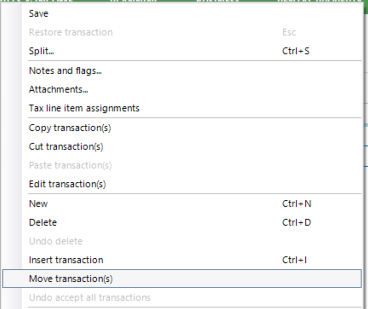
- Choose the new account and click OK.
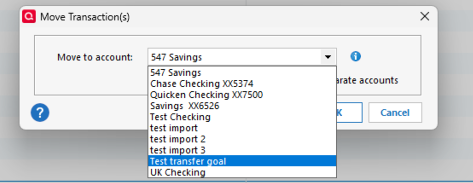
Finally, check that the new account is working as expected, and delete the old account with the steps below:
- Open the old account.
- Click the gear icon at the top right.
- Select Edit account details.
- Click Delete Account at the bottom left.
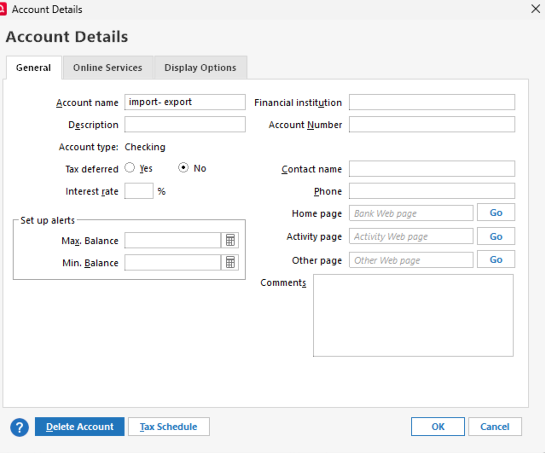
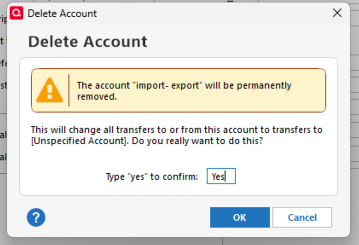
- Type Yes to confirm.
- Click Ok.
Let me know how it goes!
Quicken Laura
Make sure to sign up for the email digest to see a round up of your top posts.
0 -
Hello,
I've tried that several times and am receiving the messages in the attached screen shots. A total of 50 transactions have been moved after these attempts. Any other suggestions?
0 -
I understand copying transactions could fix the issue however, I'm concerned with losing that accounts transaction history in the "Bill and Income Reminders" screen. I use that history quite a bit. Is there any way to fix the data in that account?
0 -
Hi @bensojw,
Thank you for sharing the results. I completely understand your concern about preserving your historical reminder information; that’s a valid concern.
You won’t lose your reminders. Before deleting the old account, we can update the reminders to point to the new account. This will carry everything over. We would only need to manually recreate any transactions that do not move automatically. Also, please let me know if your reminders are manual or online, as that can affect the process.
Another option we can try is creating a copy of your data file to see if that resolves the account balance issue. Creating a copy generates a new data file and transfers your accounts, transactions, and reminders. Please note that budgets and saved reports are not transferred.
You can create a copy using the steps below (this will not overwrite your existing file):
Step 1: Start the copy process
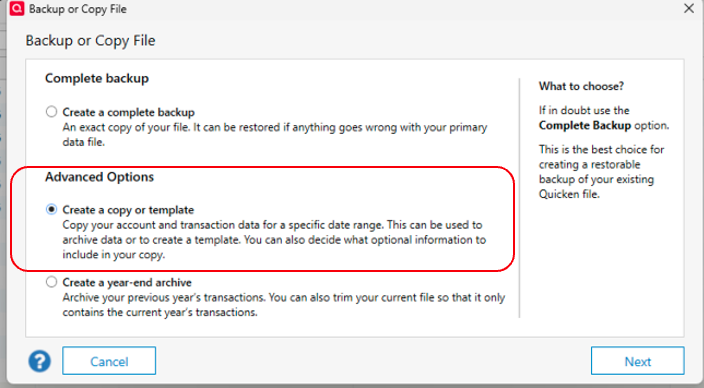
- Go to File > Copy or Backup File.
- In the Backup or Copy File window, under Advanced Options, select Create a copy or template.
Step 2: Choose what to include in the copy
- Set the Include transactions From and To dates to control which transactions are included.
- You can also choose to include:
- Uncleared transactions (such as unpaid invoices; available in Business & Personal editions)
- Investment transactions (not available in Quicken Starter)
- Attachments (documents linked to transactions, such as receipts)
Step 3: Name and save the copied file
- Under Where would you like to put the new file?, choose a name and location for the copied file.
- Use the Browse button if you want to change folders.
- Do not include the
.QDFextension in the name—Quicken will add it automatically. - Avoid using these characters in the file name:
* ? < > | " : \ / - When ready, click Save Copy.
Step 4: Verify the accounts
Open the copied file and confirm that the accounts display the correct balance.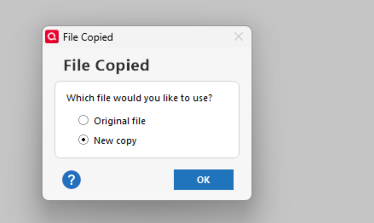
Please let me know how it goes or if you have any questions along the way!
Quicken Laura
Make sure to sign up for the email digest to see a round up of your top posts.
0 -
Hello
Option 1 - copy/move all the records to a new account and keep the Bill and Income Reminders history.
Per your comments above, I tried to "update the reminders to point to the new account". The reminder's account changed for the current month and all future months but, not for prior months. How would you change this for prior months as I do not want to lose that history? Also, the reminders are all manual.
Option 2 - create a copy or template.
I tried this and it did not fix the issue.
0 -
Hi @bensojw,
Thank you for testing with the copy of your file and reporting the results. I also appreciate you clarifying that your reminders are manual.
From what I understand, you’ve already entered the past-due reminders in the corresponding account. Moving your information would also move those past reminders, which have now become transactions, either entered manually in your register or automatically by Quicken, depending on your settings.
Please correct me if I’m mistaken. I’d be happy to explore a different solution with you!
Quicken Laura
Make sure to sign up for the email digest to see a round up of your top posts.
0 -
I'll give an example - when I look at the Bill and Income Reminders screen for November, 2025, I see my savings goal transactions associated with the 'old' account. If/when I move the transactions to a new account, the savings goal transactions disappear from that November, 2025 screen.
0 -
Hi @bensojw,
Thank you for clarifying. You are correct; the progress in the actual savings goal will not update, even if the transactions are still displayed in the new account.
I tested a few other possibilities, but none of them would move the progress of the goal. At this point, the best option may be to restore a backup from before the issue began (especially if the issue started recently).
- Go to File > View/Restore Backups…
- Browse the Local and Online Backups tabs to find the backup file you want to restore. Quicken backup files have the extension .QDF-Backup.
- Select the file you want to restore and click Restore Backup.
- Choose whether you want to overwrite the open file or create a copy of the backup you are restoring.
Please let me know how it goes!
Quicken Laura
Make sure to sign up for the email digest to see a round up of your top posts.
0 -
This did not happen recently so, restoring is not an option. If there's no way to find that discrepancy by tracking it down, I guess I'll just live with it. It seems like since I've created a working file that only contains the account with the issue, it wouldn't be that hard to locate why the numbers don't add up.
0 -
Hi @bensojw,
I’m sorry we weren’t able to find a solution for your existing account in the current file. In some cases, issues like this can be caused by “phantom” transactions that are not easily visible.
You can also reach out to Quicken Support via phone call or chat. They can work with you in real time, walk you through additional troubleshooting steps, and escalate the issue if needed.
You can find the Quicken Support phone number here: Support Home | Quicken. Phone support is available Monday through Friday, from 5:00 AM PT to 5:00 PM PT.
I apologize that I could not provide a more direct solution, but please don’t hesitate to reach out again if you have any other questions.
Quicken Laura
Make sure to sign up for the email digest to see a round up of your top posts.
0
