Investment Accounts beyond the possibility of reconciliation

I have about ten years of investment transactions during which time I have not properly maintained reconciliation with those accounts. This is despite fastidiously downloading transactions on a daily basis during that period. For that reason, the investment accounts in my Quicken Classic data file no longer represent an accurate accounting of my investments. I have all of the statements necessary to reconcile them, although it would be entirely impractical to do so for that period of time. I would like to know the best approach to correct the problem so that I can start anew. I would also like to know the consensus on the viability of reconciling investment accounts. Thanks in advance.
Best Answer
-
Hi @GerryP,
Thank you for sharing the issue you're experiencing. I’d be happy to help you find the best way to reconcile your accounts.
There are two relatively simple options you can try. Before proceeding, I recommend creating a backup of your data file.
Option 1: Adjust Security Values and Cash Balances
This option allows you to correct the balances as of today without re-entering your entire history. Your historical transactions remain intact, and your balances should be accurate moving forward.
- Open one of the affected accounts.
- Click Holdings.
- Compare each security’s value with the balance shown by your financial institution.
- If the value is incorrect, check both the number of shares and the share price.
If the number of shares is incorrect:
- Click the gear icon in the upper right.
- Select Update Share Balance.
- Enter the security name and the correct number of shares.
- Click OK.
If the share price is incorrect:
- Go to Tools > Security List.
- Find and select the security you want to update.
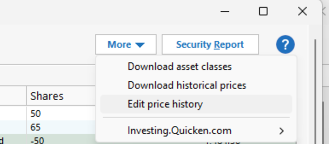
- Click More > Edit Price History.
- Click New.
- Enter the date and price per share.
- Click OK, then Done.
Alternatively, you can update the price directly from the Holdings view:
- Open Holdings.
- Select the security.
- Edit the Price field.
This updates the security’s value in all accounts that hold it.
If the cash balance is incorrect:
- Click the gear icon in the upper right.
- Select Update Cash Balance.
- Enter the correct amount and click OK.
Option 2: Create New Accounts and Archive the Old Ones
Please note that this option may impact your history, since the new accounts will only download transactions as far back as the financial institution allows.
- Go to Tools.
- Select Account List.
- Find the account and click Edit.
- In the Account Details window, open the Online Services tab.
- Click Deactivate next to the service.
- Click Yes to confirm.
Hide and separate the old accounts
- Go to Tools > Manage Hidden Accounts.

- Select the desired options, such as:
- Hide in Account Bar and Account List
- Hide in Transaction Entry Lists
- Keep this Account Separate
- Go to Tools > Add Account.
- Search for and select your financial institution.
- Choose the appropriate connection method if prompted.
- Follow the on-screen instructions to complete the setup.
Please let me know if you have more questions.
Quicken Laura
Make sure to sign up for the email digest to see a round up of your top posts.
0

Answers
-
Hi @GerryP,
Thank you for sharing the issue you're experiencing. I’d be happy to help you find the best way to reconcile your accounts.
There are two relatively simple options you can try. Before proceeding, I recommend creating a backup of your data file.
Option 1: Adjust Security Values and Cash Balances
This option allows you to correct the balances as of today without re-entering your entire history. Your historical transactions remain intact, and your balances should be accurate moving forward.
- Open one of the affected accounts.
- Click Holdings.
- Compare each security’s value with the balance shown by your financial institution.
- If the value is incorrect, check both the number of shares and the share price.
If the number of shares is incorrect:
- Click the gear icon in the upper right.
- Select Update Share Balance.
- Enter the security name and the correct number of shares.
- Click OK.
If the share price is incorrect:
- Go to Tools > Security List.
- Find and select the security you want to update.
- Click More > Edit Price History.
- Click New.
- Enter the date and price per share.
- Click OK, then Done.
Alternatively, you can update the price directly from the Holdings view:
- Open Holdings.
- Select the security.
- Edit the Price field.
This updates the security’s value in all accounts that hold it.
If the cash balance is incorrect:
- Click the gear icon in the upper right.
- Select Update Cash Balance.
- Enter the correct amount and click OK.
Option 2: Create New Accounts and Archive the Old Ones
Please note that this option may impact your history, since the new accounts will only download transactions as far back as the financial institution allows.
- Go to Tools.
- Select Account List.
- Find the account and click Edit.
- In the Account Details window, open the Online Services tab.
- Click Deactivate next to the service.
- Click Yes to confirm.
Hide and separate the old accounts
- Go to Tools > Manage Hidden Accounts.
- Select the desired options, such as:
- Hide in Account Bar and Account List
- Hide in Transaction Entry Lists
- Keep this Account Separate
- Go to Tools > Add Account.
- Search for and select your financial institution.
- Choose the appropriate connection method if prompted.
- Follow the on-screen instructions to complete the setup.
Please let me know if you have more questions.
Quicken Laura
Make sure to sign up for the email digest to see a round up of your top posts.
0 -
Hi, Laura, Thanks for the excellent advice. I will pursue Option 1 since it will allow me to maintain my investment transaction history intact.
Regards,
Gerry
0 -
Quicken Laura
Make sure to sign up for the email digest to see a round up of your top posts.
0 -
Hi, Laura, thanks again for your assistance. It appears that "Update share balance" and "Update cash balance" options are listed under "Transactions" register rather than under "Holdings" in my version of Quicken Classic. the available options under Holdings via the gear icon are "Preferences; Show closed lots; Show cents in amounts; Also show symbol in name column; get online quotes; and Show full portfolio." Would it be correct to click on the "Name" column in the Transaction window to arrange the securities in alphabetical order to get the latest downloaded share and cash balances for each security and compare the last downloaded values to the bank's values? I can then add the adjustment as a transaction in the transaction register.
Thanks again for your assistance in this effort.
0 -
Within option 1, the instructions said:
If the
share price is incorrect:- Edit the most recent
BuyorAdd Sharestransaction for that security and update the price.
That is not an appropriate step to correct a share price issue. I'd recommend going the the Holdings view or a portfolio view (Ctrl-u) with a quotes column included, set the 'as of date' to the date you are matching, and then entering the correct share price in the line for each applicable security.
Would it be correct …
Sorting the holding or portfolio view by any convenient form is very appropriate. Again, be sure the As of Date is also correct for what you are doing.
0 - Edit the most recent
-
I will try this advice. Thank you.
0 -
Hi @GerryP,
That’s correct; you can update your share balance and cash balance using the gear icon located in the Transactions view of the account.
@q_lurker Thank you for pointing that out. I’ve corrected the steps accordingly.
Please don’t hesitate to reach out if you have any additional questions!
Quicken Laura
Make sure to sign up for the email digest to see a round up of your top posts.
0 -
I see that the Holdings View for a given investment account provides a straightforward method of adjusting the price in the Quote/Price column and the shares in the Shares column with the As of: date entered as desired.
I find that
1) Some securities are listed in the Holdings View for the investment account that are no longer in my portfolio. I assume that I should delete the security from the Holdings View.
2) Some securities are now in my portfolio that are not listed in the Holdings View for the investment account. I assume that the price and share quantity should be entered with the values shown in my portfolio.
3) Some securities are now listed in the Holdings View that are in my portfolio. I assume that the price and share quantity in the Holding View should be corrected to the values in my portfolio for that account if necessary.
If my assumptions are correct, I will proceed accordingly.
Thanks for the recommendations.
[Edited Readability]
0 -
Hi @GerryP,
Your assumptions are correct.
If you would like step-by-step guidance on making any of these changes, please feel free to let me know. I’ll be happy to assist you.
Quicken Laura
Make sure to sign up for the email digest to see a round up of your top posts.
0 -
Hi, Laura, your offer for step-by-step guidance would be much appreciated. I think that once I can correct one or more securities in price and shares, it should be sufficient for me to implement your strategies for correcting the remainder of the securities.
Regards,
Gerry
0 -
Hi @GerryP,
Thank you for following up! I’d be happy to guide you through updating your holdings. Please follow the steps below:
Remove securities that are no longer in your portfolio:
- Click the gear icon in the upper-right corner
- Select Update Share Balance
- Enter the security name and set the number of shares to 0
- Click OK
- Review your holdings to confirm the security has been removed
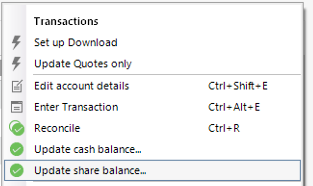
- You can follow the same process to correct the share quantity.
Add securities that are not part of your holdings
- Go to the Investing tab > Tools > Security List.
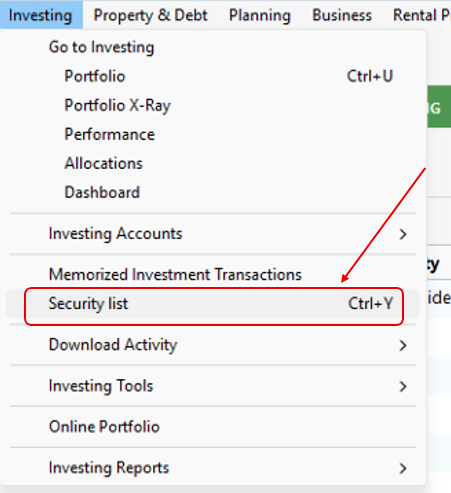
- Check if the security you are going to add is part of the list; if it's not, follow the steps below:
- Click Add Security.
- Search for the security.
- Select the security.
- Click Next and done.
- Select the account where you are going to add the security.
- Click Enter transactions.
- Select Add shares in the dropdown menu.
- Select your security and the necessary information.
- Click Enter/Done.
I hope this helps!
Quicken Laura
Make sure to sign up for the email digest to see a round up of your top posts.
0