How do I move categories from Personal Expense to Business Expense

I imported my data from Quicken for Mac and now the categories are assigned to Personal or Business groups without any discernible method.
Most of my expense categories are now in the Personal group. I want them in the Business group.
I've read the article about assigning categories to another group, but that only works for Custom groups. I have also checked the Tax Related box and entered the Schedule C and line item. Nope, still in the Personal Expense group.
I've spent more than an hour researching this and have found no solution.
So how do I do that? Or is that just not a feature of Quicken?
Answers
-
Business vs. Personal is determined by the Tax Line associated with the category, where NO tax line is personal.
Q user since February, 1990. DOS Version 4
Now running Quicken Windows Subscription, Business & Personal
Retired "Certified Information Systems Auditor" & Bank Audit VP0 -
From what I understand Quicken Mac Business choose to use a different method to mark categories as business than Quicken Windows uses, and as such it isn't really surprising that converting between the two would have this kind of problem.
In Quicken Windows what determines if it is a business or personal account is if the category has been assigned a Schedule C tax line.
For instance, I just created this category:
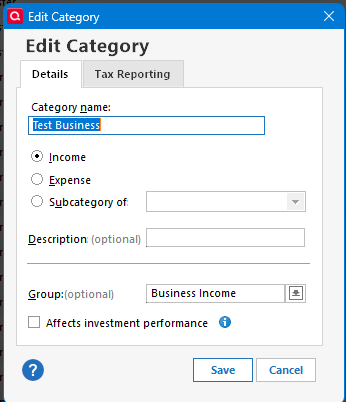
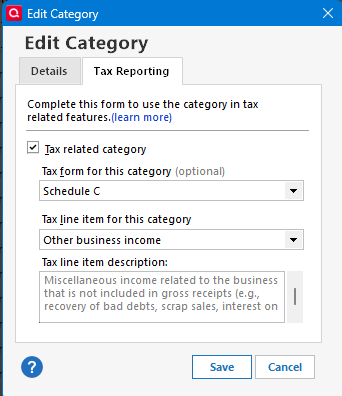
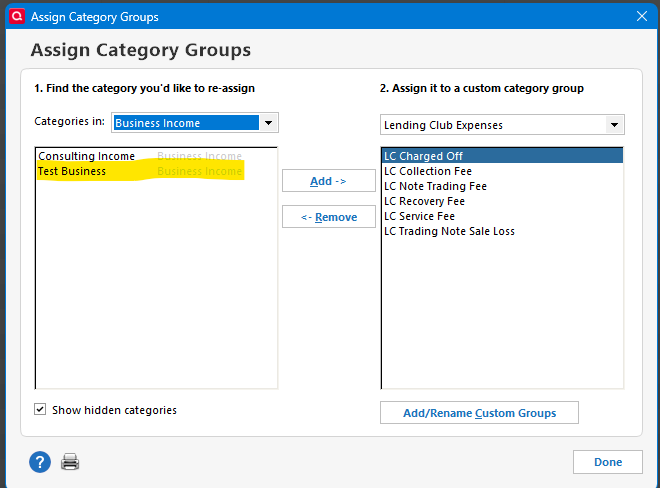
And I go to Tools → Category List → Options → Assign Category Groups and select Business Income, and as you can see my new business category is there:
 0
0

