Let's have a contest...which of us is the most [insert cognitive degradation expletive]?

Here, I'll start.
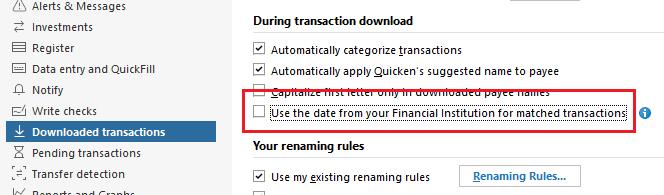
Been using Quicken since 1991 and have always complained that downloaded transactions use the account post date instead of the date I have on the transaction in the register. THIRTY FIVE YEARS LATER, I discover this setting. I think I might win this contest.
Quicken user since 1991
VP, Ops & Tech in the biometric space
Comments
-
Good question, @MSStateDawg
I have been used Quicken (Mac) since '91 as well. I was in college in those days (albeit not MS State), so my needs of Quicken were basic.
Splitting transactions is likely one of the features that I discovered later. I didn't have a reason to utilize that early on, so it went under the radar.
Tags (formerly Classes) is a runner up. But, I suspect that was more because "Classes" wasn't an intuitive name and their implementation at the time was crude. IIRC, they were like DOS switch commands. Utilities:Gas/123 Main Street
I suspect a lot of users don't utilize Tags to their potential today.
1 -
@MSStateDawg Don't feel bad, I think the "Use date from your financial institution" option is relatively new, it is one of those unannounced changes that just appear every now and then.
Another new option that comes in handy sometimes is on the Security Detail view > Edit details > Other info page: "Ignore prices from broker download." This is useful when brokers such as Charles Schwab download bogus share price data before the market opens and on weekends and holidays.
Usually the Help system does not get updated when these new features are introduced, so we users are left to figure them out on our own.;
QWin Premier subscription1 -
I've not personally found a need to use tags usefully. What examples could you provide that might change my financial management life in profound manner? 😀
Quicken user since 1991
VP, Ops & Tech in the biometric space
0 -
I use Tags to keep track of expenses related to frequent trip destinations or major events. For example a trip to a wedding might use several Categories - Travel, Gifts given, Groceries, etc. With a Tag of "Abe's wedding", I can easily keep track of all the related expenses.
To avoid clutter in the Tag list, you can hide ones you are not using any more, or if you are really done with them, you can delete them and the transactions will just become Untagged.
QWin Premier subscription2 -
Interesting. All this time I've been breaking out categories into subs. For example, the sub categories I created for different trips to the same location to compare the cost of each:
202601 - Jerkwater USA
202602 - Jerkwater USA
202603 - Jerkwater USA
Sounds like tags may have been the better way to approach this.
My God, I'm ignint.
Quicken user since 1991
VP, Ops & Tech in the biometric space
0 -
Tags certainly help prevent a proliferation of subcategories. I like to think of them as another dimension for sorting and filtering, and subtotaling.
Another use would be track expenses for a particular car or medical expenses for each family member.
QWin Premier subscription2 -
And tags are good for reporting?
Quicken user since 1991
VP, Ops & Tech in the biometric space
0 -
Most reports have the option to filter based on tags. Edit the report and look for the Tags tab.
0 -
And tags are good for reporting?
For me it is all about reporting.
The most helpful use of tags for me is for travel expense reporting. Say I had a long travel trip that I visited multiple cities. Not only I can generate a report to see the cost of the entire trip, but the tags can break it down by how much I spent in each city. In one case the tags helped me realize how ridiculously expensive one city was when the type of expenses and number of days were identical to the others - I can see that all in a single report.
I also use tags to exclude certain expenses from a report - example: Kids college expenses include expenses that are considered "qualified education expenses" for tax purposes. So I use an "Exclude" tag to mark the ones that are not qualified. That allows me to generate an appropriate report for tax time. If I were to use categories for such purpose I'd have to add 20 categories to differentiate the expenses, where a single tag will do the trick.
- Q Win Deluxe user since 2010, US Subscription
- I don't use Cloud Sync, Mobile & Web, Bill Pay0 -
There's also a "Transactions by Tag" report that lists transactions grouped by tag. And a "Category by Tag" cross tab report that gives you a grid with tags on one axis and categories on the other, if you need to see categories broken out by tag.
Personally I only use tags on tax related transactions (medical, charity, tax withholdings and payments, etc) to identify the tax year they are for, since that doesn't always line up with the calendar year.
0 -
And tags are good for reporting?
For personal users, I think reporting is the main reason to use Tags. I added subtotaling in my comment above. If used consistently, they let you easily answer questions like "How much did I spend on trips to Denver last year?"
For business users, they are essential for tracking income and expenses related to jobs or rental units.
Tags do have some shortcomings. They are not hierarchical like Subcategories, and I think reporting can be difficult if you use multiple Tags on one transaction.
QWin Premier subscription0 -
Tags are great, and I, too, think of them as a third dimension to categories. That prevents a lot of similar categories.
I think Tags are great for things like utilities (Electric, gas), etc. so I can assign a unique Tag to each property. Or costs associated with a particular vehicle (Camry, Tundra), the total cost of ownership of a piece of computer hardware, Capex items for items around the house, Pets, People, Trips. . .the list goes on.
And you can color code them (at least on the Mac side) so that all particular types are of a particular grouping. I.e., housing Tags are all orange, Pets Green, Computer Hardware purple, etc.
And they definitely help with reporting!
0



