Let's have a contest...which of us is the most [insert cognitive degradation expletive]?

Here, I'll start.
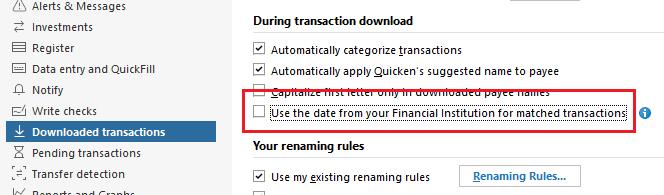
Been using Quicken since 1991 and have always complained that downloaded transactions use the account post date instead of the date I have on the transaction in the register. THIRTY FIVE YEARS LATER, I discover this setting. I think I might win this contest.
Quicken user since 1991
VP, Ops & Tech in the biometric space
Comments
-
Good question, @MSStateDawg
I have been used Quicken (Mac) since '91 as well. I was in college in those days (albeit not MS State), so my needs of Quicken were basic.
Splitting transactions is likely one of the features that I discovered later. I didn't have a reason to utilize that early on, so it went under the radar.
Tags (formerly Classes) is a runner up. But, I suspect that was more because "Classes" wasn't an intuitive name and their implementation at the time was crude. IIRC, they were like DOS switch commands. Utilities:Gas/123 Main Street
I suspect a lot of users don't utilize Tags to their potential today.
0 -
@MSStateDawg Don't feel bad, I think the "Use date from your financial institution" option is relatively new, it is one of those unannounced changes that just appear every now and then.
Another new option that comes in handy sometimes is on the Security Detail view > Edit details > Other info page: "Ignore prices from broker download." This is useful when brokers such as Charles Schwab download bogus share price data before the market opens and on weekends and holidays.
Usually the Help system does not get updated when these new features are introduced, so we users are left to figure them out on our own.;
QWin Premier subscription0


Categories
- All Categories
- 18 Product Ideas
- 34 Announcements
- 246 Alerts, Online Banking & Known Product Issues
- 19 Product Alerts
- 517 Welcome to the Community!
- 682 Before you Buy
- 1.5K Product Ideas
- 55.7K Quicken Classic for Windows
- 16.8K Quicken Classic for Mac
- 1K Quicken Mobile
- 834 Quicken on the Web
- 127 Quicken LifeHub