"One Step Update", "Update Transactions" Do Not Report All "601 Errors" & All Accts Updtd

"One Step Update" and "Update Transactions" functions do not report out to the user all 601 Errors ("failure to connect"). Some 601/failure to connect errors are reported randomly, and some are not at all.
There are 2 sources of 601 errors: one source randomly, not all the time, or not at all, reports 601 errors to the user. Per Quicken Supervisor Beverly, there is a second source that only reports out 601 errors to Quicken support Supervisors with proper access/permissions to view error codes on the server end by user "data file name". This is a "Priority 1 bug fix request", not a "feature request", when critical functionality fails to successfully connect/process, and that fact (error state) is NOT REPORTED OUT TO THE USER. This also applies to the re-link failures in the process of re-linking Quicken accounts via Express Web Connect + to financial institutions.
Allowing "One Step Update", "Update Transactions", and the "Re-link Process to run and "error out" with no error-reporting to the user is unconscionable, as it causes untold headaches, panics, and wasted time by the user and Quicken support trying to determine status and fix next steps.
In addition, One Step Update (OSU) at completion appears to only display "Financial Institutions Updated" for institutions updated via the old Direct Connect method. For me, that is 2 accounts. My other 15 accounts include Fidelity, Chase, Citi, Capital One, and Barclays, which update transactions via OSU via Express Web Connect +, but OSU does not list those accounts as "updated" when they were updated in an OSU session. This is also a P1 bug that needs to be fixed. Meaning, all institutions that had transactions updated should be reported as such, regardless of the link method. This bug fix to display ALL INSTITUTIONS ACTUALLY UPDATED should also include the 601 Errors (all sources of connect failure) for ALL INSTITUTIONS that "failed to connect/update" when previously successfully linked, meaning an update ping to the vendor that should have been answered but was not answered for whatever reason, meaning a 601 error.
[Edited Readability]
Comments
-
Hello @OTN,
Thank you for reaching out! I see that you already reported the first issue (the 101/601 error not always being visible to users) to a supervisor when you contacted Quicken Support directly.
When I reviewed the Support ticket, it doesn't appear that you brought up the second issue with them. Based on your description, it is most likely caused by a problem with the runtime.dat file. To resolve this issue, please navigate to this directory in your Windows system: C:\ProgramData\Quicken\Inet[folder with your data file name].
The Program Data folder is hidden by default. If you need instructions on unhiding the folder, you can find instructions on Microsoft's support site.
Once you're in that directory, rename the runtime.dat file found at C:\ProgramData\Quicken\Inet\FILENAME\.
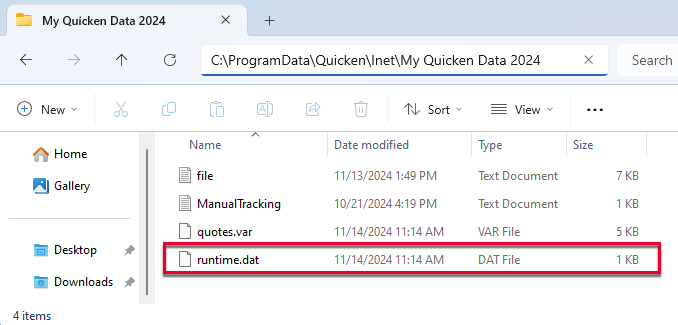
After you have renamed the runtime.dat file, run a One Step Update (OSU) again to confirm the issue is resolved.
Note: If you are not comfortable performing this troubleshooting, I recommend contacting Quicken Support by phone and requesting that an agent walk you through the process. The Quicken Support phone number can be found through this link here. Phone support is available from 5:00 am PT to 5:00 pm PT, Monday through Friday.
Please let me know how it goes!
Quicken Kristina
Make sure to sign up for the email digest to see a round up of your top posts.
0 -
rename the file to what?
0 -
Hello @es114,
Thank you for reaching out! To answer your question, it doesn't matter what you change the name to. Putting a 1 at the start of the file name should suffice.
I hope this helps!
Quicken Kristina
Make sure to sign up for the email digest to see a round up of your top posts.
0 -
it did. Thanks.
0 -
Thank you for the follow-up,
I'm glad to hear the issue is resolved.
If you need further assistance, please feel free to reach out!
Quicken Kristina
Make sure to sign up for the email digest to see a round up of your top posts.
0
