Link to Account drop-down cannot scroll, hiding accounts beyond screen and showing hidden accounts

I'm using Quicken Classic Deluxe on Windows 11 Home, Version R65.29, Build 27.1.65.29
Note that this is a release dated 12/22/25. Originally I was running the most current release R66.23 dated 3/2/26 but it caused the problem I describe below. The customer support agent had me install the older release, essentially turning back my system, and the problem was resolved. Note that this is a temporary solution since newer releases cause the problem.
The problem: I have been using Quicken for 20+ years, and have several accounts from Fidelity that I have connected to accounts in Quicken. Recently I added a few more accounts at Fidelity, but was unable to connect them to Quicken. While inside Quicken, I went to Tools/Add Account and then went through the process of logging into Fidelity, accepting their Terms & Conditions, and choosing the accounts I wanted to connect. Quicken then showed me a listing of all of my Fidelity accounts, and on the new accounts, it gave the option of "Add Account to Quicken", "Link to Existing account", or "Do Nothing". I wanted to "Link to Existing Account" since I already had some of the accounts set up in Quicken; in fact, some of the accounts that needed to be reconnected had years of data in them, so I didn't want to have Quicken add a new account and put in placeholders.
However, when I chose "Link to Existing Account", I was presented with a list of accounts that was not comprehensive. The list actually looked like hidden accounts. In the past, choosing "Link to Existing Account" gave scroll buttons at both the top and bottom of the list, so I could scroll through and find the correct account to link. This was missing from Quicken.
As mentioned above, the (temporary) solution was to close Quicken, install a prior patch (in my case, the patch R65.29 dated 12/22/25), restart Quicken, and reconnect the accounts. That seems to have worked, although there are still some inconsistencies with some of my Fidelity accounts. Specifically, when I now run One Step Update, some of the Fidelity accounts need to be reauthorized.
The website for finding the prior system patches for Quicken is:
I'm hoping that Tech Support will be able to fix this error in current/future patches so I can use the most current patch.
Comments
-
Hi @lpensack,
Thank you for reaching out and describing what you’re experiencing. This issue has already been reported to the appropriate team, and I will add you to the existing ticket.
To help with the investigation, please submit your log files by following these steps:
- Open Quicken
- Click Help
- Select Report a Problem
- Click Send to Quicken
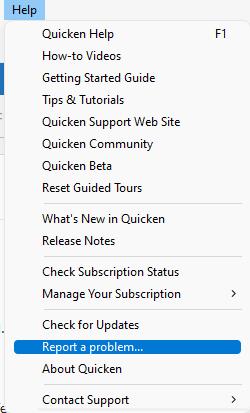
Once you’ve submitted the logs, please let us know. I look forward to your response!
(CTP-16544)
Quicken Laura
Make sure to sign up for the email digest to see a round up of your top posts.
0 -
Hi @lpensack,
The issue with the scrolling bar in Release 66.28 has been resolved, and it now displays only the appropriate account types.
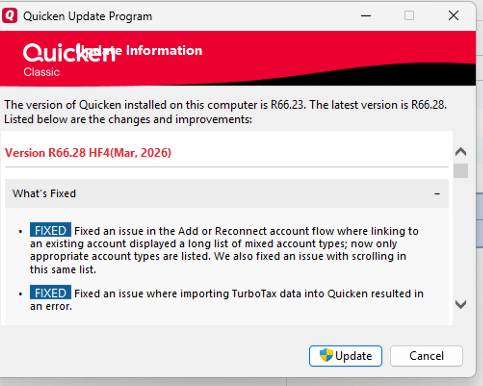
Please let me know if you experience any issues reconnecting your accounts. I’ll be here to help!
Quicken Laura
Make sure to sign up for the email digest to see a round up of your top posts.
0 -
What worked for me was to close a number of accounts that I don't use anymore. They had zero balance and I was just keeping them for history which is maintained even if closed. This gave me a scrollable list with fewer account names and the right ones were there!
0 -
I've had that issue happen once before. IT was a while ago and I had posted about it. Couldn't duplicate it, as the second time it had a proper list.
0

Categories
- All Categories
- 20 Product Ideas
- 34 Announcements
- 247 Alerts, Online Banking & Known Product Issues
- 19 Product Alerts
- 518 Welcome to the Community!
- 682 Before you Buy
- 1.5K Product Ideas
- 55.7K Quicken Classic for Windows
- 16.8K Quicken Classic for Mac
- 1K Quicken Mobile
- 834 Quicken on the Web
- 128 Quicken LifeHub