One Step Update Hanging/Freezing [Edited]

First encountered this problem evening of March 16, 2026. When downloading transactions, Quicken Classic seems to have downloaded the information for one investment account - it says Complete, but for all other accounts, it says Waiting and stays hung up that way. The only way out is to end the task in Windows 11. The problem persists the evening of March 17.
[Edited Readability]
Comments
-
Hi @Bernie M,
Thank you for bringing this to my attention. This is a known issue that our team is actively working on. To help us better understand the situation, could you please provide a screenshot of the issue you’re seeing during the OSU hanging?
If needed, you can refer to this Community FAQ for instructions on attaching a screenshot. Alternatively, you can drag and drop screenshots into your response if the option to add attachments isn’t available.
Additionally, could you provide the following details:
- Quicken data file location:
- Open Quicken and go to File.
- At the bottom of the menu under Recent Files, the file with the check mark next to it is the one currently open. Please let me know the full file path shown there.
- Third-party backups/syncing:
- Is your file being backed up or synced by services like Carbonite, OneDrive, or Backblaze?
- One Step Update behavior:
- You mentioned you have multiple financial institutions. What happens if you update only one of them?
- Click One Step Update, open One Step Update Settings, and choose a different financial institution—preferably one that is showing “waiting.” Then try updating and let me know if it still hangs or freezes.
Please submit your log files (including the sanitized version of your file) by following these steps:
- Open Quicken.
- Click Help.
- Select Report a Problem.
- Click Send to Quicken.
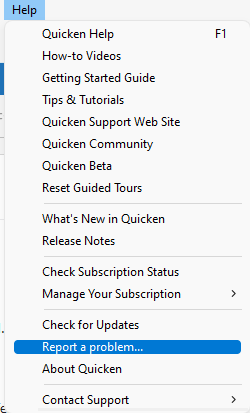
Once you’ve submitted the logs, please let us know. I look forward to your response!
(Ticket #11718340/CTP-12754)
Quicken Laura
Make sure to sign up for the email digest to see a round up of your top posts.
0 - Quicken data file location:
-
I've submitted the logs.
Quicken Data File Location: C:\Users\berni\Documents\Quicken_data\QuickenPremier
Backed by Quicken's auto backup every 5 times, and by Windows backup
I did try updating only one other account. It did freeze again.
I just tried Mobile&Web > Cloud Sync. It opened the Syncing Window and it spins forever. Screenshot attached.
Tried One Step Update to Capital One. Stuck on Waiting. Screenshot attached.
Tried Citi Cards. Same thing.
When I've done an End Task and restarted Quicken to try the individual updates, it has not asked me for the key to the vault nor for a password! I'm not sure if it asked me at all for that today. I expected it to ask each time Quicken was started.
0 -
I expect you’ll have to deactivate/activate each of your accounts. I’d try one account to see if it solves your issue.
0 -
es114, I thought about doing that, but was hoping to avoid that hassle. However I just did try to Deactivate one online connection - and Quicken froze!!!
When I ended the Task and brought Quicken up again, the Online Services connection for the account is still active.
0 -
Thank you both for your responses, for providing your log files, and for sharing the results of attempting to deactivate one account at a time.
This is a known issue that our team is currently investigating. In the meantime, I recommend contacting Quicken Support for further assistance. They’ll be able to guide you through additional troubleshooting steps in real time or escalate the issue if needed.
(Ticket #11718340 & CTP-12754)
Please don’t hesitate to reach out if you have any further questions!
Quicken Laura
Make sure to sign up for the email digest to see a round up of your top posts.
0 -
Support was able to resolve the problem.
The solution was to
- Make a backup (just in case)
- Press the + next to Accounts
- Select a financial institution
- Follow the steps to authorize the institution to communicate with Quicken
- In Quicken, verify that the accounts at the institution link to the proper existing account(s) in Quicken
- Repeat for each account
0 -
Hi @Bernie M,
That’s great news! I’m glad to hear that support was able to help resolve the issue. Thank you as well for outlining the steps you took. This will definitely help other users who may run into the same situation.
Please feel free to reach out if you have any additional questions!
Quicken Laura
Make sure to sign up for the email digest to see a round up of your top posts.
0 -
Same thing. Quicken hangs on update.
Yesterday, turned off sync. Ran super validate. Loaded back up. Turned on sync. Worked multiple times.
Close Quicken, run update today. Pops up a modal and then hangs.
Not responding in Task Manager, but the IO is still spinning, going up.
Prior to this, somehow that last update TURNED OFF SYNC, and I kept getting the alert "Unsaved Sync Changes," which I'd never seen before.
Seems to work when I turn off sync, but the modal popup doesn't show the progress. Possibly the prior run actually did the download but hung on syncing? Not sure, everything shows 'waiting' with no progress…
I hope this is not due to AI code; it is my personal desire.
[Edited readability]
0 -
Thank you for joining the thread and for outlining the steps you’ve taken so far.
If you continue to encounter the same issue with transaction downloads and have already completed the troubleshooting steps above, I recommend contacting Quicken Support for further assistance.
Please let me know if you have additional questions!
Quicken Laura
Make sure to sign up for the email digest to see a round up of your top posts.
0


