Budget Category not showing all

I am trying to make a budget only using some of the category's but some of them are not in the list to select. this is what is in my budget.
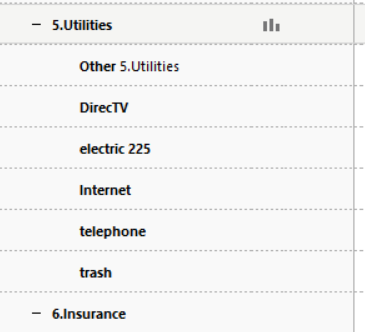
I have other categories in my utilities that I want to include. So I go to manage categories and get this, the ones i want are not there
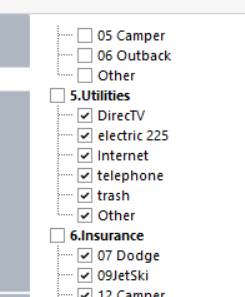
Some of them are missing the next shot is form tools category list
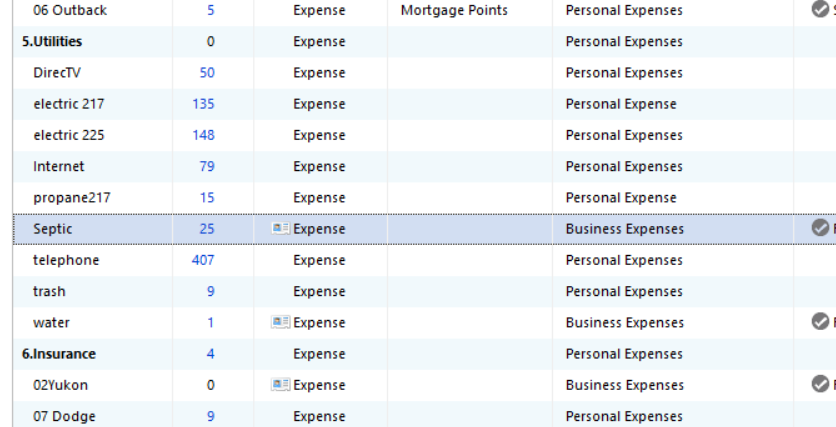
There are 4 categories missing from the budget selection list , electric217, propane 217, septic, water. I cannot figure out why these are not showing. Any help would be appreciated.
Comments
-
The categories which aren't showing use a different Category Group from the others.
AFAIK, you cannot mix and match subcategories having different category groups.Try renaming these category groups from what they have now to use the exact same category group as the parent category.
[Added - UKR, 3/12/26] In the case of Utilities:Septic in the above image … if that must remain a Business Expense category, create a new parent category, "Utilities (Business)", then change the Septic category to become a subcategory of "Utilities (Business)".
0 -
Hello @lawser55,
We haven't heard back from you in a while. Do you still need assistance?
Were you able to give @UKR's suggestion a try?Check back and let us know! Thank you.
-Quicken Anja
Make sure to sign up for the email digest to see a round up of your top posts.0 -
Hello again,
Checking in once more before this thread is closed.
Let us know if you still need assistance.Thank you!
-Quicken Anja
Make sure to sign up for the email digest to see a round up of your top posts.0 -
Hello again,
Due to the lack of response, I went ahead and closed this post.
If you still require assistance, please feel free to start a new post.
Thank you!
-Quicken Anja
Make sure to sign up for the email digest to see a round up of your top posts.0

