Ivy Bank OSU Not Working Since Bank System Upgrade

Ivy Bank upgraded its banking platform about two weeks ago.
Since then….no OSU!
Anyone Else?
I worked with a Quicken Rep providing screenshots and troubleshooting steps and also have contacted the bank multiple times with zero resolution.
I am Using Quicken Business and Personal Version R65.29, Build: 27.1.65.29 on Windows 11 Home Edition Version 25H2, OS Build 26200.7840, Windows Feature Experience Pack 1000.26100.291.0
Below is an Email I received from Quicken support on 2/20/2026:
Hi Michael,
I’m writing to follow up regarding the issue you’re experiencing with Ivy Bank in Quicken.
At this time, this issue has been identified as a known, widespread problem, and our teams are actively working toward a resolution. While we do not yet have an estimated timeframe for when this will be resolved, progress is ongoing.
We understand how frustrating this can be. Due to the complexity and security requirements of online banking connections, we’re unable to provide a precise resolution date. In the meantime, we recommend attempting to update your accounts periodically. Once the issue is resolved, updates should complete successfully.
We appreciate your patience and understanding while our teams work on this.
Attached is a screenshot showing the specific error.
[Edited-Readability]
Comments
-
Hello @Mike_S,
Thank you for sharing your experience with us.
After reviewing your recent interaction and the escalation you mentioned, I see notes to the same effect as what you shared. Our teams are working toward a resolution on this, although we do not have an ETA.
We apologize for any inconvenience this may cause.
Thanks again!
[Ticket#:12244139]
Quicken Alyssa
Make sure to sign up for the email digest to see a round up of your top posts.
0 -
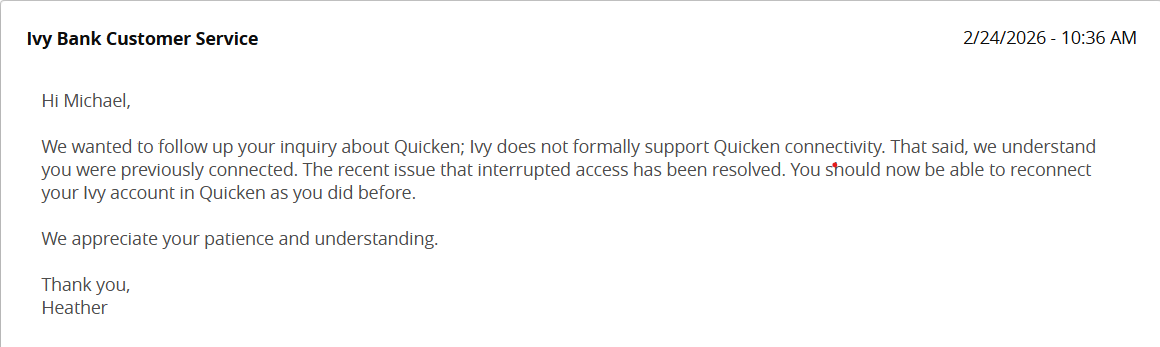
I just now received this from Ivy Bank Customer Support. I am still getting the same error. I tried logging out of my Quicken account and logging back in again to refresh the file, but the error persists.
[Edited-Readability]
0 -
Thank you for following up and sharing additional information.
I reached out to our teams in regard to this issue. They have taken additional steps to escalate this for you. If they need anything more from you, they will reach out via email.
Hope this helps!
[Ticket#:12169833]
Quicken Alyssa
Make sure to sign up for the email digest to see a round up of your top posts.
0 -
Good morning! I tried again this morning to link IVY bank to Quicken OSU and it worked! Thank You!
1 -
Thank you for following up to let us know this issue has resolved.
If you need more help, don't hesitate to reach back out.
Thanks again!
Quicken Alyssa
Make sure to sign up for the email digest to see a round up of your top posts.
0 -
Quicken had an update this morning to Version R66.28, Build 27.1.66.28. Running on Windows 11.
Connectivity to various Banks through OSU did not work this morning, but I was able to restore connectivity through an account reset.
IVY bank is not working and I cannot resolve the issue. Not sure if it is related to the Quicken upgrade or not?
Below is the error from Quicken: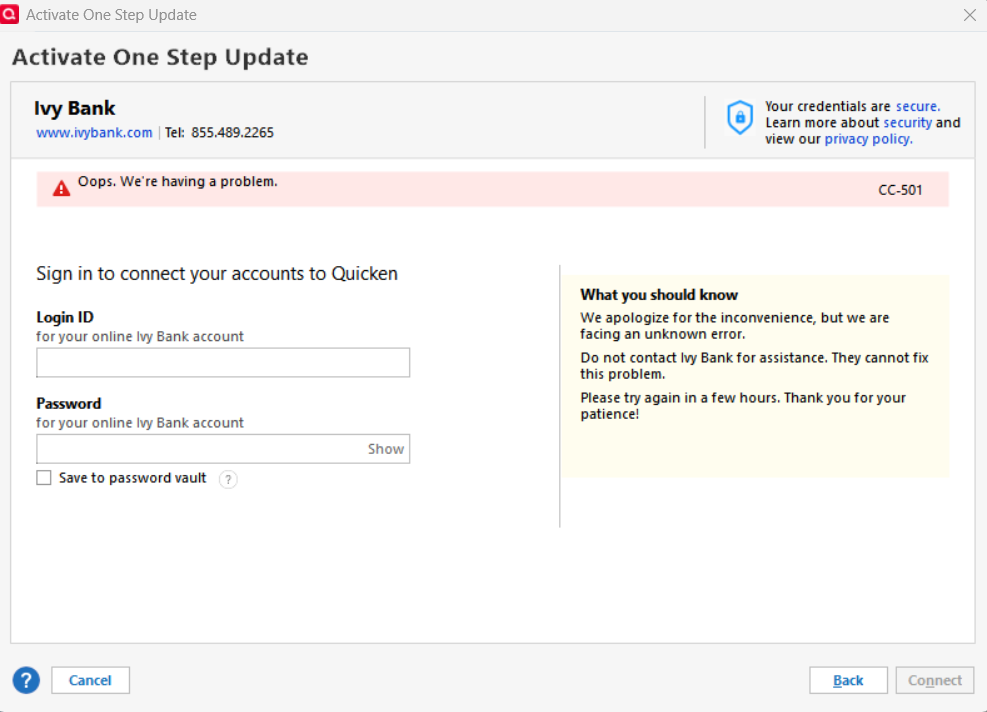 0
0 -
Hello @Mike_S
Thank you for following up and letting us know what you're experiencing now.
Although the screenshot shows a CC-501 error, I checked internally and am seeing this presenting as an FDP-103 (CC-503) error internally.
A CC-503 error means that the financial institution is reporting the login credentials as invalid. Below are the recommended steps to try (which you can also find in this support article):
Step One: Verify your bank login information- Type your password/PIN into a text application, such as Notepad, WordPad, or other text/word application.
- Note: This is a way of confirming you don't have typographical errors in this field.
- Highlight the "confirmed" password and then copy it (Ctrl + C) and paste it (Ctrl + V) into the appropriate fields in Quicken.
Step Two: Verify your bank login at the bank's website
- Go to your bank's website and confirm that you're able to log in with the expected username and password.
- Once you are logged in, review your account at the website for notifications (such as pending messages in a mailbox or message center) to confirm if further action is required to grant Quicken access.
- Some banks will require a separate login, password, or both to access accounts on third-party software. Also note, you may need to go to your settings at the website to access these prompts for new credentials.
New passwords: If you are required to make a new password, be aware that some special characters may cause errors in Quicken. These special characters are the ampersand (&), left carat (<), right carat (>), backslash (\), and forward slash (/). Additionally, while Quicken does not have a character limit, your bank may have one.
Step Three: Update your password(s) in Quicken
- Launch Quicken and go to Tools > Password Vault > Add/Edit Passwords.
- Click on the account in the Password Vault.
- Choose Delete Password for the account.
- Complete a One Step Update, you will be prompted to enter the password manually.
- Type in the password (the same one used on the bank's website) and check in the box marked Save next to the password field.
- Click Update Now.
If there is no option to delete and update the password, or if the login ID/username also needs to be changed:
- Choose Tools > Account List.
- Click the Edit button next to the account you want to change the login ID for.
- In the Account Details window, click the Online Services tab.
- Click Reset Account.
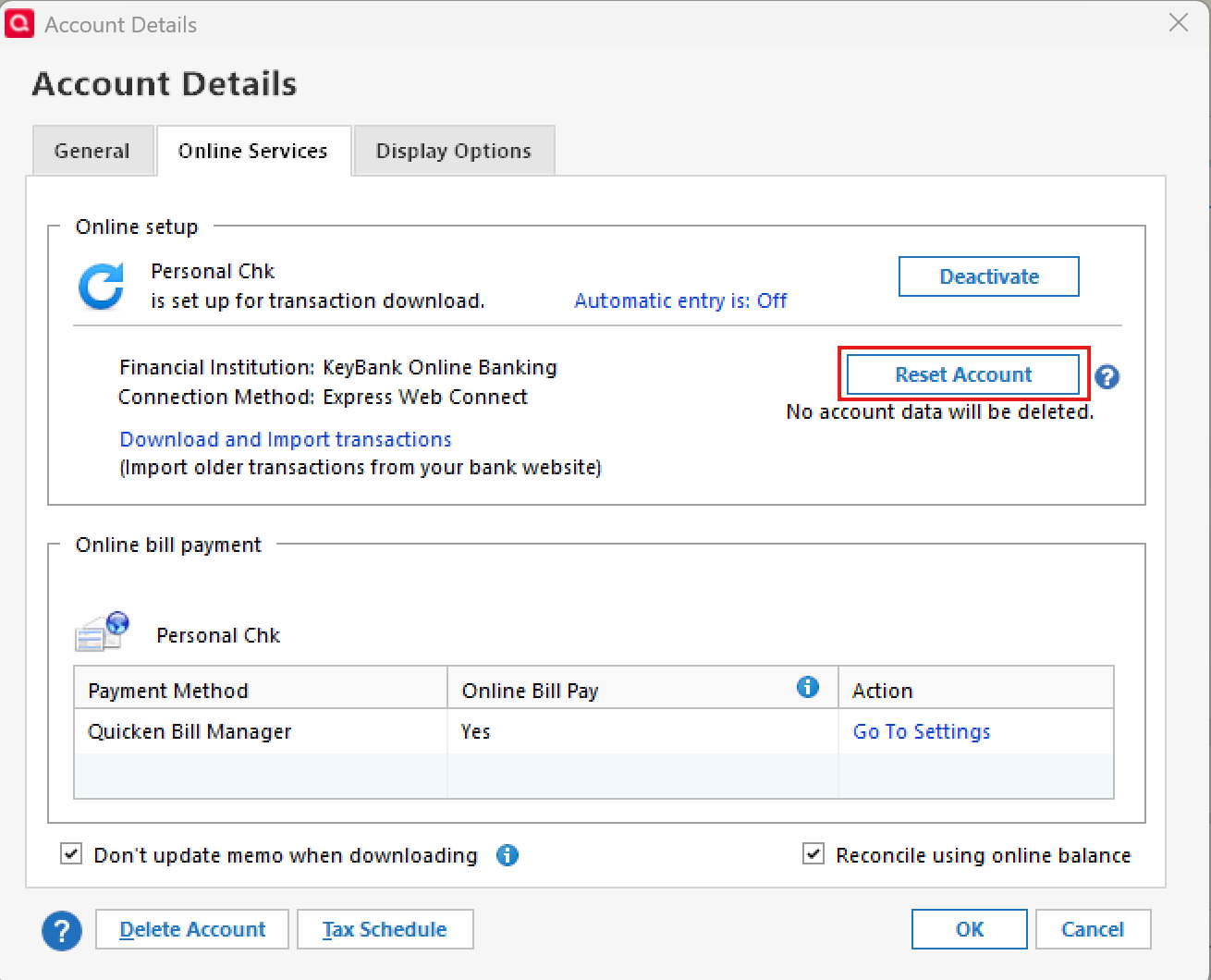
- Enter the correct login ID and follow the on-screen prompts to complete the reset.
- If prompted, carefully LINK the accounts found to the existing accounts in Quicken.
After the reset process is complete, attempt your online session again.
If the issue persists
Try Deactivating and Reactivating the affected accounts:
- Choose Tools > Account List.
- Click the Edit button next to the account you want to change the login ID for.
- In the Account Details window, click the Online Services tab.
- Click Deactivate, and then click Yes to deactivate online services.
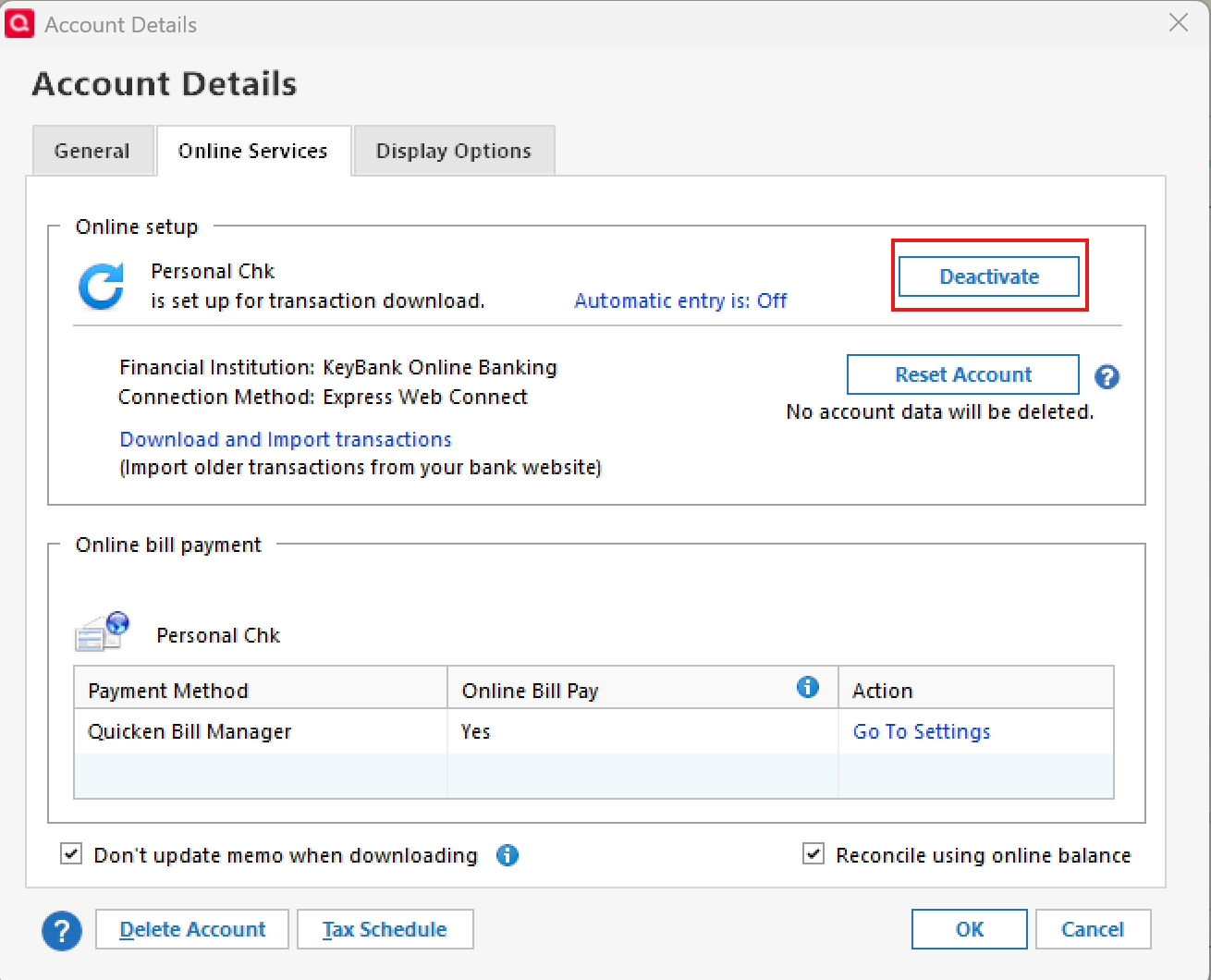
- Click Yes again, if necessary, to confirm your choice.
- Repeat these steps to deactivate all accounts at this same bank.
- Return to the Online Services tab and click Set up Now for each account you've deactivated.
- Enter the correct login ID and follow the on-screen prompts to activate your account.
If the problem continues after following the guidance above, then we recommend contacting Quicken Support so they can review your logs and connection attempts in more detail.
Thank you!
-Quicken Anja
Make sure to sign up for the email digest to see a round up of your top posts.0 - Type your password/PIN into a text application, such as Notepad, WordPad, or other text/word application.
-
I have tried all of the above and I am certain that my username and password entries are correct. It all started this morning after the Quicken upgrade. For some reason, Ivy Bank wanted to send me a "code" multiple times during the process to get OSU working (seemed like an excessive number of times I needed to get a code). My online account then said "too many attempts" and it was locked out. I waited a couple of hours, then IVY Bank allowed me to log in to my account again.
Is it possible that my account is locked out on the Quicken Login to OSU now? Should I wait 24 hours and try again?
0 -
@Mike_S Thanks for following up! Based on what you described, it is possible that the connection is temporarily locked on the bank’s side due to the repeated authentication attempts and verification codes. Even after you regain access on the bank’s website, there can sometimes be a delay before third-party connections like Quicken are fully restored.
At this point, I would recommend waiting about 24 hours before attempting to connect again, and then trying a fresh update.
When you do try again:
- Perform the update once and avoid multiple repeated attempts
- Complete any verification prompts carefully if they appear
If the issue persists after that waiting period, please contact Quicken Support so they can review your logs and escalate if needed.
Thank you!
-Quicken Anja
Make sure to sign up for the email digest to see a round up of your top posts.0 -
Just checking in!
Were you able to get this issue resolved? Do you still need assistance?
Thank you!
Quicken Alyssa
Make sure to sign up for the email digest to see a round up of your top posts.
0 -
Yes….it is working now. Requires a "code" for every OSU which is kind of a pain…but it is working. Thank You.
1 -
Thank you for following up to let us know this issue is resolved.
If you need more help, don't hesitate to reach back out.
Thanks again!
Quicken Alyssa
Make sure to sign up for the email digest to see a round up of your top posts.
0


