I wanted to share a bug I found starting with R66.11 thru R66.23 (current)

I was receiving the OL-295-A error for the past several days with my accounts at America First Credit Union, and I contacted them to see what, if anything, was going on on their end. They told me that there were no issues (not unusual), so I decided to deactivate and reactivate my accounts to see if this would work. It was seemingly going ok, until it wasn't. I also previously performed validate and super-validate to no avail.
The OL-295-A error continued when reactivating my accounts, but was easily bypassed by clicking OK on the error dialog box. I was then able to log into my accounts and move forward with re-linking them for download. This is where I ran into trouble. When trying to link to existing accounts, the account list that pops up did not display all the accounts I was looking for. I was able to link only 2 of 6 accounts.
Running out of ideas, I called Quicken Support and was on the phone with them for nearly 2 hours. The support rep was able to finally get to the issue. When using the "Link to Existing Account" option, the list that pops up is no longer scrollable starting with R66.11. At the rep's request, I downloaded R65.29, and the scrollable list reappeared. I then downloaded R66.11 to test, and the issue was back. Since I was on R66.23, I know the issue is there as well.
Per the rep, I submitted a "suggestion" through Quicken, instead of "Report a Bug". He provided a ticket number, which I typed into the dialog box, but did not copy for my records.
Suggested enhancement... The list of accounts to choose from when linking should NOT be every single account. I have about 10 active accounts and about 6 times that many that are hidden. I don't see a reason to have hidden accounts available for linking. On top of that, the logic behind identifying whether an acct is a "Credit Card", "Checking", or "Savings" account is also flawed. One of my "Savings" accts was set as "Credit Card" and I was unable to change it until I went back in to re-link that single acct after completing the other 5 accts.
[Edited - Readability]
Comments
-
Hi @Gringgo,
Thank you for sharing what you’re experiencing. I was able to replicate the issue on my end, and it appears to be related to the current design.
Please submit your log files so we can forward them to the appropriate team to review and work toward a fix.
To send the report, please follow these steps:
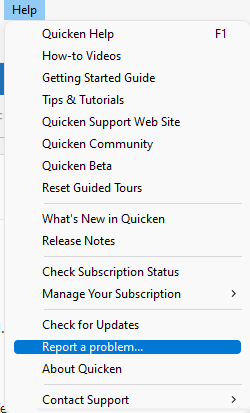
- Click Help.
- Select Report a Problem.
- Provide a brief description of the issue.
- Make sure all logs are selected.
- Click Send to Quicken.
I’ll look forward to your response!
Quicken Laura
Make sure to sign up for the email digest to see a round up of your top posts.
1 -
Report sent.
0 -
I am experiencing the same ongoing issue with America First Credit Union download error message: OL 295-A. When trying to Reset Account in Online Service Quicken freezes and locks up.
What is the status of this fix?! Or must I roll back the update? Is it possible to roll back to R65.29 (or a previous version) for the download to work? (and how is this done? )
I am on R66.23. Please advise ASAP
[Edited - Readability]
0 -
Hi there,
Thank you, @Gringgo , for sending your logs. I have attached the information you provided to the internal ticket.
Also, thank you @smart for joining the thread and sharing your experience . It appears that the OL-295-A error was resolved by deactivating and reactivating the affected account using the steps below:
Deactivate account:
- Select Tools.
- Click Account List.
- In the Account List, locate the account you want to deactivate and click Edit.
- In the Account Details window, select the Online Services tab.
- Click Deactivate next to the service you want to disable.
- Click Yes to confirm that you want to disable the service.
After deactivating the account, please revoke Quicken’s third-party access from your account on your financial institution’s website.
- Go to Tools > Add Account.
- Search for and select your financial institution.
- If prompted, choose the appropriate connection method.
- Follow the on-screen instructions.
- When the list of accounts appears, make sure to select Link to connect them to your existing accounts (do not add duplicates).
If you are experiencing the same issue with the scrollbar when linking accounts, please submit your log files and install Release R65.29 as a temporary workaround.
Thank you!
(CTP-16544)
Quicken Laura
Make sure to sign up for the email digest to see a round up of your top posts.
0 -
Any idea of when the issue is going to be resolved an rolled out?
0 -
Hi @Gringgo,
Thank you for following up.
At this time, there is no estimated time for resolution. Our team is still actively working on a fix, and I will be sure to share any updates as soon as they become available.
We appreciate your patience and understanding while we continue working on this issue. Thank you!
Quicken Laura
Make sure to sign up for the email digest to see a round up of your top posts.
0 -
Hi @Gringgo,
The issue with the scrolling bar in Release 66.28 has been resolved, and it now displays only the appropriate account types.
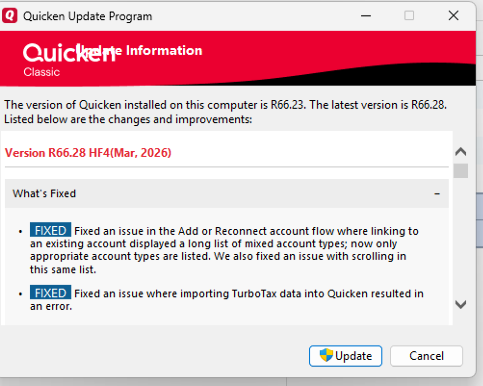
Please let me know if you experience any issues reconnecting your accounts. I’ll be here to help!
Quicken Laura
Make sure to sign up for the email digest to see a round up of your top posts.
0 -
Thank you for the update and the quick turn around on the fix.
I installed the new version and for the most part everything is good. The account list has been shortened significantly, but I still think you should eliminate accounts that are "hidden". The accounts mostly matched on type (checking/savings/credit card), but it's not 100%. I had issues with the account type not being accurate for my loan account. I've included screen shots of the issue.John
0 -
@Gringgo Thank you for reporting the new behavior you’re noticing. I’ll forward this information to the appropriate team and keep you updated as soon as I have more details.
Please feel free to reach out if you have any additional questions in the meantime!
Quicken Laura
Make sure to sign up for the email digest to see a round up of your top posts.
0



Categories
- All Categories
- 6 Product Ideas
- 34 Announcements
- 248 Alerts, Online Banking & Known Product Issues
- 19 Product Alerts
- 265 Welcome to the Community!
- 301 Before you Buy
- 1.5K Product Ideas
- 55.8K Quicken Classic for Windows
- 16.9K Quicken Classic for Mac
- 1K Quicken Mobile
- 834 Quicken on the Web
- 129 Quicken LifeHub