Entering Future Trades

eutu1960
Quicken Windows Subscription Member
I would like to enter my Future trades manually and not download transactions. How is the best way to enter Future trades. For now I am recording it under Other Cash transaction, Futures Trade, and created a Futures Trade Category.
0
Comments
-
Hi @eutu1960,
Thank you for contacting the Quicken Community.
If you would like to track your accounts manually, I recommend deactivating the account to prevent transactions from downloading automatically. If you haven’t done this yet, you can follow these steps:
To deactivate an account:
- Select the Tools menu and choose Account List.
- In the Account List, select the account you want to deactivate, then click Edit.
- In the Account Details window, click the Online Services tab.
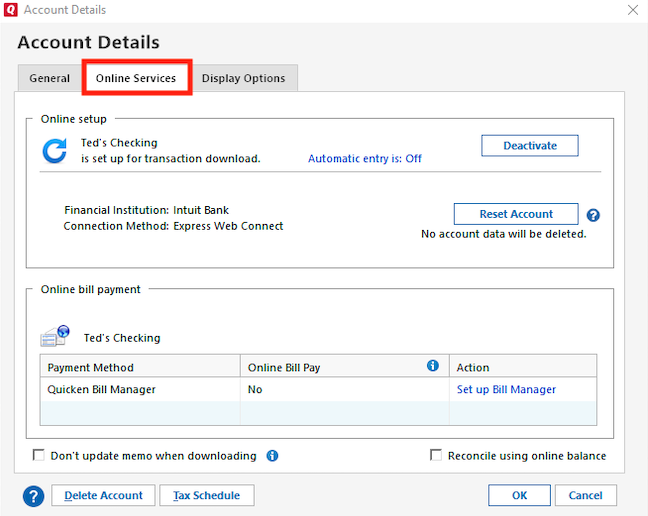
- Click Deactivate next to the service you want to disable.
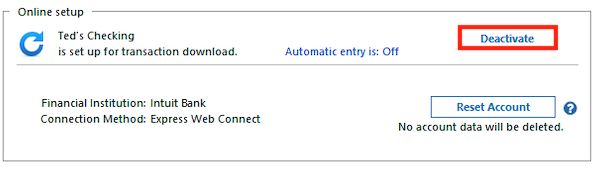
- Click Yes to confirm that you want to disable this service.
To enter transactions manually:
- Open the account in question and click Enter Transactions
- Select the type of transaction you would like to enter from the dropdown menu.
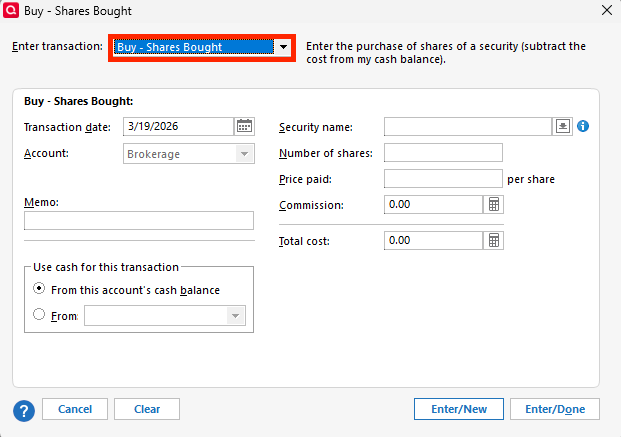
- Enter the required information and save the transaction.
I hope this helps! Please let us know if you have any further questions.
Quicken Carlos
Make sure to sign up for the email digest to see a round up of your top posts.
0

Categories
- All Categories
- 6 Product Ideas
- 34 Announcements
- 249 Alerts, Online Banking & Known Product Issues
- 19 Product Alerts
- 266 Welcome to the Community!
- 301 Before you Buy
- 1.5K Product Ideas
- 55.8K Quicken Classic for Windows
- 16.9K Quicken Classic for Mac
- 1K Quicken Mobile
- 834 Quicken on the Web
- 129 Quicken LifeHub