How to enter Vanguard share balance rounding after ETF sale?

I'm on Quicken Classic Premier R66.23.
I sold some shares in two Vanguard ETFs. The Vanguard transaction reports show shares sold to four decimals, and those numbers downloaded correctly to Quicken.
However it seems that after recording the sale, Vanguard then rounded the online share balance to three decimals (this time in my favor), as I can see in the Vanguard Holdings screen. So now Quicken is telling me that there is a Securities Comparison Mismatch of 0.0005 and 0.0002 shares. It's offering to create a placeholder transaction for those shares. From the Help, it looks like if I do that, it will ask me about the cost basis.
- Am I correct that Vanguard is rounding these share balances to three decimals?
- What should I do in Quicken?
I realize these are tiny amounts but it seems I need a procedure to handle Vanguard rounding in Quicken.
Best Answer
-
Thanks for the replies.
I like the automated downloads and I like the ability to sell fractional shares based on value.
I think I'll do this:
- From gear icon > Reconcile Shares, let Quicken create the placeholder transactions.
- Edit the placeholder. Enter History. Enter Missing Transactions. Create a "Buy - Shares Bought" for the rounding amount, e.g. 0.0002 shares. Price paid and Total cost $0 (it's a free gift from Vanguard!).
- The placeholder now shows 0 shares. Delete it.
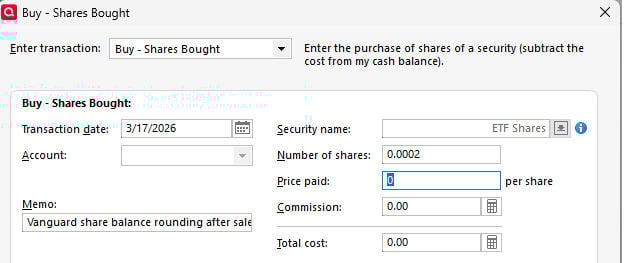
Now Quicken's balance matches Vanguard's. Basically it's just a manual entry reflecting Vanguard's rounding behavior. If I'm on the "losing" end of a rounding error, I guess it would be a "Sell - Shares Sold" transaction instead, but also at $0 price and cost.
0
Answers
-
Hi @sd_mark
I just took a look at a Vanguard account. I actually scanned six hundred transactions and noted that, while there were transactions that displayed four decimal places, the fourth decimal place was always a zero.
Have you always downloaded transactions, or is it possible that you made some manual transactions that had four decimals where the 4th one was NOT a zero?
Get back to me with some additional information and we'll go from there.
Frankx
Quicken Home, Business & Rental Property - Windows 10-Home Version
- - - - Quicken User since 1984 - - -
- If you find this reply helpful, please click "Helpful" (below), so others will know! Thank you. -0 -
@Frankx are you looking at ETFs/stocks? They may handle mutual funds differently.
On most of these, I used Vanguard's option to Sell at market rate based on dollar value, meaning it's calculating fractional shares to sell. Here is a screen shot from one transaction report:
 0
0 -
Hi again @sd_mark
I have Vanguard investments in stocks and mutual funds. None of my accounts are showing transactions that have prices where the fourth decimal is other than zero. I see, in the example you have displayed above, the transaction is based on amount of the dollar value you seek. And in the example - the number of shares is displayed to the fourth decimal.
Have you tried to allow Quicken to use a placeholder? It seems that may be your only option for the current transaction. However, in the future it might be better to change the dollar amount you are seeking, to align with a sale of the number of shares that will only have three decimals.
Frankx
Quicken Home, Business & Rental Property - Windows 10-Home Version
- - - - Quicken User since 1984 - - -
- If you find this reply helpful, please click "Helpful" (below), so others will know! Thank you. -0 -
I’ve been using Vanguard for many years, I don’t download, I enter everything manually. I enter quantity, price, and total cost from my Vanguard’s confirmations. Every once in a great while, when I look at my monthly statements, there is a discrepancy of a few cents due to the rounding. All I do is make an adjustment entry for the difference to get it to equal.
I wouldn’t worry about the cost basis, seeing that it is so minimal.
Here is an example: I just updated my daily quotes. I have Vanguard Total Bond Market ETF -BND.Quicken shows $73.76 Price quote,67.903 shares, MV $5,008.53
On my Vanguard online account, it shows $73.76price,67.903 shares, but it shows Current Balance of $5.008.51
Now if I look at my last statement ending 2-28, it shows share amount of 67.6958 before dividend, and If I go back to that date on Quicken it shows
67.696 shares, making the different balance do to the rounding of shares.
0 -
Whatever you're doing when manually entering investment transactions, make sure that
- number of shares and
- total amount
always exactly match the actual trade transaction.
Let Quicken calculate the price per share to as many decimal places as it wants to, even if that does not quite match the rounded values shown at the brokerage.
This way you avoid account balance mismatches and there will be no need for balance adjustment transactions.2 -
Thanks for the replies.
I like the automated downloads and I like the ability to sell fractional shares based on value.
I think I'll do this:
- From gear icon > Reconcile Shares, let Quicken create the placeholder transactions.
- Edit the placeholder. Enter History. Enter Missing Transactions. Create a "Buy - Shares Bought" for the rounding amount, e.g. 0.0002 shares. Price paid and Total cost $0 (it's a free gift from Vanguard!).
- The placeholder now shows 0 shares. Delete it.
Now Quicken's balance matches Vanguard's. Basically it's just a manual entry reflecting Vanguard's rounding behavior. If I'm on the "losing" end of a rounding error, I guess it would be a "Sell - Shares Sold" transaction instead, but also at $0 price and cost.
0 -
@fun1000000 I don't hold investments at Vanguard, but i do at Fidelity and it wouldn't surprise me if this factoid about Fidelity is also true at Vanguard.
When fractional shares, and/or fractional quotes, are involved, the multiplier of the 2 often results in a dollar amount that's a fraction of a penny.
Fidelity uses truncation to determine the total transaction amount, while Q uses 5/4 rounding. So it's not at all unusual for a transaction to be off by a penny. And with multiple funds in the account, the account might even be off by a nickel or so.
I tend to just ignore such minuscule amounts as they're only going to continue to sporadically occur.
Q user since February, 1990. DOS Version 4
Now running Quicken Windows Subscription, Business & Personal
Retired "Certified Information Systems Auditor" & Bank Audit VP0 -
To be clear, the discrepancy I was trying to reconcile is in share balance, not dollar value. Quicken accurately downloaded and summed the share balance to four decimals; Vanguard transacted four decimals then rounded the balance to three.
0 -
@sd_mark Another way to eliminate the share balance discrepancy due to rounding is to note the security and the amount of the mismatch and exit the Security Comparison Mismatch without creating a Placeholder. Then edit the number of shares in the downloaded Sold transaction so as to eliminate the mismatch. This will be a small fraction of a share.
You can check your work by clicking on the gear at the top right of the transaction list and selecting Reconcile Shares. This will compare the downloaded share balances to the balance in Quicken and should present a dialog that says they agree.
QWin Premier subscription0 -
Thanks @Jim_Harman. I can see how that would work, but I like having the transaction that exactly matches the Vanguard transaction statement. But the net effect of your approach and mine would seem to be the same: adjust the share balance without changing the dollar value.
0 -
If you really want to enter an additional transaction, Added or Removed would be better. That adjusts the share balance without affecting the cash balance. To prevent messing up the share price and cost basis, when Adding, use the date and share price of the last transaction for that security.
QWin Premier subscription0 -
I'll have to look at Added/Removed. "Buy - Shares Bought" is what was suggested when resolving the placeholder. It seemed to work to just use $0 for price and total cost.
0 -
It's up to you what you enter, but adjusting with a Buy with a cost of zero will create a small tax lot with zero cost basis and may mess up Quicken's price history.
QWin Premier subscription0





Categories
- All Categories
- 6 Product Ideas
- 34 Announcements
- 248 Alerts, Online Banking & Known Product Issues
- 19 Product Alerts
- 265 Welcome to the Community!
- 301 Before you Buy
- 1.5K Product Ideas
- 55.8K Quicken Classic for Windows
- 16.9K Quicken Classic for Mac
- 1K Quicken Mobile
- 834 Quicken on the Web
- 129 Quicken LifeHub