BECU CC-506

rdschmid
Quicken Windows Subscription Member ✭✭✭
"Quicken is unable to update your account. This may be because the account was closed, or its nickname was changed."
Account is open and unchanged. Started a few days ago.
Tagged:
0
Comments
-
Hello @rdschmid,
Thank you for letting us know you're seeing this issue. To troubleshoot, please backup your Quicken file and follow these steps from our article on CC-506 errors:
Refresh your account information
- From your account register, select the Actions gear icon at the very top of your register (Ctrl + Shift + N).
- Then select Update Now.
- Follow the on-screen instructions to complete the update.
- If the problem persists, continue with the procedures below.
Deactivate all accounts for this financial institution, then force Quicken to "discover" all available accounts:
- Open the Account List in Quicken (Tools > Account List or Ctrl + A).
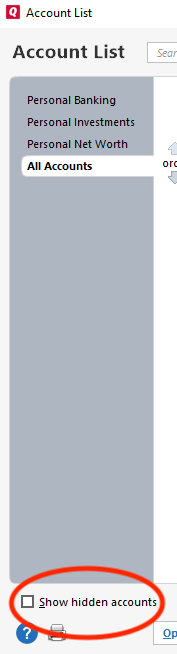
- If present, select the Show Hidden Accounts checkbox at the bottom of the Account List.
- Use the Edit button for each account with this financial institution to Deactivate (or Remove From One Step Update) on the Online Services tab.
- When finished, close the Account List.
- Close, then re-open Quicken.
- Click the Add Account + button at the top of the Account Bar on your main view.
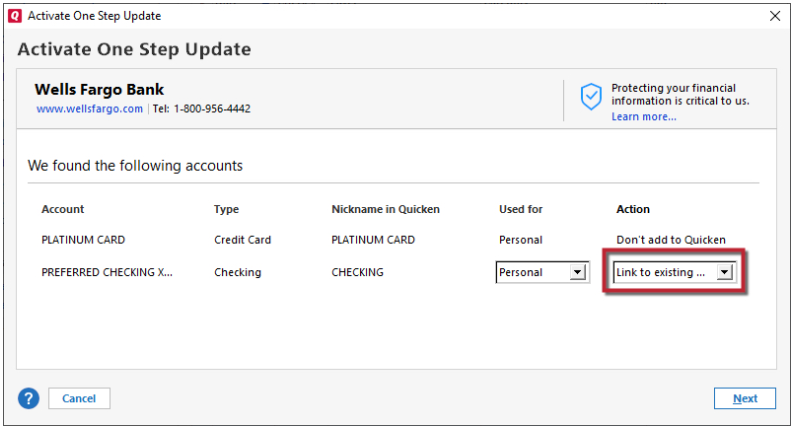
- Walk through this process as if you were going to add a new account, providing the login credentials and answering any security questions/processes presented, until you reach the screen where Quicken displays the Accounts Discovered at the financial institution.
- Very carefully LINK each of the found accounts to the appropriate account you already have set up in Quicken.
If the account was closed, deactivate it from future online updates
- Choose Tools menu > Account List.
- Click the Edit button next to the account you want to deactivate.
- In the Account Details dialog, click the Online Services tab.
- Click Deactivate to stop downloading transactions for this account.
Please let me know how it goes!
Quicken Kristina
Make sure to sign up for the email digest to see a round up of your top posts.
0

Categories
- All Categories
- 22 Product Ideas
- 34 Announcements
- 247 Alerts, Online Banking & Known Product Issues
- 19 Product Alerts
- 518 Welcome to the Community!
- 682 Before you Buy
- 1.5K Product Ideas
- 55.7K Quicken Classic for Windows
- 16.9K Quicken Classic for Mac
- 1K Quicken Mobile
- 834 Quicken on the Web
- 128 Quicken LifeHub