Quicken losing and mixing up Wells Fargo Transactions, Zelle Transactions and Account Transfers

I have used Quicken for Windows for over 20 years now and have seen the quality of the program diminish horribly over the last 2-3 years. I am finding that electronic transfers that I make between WF accounts, Zelle payments, and reconciled transactions either change or are missing. I have had to repeatedly reconcile the same account multiple times because somehow transactions are changed. What is happening, and how do I correct this?
Answers
-
Hi @SallieMC,
Thank you for reaching out, and I’m sorry to hear you’re experiencing issues with your transfers and reconciled transactions. I’d be happy to help you work toward a resolution.
To better understand what’s happening, could you please provide a bit more detail on the following:
- When did you first notice this issue?
- Where is your Quicken data file stored?
To check, open Quicken and go to File. At the bottom under Recent Files, the file with the checkmark is the one currently open—please share the full file path listed there. - Is your data file being backed up or synced with any third-party services (such as Carbonite, OneDrive, or Backblaze)?
- Have you tried restoring a backup from before the issue started?
- Have you noticed any pattern that seems to trigger the issue (for example, updating accounts or restarting Quicken)?
- Is Transfer Detection currently enabled?
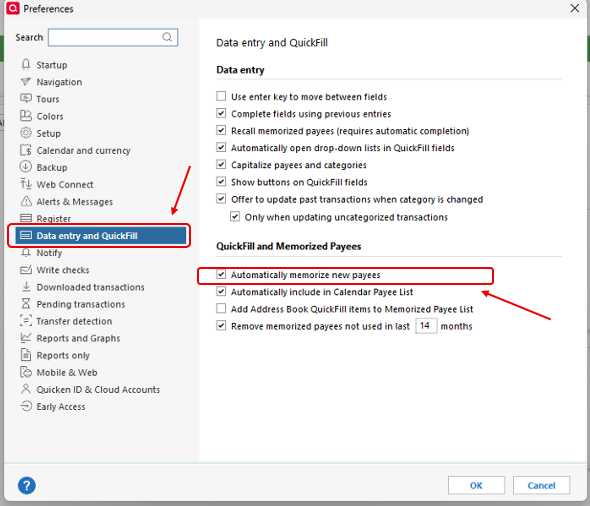
- Is Automatically memorize new payees turned on?
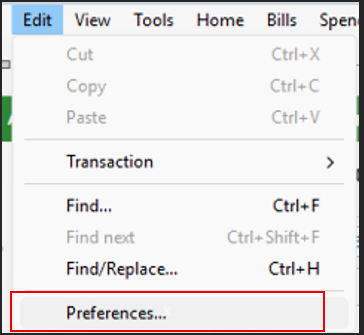
You can verify these settings by following the steps below:
To check Transfer Detection:
- Go to Edit > Preferences
- Select Transfer Detection from the left panel
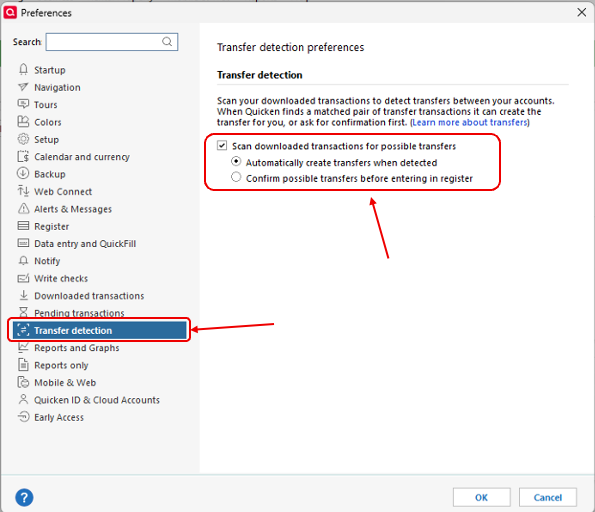
- Review the settings on the right
To check Automatically Memorize New Payees:
- Go to Edit > Preferences
- Select Data Entry and QuickFill
- Look for the Automatically memorize new payees option
Your responses will help narrow down the cause and guide the next steps. I look forward to hearing back from you!
Quicken Laura
Make sure to sign up for the email digest to see a round up of your top posts.
0 -
Hi @SallieMC,
I just wanted to follow up since I haven’t heard back from you. I’m checking in to see if you still need assistance.
Quicken Laura
Make sure to sign up for the email digest to see a round up of your top posts.
0 -
If you have issues with transfer transactions not being generated correctly:
For best results manually enter transfer transactions into your register BEFORE you download transactions from the bank which contain the transfer confirmations. For recurring transfers use scheduled reminders and enter them a day or two before the due date.
Be sure to use distinct Payee Names for each transfer or credit card payment to avoid confusing Quicken - memorized payee entries.
That takes the guesswork out of the downloading process. Because a correctly entered transfer transaction already exists in your account registers, the download process should just match the downloaded transfer transaction to the already existing one in both accounts.0 -
Hello again,
I'm checking in once more before this thread gets closed.
If you need assistance, let us know."Quicken Laura
Make sure to sign up for the email digest to see a round up of your top posts.
0

