Is there a way to create a new budget with adjusted account carryover balances that are reconciled?

2025 was our first Quicken budget year. Starting 2026 we made changes more appropriate to our needs AND worked with Quicken staff to change the rollover amount on one of two accounts. All went well with the exception that the budget would not pick up the rollover amounts on either account as actual income being transferred.
Today I spent 3 hours on the phone with a Quicken tech who in the end told me that we could NOT show the rollover amounts as actual prior year income in the budget, although the adjusted amount and non-adjusted amounts both appear in our transactions. We can enter the amounts in our 2026 budget as projected, but not as available on January 1st.
This makes absolutely no sense to me. Has anyone else had a similar experience and figured out a work around? The inability to make this work is definitely unbelievable for a massive "budget" program such as Quicken.
Answers
-
First off let's get some terminology correct. Even though you can filter a budget by accounts, the budget is category based. You adjust category amounts.
The second part if what is the "rollover". They aren't "transactions amounts" to be reconciled. They can add up to what you reconciled in the past, but they really have no direct connection to past transactions. For instance, one might decide to rollover all the gas prices for the year, because how much they spend on a given month varies, but on average they spending/budget a given amount. The shortfall in one month gets made up in the next month. But they might want to start the next year without any rollover and as such zero out the rollover in January.
Next on the rollover amounts. Quicken definitely has some quirks on the automatic rollover numbers it picks up, but that isn't to say that one can't override them with whatever they like.
The first thing to understand is that for any category you want to change the rollover balance on you need to turn on the rollover option. Click on this icon to turn it on:

Once you have done that make sure you have the Balance column being displayed, and then select the category balance amount for the month you want to change and you will get this popup.
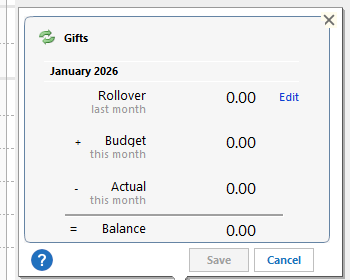
You can select Edit to change the rollover amount.
And on the Actual column, it shows actual transactions or reminders (in the case of reminders they might be prorated depending on when they fall in the month and what day of the month it is for the current month). You can decide to show reminders in your budget or not.
-1 -
"Prior year carryover" is a category that applies to an account. It is the summary of all transactions applicable to that account at the end of the year. This is what I am speaking to and asking folks if they have any suggestions on how to enter adjusted carryover data as actual carryover. If not, I will continue to seek help from Quicken staff as time permits.
0 -
Where are you seeing "Prior year carryover"?
Is this a transaction/category you created in some accounts?
0 -
Maybe the problem is that a Windows guy is talking to a Mac user?
Also, terminology might be the problem here. I know that people use the word "budget" when what they are actually talking about is real-world "financial statements." A "budget" is different than "financial statements."
You might "budget" $250 for the coming year in auto-repair and servicing, but blow a transmission and you're got to actually spend $1,500.
Quicken isn't a "massive '"budget"' program", it's an "accounting program" that allows you to track your real-world activities, and has some "budgeting" aspects tacked onto it.
0 -
Oops! Sorry!!
@Tom Young is right, I missed that you are using Quicken Mac, the budgeting in Quicken Mac is quite different than in Quicken Windows.
0

Categories
- All Categories
- 24 Product Ideas
- 34 Announcements
- 248 Alerts, Online Banking & Known Product Issues
- 19 Product Alerts
- 265 Welcome to the Community!
- 301 Before you Buy
- 1.5K Product Ideas
- 55.8K Quicken Classic for Windows
- 16.9K Quicken Classic for Mac
- 1K Quicken Mobile
- 834 Quicken on the Web
- 129 Quicken LifeHub