Some downloaded transactions don't match transactions that I had entered by using the Bills & Income

Wednesday 2026-03-25 at 07:03 PDT
Subject: Some downloaded transactions do not match transactions that I had entered by using the Bills & Income bill enter function.
Some downloaded transactions do not match transactions that I had entered by using the Bills & Income bill enter function. Those transactions have a new register line. I entered the transactions in the order that I paid them. I would like to have help to solve the problems. Below, I ask questions to help me solve them.
I entered five transactions on 2026-03-20 in this order:
AT&T Universal Card
DirecTV
Waste Connections
[Redacted] Telecom
Wells Fargo
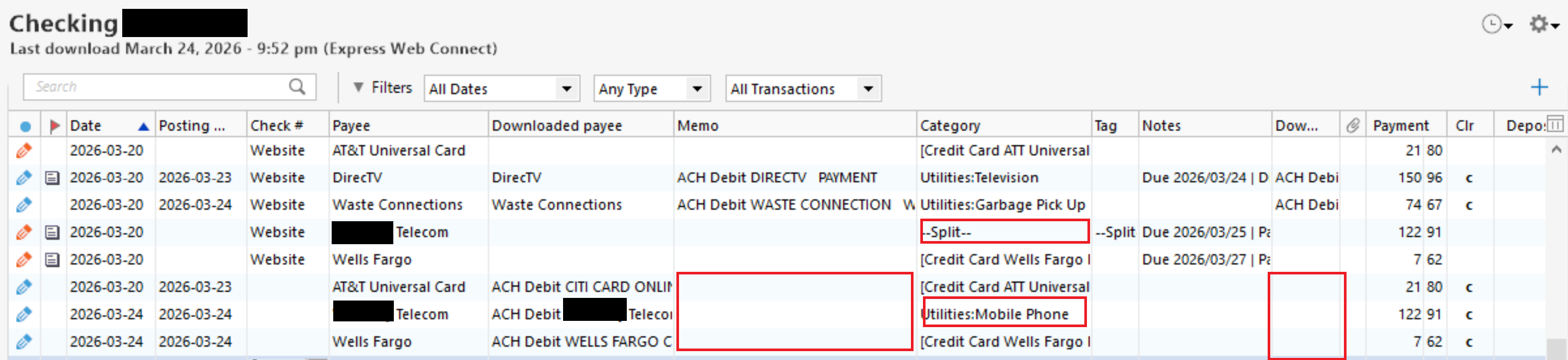
On the evening of 2026-03-24, I did a One Step Update that downloaded transactions. In my checking account register, Quicken correctly matched two transactions, DirecTV and Waste Connections, and incorrectly matched three transactions, AT&T Universal Card, [Redacted] Telecom, and Wells Fargo, which created three new transactions. Those three new transactions are missing the Memo and Downloaded memo. The new [Redacted] Telecom transaction's Category, Utilities: Mobile Phone, does not match the Category, --Split--, from the original transaction. In addition, Quicken created one new transaction instead of matching it to an existing transaction in my AT&T Universal Card account register and one new transaction instead of matching it to an existing transaction in my Wells Fargo account register.
Here is a screenshot of my checking account register that shows the problems:
=====
=====
I tried to edit the Posting Date, Downloaded Payee, and Downloaded memo for the three transactions that I entered to match the three new transactions, but Quicken does not allow that.
1) Why did Quicken fail to match the three new transactions that it did not match in my checking account and why did it fail to match the two transactions in my AT&T Universal Card account and Wells Fargo account registers?
2) Why did those three new transactions not have the Memo and Downloaded Memo? My financial institution's website shows that those transactions have the information that should be in the Downloaded Memo.
3) How do I edit the Posting Date, Downloaded Payee, and Downloaded memo for the three transactions that I entered so that they match the three new transactions? That will allow me to delete the three new transactions.
4) If what I asked in question 3 is not possible, then I think I will have to delete the three non-matching transactions, which will create an order of transactions that do not match how I entered the original five transactions. How will I be able to retain the order of the altered five transactions as I originally entered them?
Window 11 Pro
Quicken Premier Version R66.23 Build 27.1.66.23
.
Answers
-
Hello @rxyquicka,
Thank you for the very detailed explanation and screenshots.
Based on what you described, this behavior is typically related to how Quicken determines a “match,” which relies primarily on amount, date, and payee name. Even small differences (especially in the amount or slight date variations) can prevent a match and cause a new transaction to be created instead.
To better understand why these specific transactions did not match, I’d like to gather a bit more information:
- Where is your Quicken data file stored? Is it on your local hard drive (C: Drive) or a cloud-based/external drive (e.g.: OneDrive, DropBox, USB, etc.)?
- Please provide the exact file path as shown in the example below.
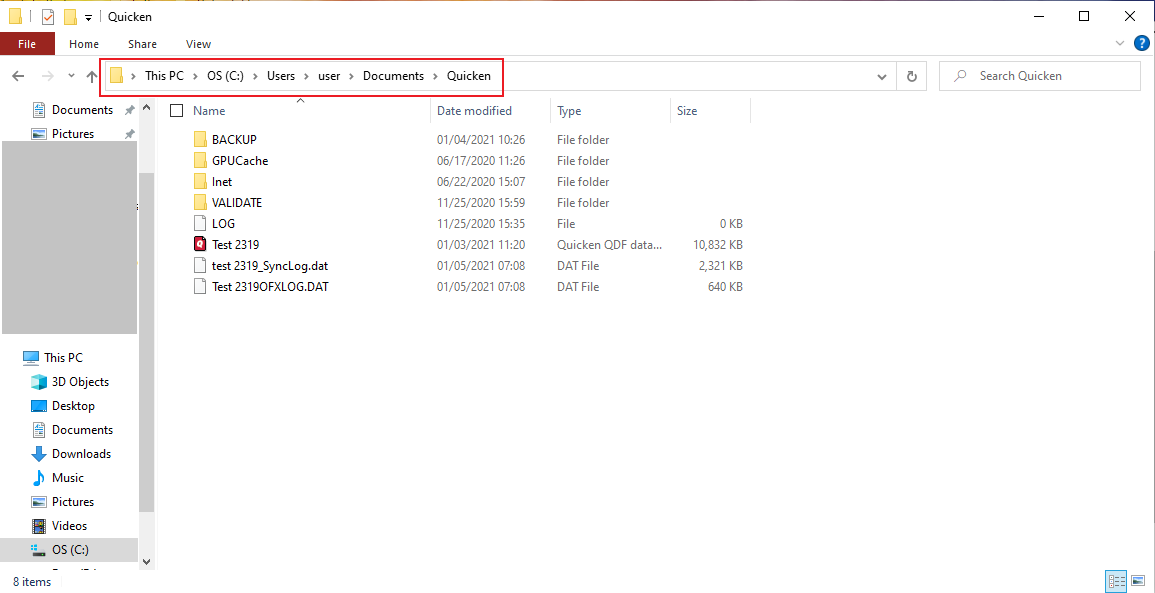
- Please provide the exact file path as shown in the example below.
- Have you attempted any troubleshooting steps so far? If so, what were they?
- When did this issue first start occurring?
- Were there any significant changes to your system or software before the issue began (updates, new installations, etc.)?
- Are the amounts and dates of the manually entered transactions exactly the same as the downloaded ones, or are there slight differences (even by a day or a few cents)?
- Looking at your screenshot, in the Status column (first column), I notice that for the Telecom transactions there is a mix of orange pencil (manual entry) and blue pencil (manually entered and later matched). This can sometimes indicate that a duplicate manual entry may have been created instead of matching to the downloaded transaction (which would typically show as a blue dot before being matched).
- Can you confirm if there may have been any duplicate manual entries created for those transactions?
- When downloading transactions, are you using the Downloaded Transactions tab (review/accept workflow), or are transactions being automatically entered directly into the register?
Regarding your other questions:
- Downloaded transactions may come in without Memo/Downloaded Memo if that information is not provided in the exact way Quicken expects from the financial institution, even if it appears on the bank’s website.
- Unfortunately, fields like Posting Date, Downloaded Payee, and Downloaded Memo cannot be edited on manually entered transactions to force a match.
- If a transaction does not match automatically, the recommended approach is to manually match it, rather than deleting and reordering entries.
Thank you!
-Quicken Anja
Make sure to sign up for the email digest to see a round up of your top posts.0 - Where is your Quicken data file stored? Is it on your local hard drive (C: Drive) or a cloud-based/external drive (e.g.: OneDrive, DropBox, USB, etc.)?
-
Thursday 2026-03-26 at 04:56 PDT
Hello Quicken Anja,
Thank you for replying.
I have answered your questions below. I quoted you and I then answered.
To better understand why these specific transactions did not match, I’d like to gather a bit more information:
- Where is your Quicken data file stored? Is it on your local hard drive (C: Drive) or a cloud-based/external drive (e.g.: OneDrive, DropBox, USB, etc.)?
rxyquicka:
C:\Users\[Redacted]\OneDrive\Documents\Finances\Quicken
- Have you attempted any troubleshooting steps so far? If so, what were they?
rxyquicka:
None except for "I tried to edit the Posting Date, Downloaded Payee, and Downloaded memo for the three transactions that I entered to match the three new transactions, but Quicken does not allow that ."
- When did this issue first start occurring?
rxyquicka:
On the evening of 2026-03-24 at 21:52.
- Were there any significant changes to your system or software before the issue began (updates, new installations, etc.)?
rxyquicka:
No. I last updated Quicken on 2026-03-11.
- Are the amounts and dates of the manually entered transactions exactly the same as the downloaded ones, or are there slight differences (even by a day or a few cents)?
rxyquicka:
I don't know why you answered this question because the screenshot I uploaded has the answer. No differences in the amounts. No differences in the Payees. Different dates for the transactions that I entered using the Bills & Income bill enter function and the new register transactions for two payees, Telecom and Well Fargo 2026-03-20 and 2026-03-24. The AT&T Universal Card has the same date in the transaction that I entered using the Bills & Income bill enter function and its new register transaction, 2026-03-20. In the past, the date did not alter how Quicken determines a "match"; why would it do that now?
- Looking at your screenshot, in the Status column (first column), I notice that for the Telecom transactions there is a mix of orange pencil (manual entry) and blue pencil (manually entered and later matched). This can sometimes indicate that a duplicate manual entry may have been created instead of matching to the downloaded transaction (which would typically show as a blue dot before being matched).
- Can you confirm if there may have been any duplicate manual entries created for those transactions?
rxyquicka:
I am unsure why you answered this question because I thought I clearly wrote that the first five transactions, the ones that have Website in the Check # column, are the transactions that I entered using the Bills & Income bill enter function. The next or last three transactions are the new ones that Quicken created instead of matching them with the three existing transactions.
- When downloading transactions, are you using the Downloaded Transactions tab (review/accept workflow), or are transactions being automatically entered directly into the register?
rxyquicka:
When I use One Step Update, it automatically enters and/or matches the transactions in the registers. I did not know about Downloaded Transactions tab (review/accept workflow) and still do not know how to do that.
rxyquicka:
My checking account has 247 transactions between 2025-03-17 and 2026-03-16. Almost all of them, 242 transactions, have a Download memo.
Unfortunately, fields like Posting Date, Downloaded Payee, and Downloaded Memo cannot be edited on manually entered transactions to force a match.
rxyquicka:
I do not want to force a match. I want to edit those three fields so that I can keep the transaction order as Quicken entered them when I used the Bills & Income bill enter function. The order of transactions is in the order that I paid each of the bills. Since I cannot edit those fields, the order of transactions will more than likely not be in the order that I paid them because I am going to have to delete the three Website transactions and use the three transactions that Quicken erroneously created, which I now show.
Currently:
Website AT&T Universal Card
Website DirecTV
Website Waste Connections
Website [Redacted] Telecom
Website Wells Fargo
AT&T Universal Card
[Redacted] Telecom
Wells Fargo
With Deletions:
Website DirecTV
Website Waste Connections
AT&T Universal Card
[Redacted] Telecom
Wells Fargo
Ideally:
Website AT&T Universal Card
Website DirecTV
Website Waste Connections
Website [Redacted] Telecom
Website Wells Fargo
Is there a way that I can keep the order of the altered five transactions as I originally entered them while keeping the downloaded transactions' data?
Thanks.
0 -
@rxyquicka Thank you for the detailed follow-up and for answering those questions.
Before anything else, I recommend creating a backup of your data file as a precaution.
File Location (Important)
I do want to point out that your data file is currently stored here:
C:\Users\[Redacted]\OneDrive\Documents\Finances\Quicken
Storing your active Quicken data file in a cloud-synced folder (like OneDrive) can lead to data inconsistencies, data damage, or even file corruption over time. Due to this risk, we recommend moving your data file to a local folder (outside of OneDrive sync).
While this may not immediately resolve what you’re seeing, it is a known cause of unpredictable behavior like incorrect matching. After moving the file, we would need to observe future downloads to confirm whether the issue persists.
About Matching Behavior
Quicken matching is based primarily on:
- Amount
- Date
- Payee
Even small differences, can prevent a match. While this may not have impacted matching in the past, changes in how financial institutions send data (or timing differences between entered vs. posted transactions) can affect this.
Downloaded Transactions Review (Optional but Recommended)
Right now, your setup is automatically adding transactions to the register. If you'd like more control over matching, you can enable the Downloaded Transactions tab:
- Go to Edit > Preferences > Downloaded Transactions
- Uncheck “Automatically add to banking registers”
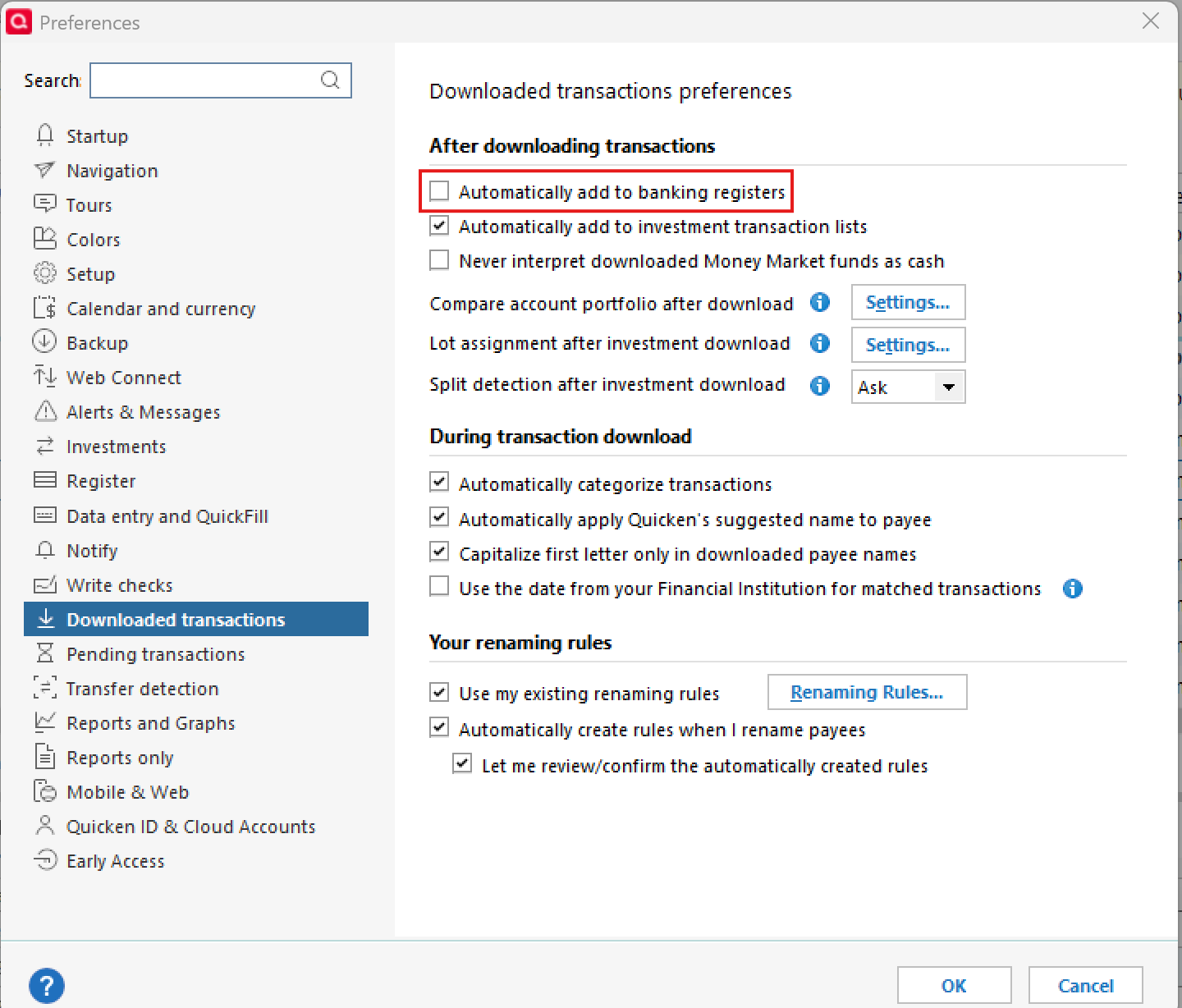
This will allow transactions to download into a review area below the register, where you can:
- Manually confirm matches
- Correct mismatches before they are added
- Avoid duplicate entries like what you’re currently experiencing
Totally optional—but helpful in cases like this.
Maintaining Transaction Order
Unfortunately, there isn’t a way to fully preserve the original manual entry order and retain downloaded transaction data exactly as-is and at this time, there isn’t a way to manually reorder transactions in the register outside of how they are sorted.
If this is functionality you’d like to see, we recommend creating an Idea post in the Community to request it. If the idea gains enough votes from other users, it can be forwarded to our Development team for consideration.
Next Steps (Troubleshooting)
You can also try Validating and/or Super Validating your data file following the instructions provided below. This can help identify and repair inconsistencies:
Validate:
- File
- Validate and Repair File...

- Validate File
- Click OK
- Close the Data Log
- Close Quicken (leave it closed for at least 30 secs)
- Reopen Quicken and see if the issue persists.
If the issue persists, proceed to Super Validate. If the issue is resolved after performing validation, then please disregard the instructions to Super Validate.
Super Validate:- File
- Hold CTRL + Shift and click Validate and Repair File...
- Super Validate File

- Click OK
- Close the Data Log
- Close Quicken (leave it closed for at least 30 secs)
- Reopen Quicken and see if the issue persists.
I hope this helps!
-Quicken Anja
Make sure to sign up for the email digest to see a round up of your top posts.0

Categories
- All Categories
- 6 Product Ideas
- 34 Announcements
- 248 Alerts, Online Banking & Known Product Issues
- 19 Product Alerts
- 265 Welcome to the Community!
- 301 Before you Buy
- 1.5K Product Ideas
- 55.8K Quicken Classic for Windows
- 16.9K Quicken Classic for Mac
- 1K Quicken Mobile
- 834 Quicken on the Web
- 129 Quicken LifeHub