TRANSFERT QUICKEN 98 SUR QUIICKEN 2013

1° EST IL EXACT QU'il faut absolument passer par QUICKEN 2004 POUR transporter les donnees de quicken 98 VERS QUICKEN 2013
2) si affirmatif comment trouver un quicken 2004
MERCI de votre réponse car je suis bloqué dp 27 03 2026
——
Translation:
QUICKEN 98 TRANSFER TO QUICKEN 2013
1° Is it true that it is absolutely necessary to go through QUICKEN 2004 to transfer data from Quicken 98 to Quicken 2013?
2° If yes, how can I find a copy of Quicken 2004?
Thank you for your response, as I’ve been stuck since 03/27/2026.
Comments
-
Bonjour @PIERREPAUL,
Merci d’avoir pris contact avec nous.
Oui, vous devrez d’abord convertir votre fichier Quicken 98 vers Quicken 2004 avant de pouvoir le transférer vers Quicken 2013.
Vous pouvez télécharger Quicken 2004 depuis cet article de support (les instructions sont en anglais, nous n’avons pas d’article en français).
Contexte et instructions:
Quicken 2004 a été testé et peut s’installer sur Windows 7, 8 et 8.1 (32 ou 64 bits) pour effectuer la conversion depuis Quicken 98-2003. Il n’a pas été testé sur Windows 10 ou 11.Voici les étapes pertinentes pour convertir votre fichier de Quicken 98 vers Quicken 2004:
Étape 1 : Sauvegarder et installer Quicken 2004
- Dans Quicken 98-2003, assurez-vous que votre fichier de données est à jour, puis effectuez une sauvegarde.
- Fermez Quicken.
- Téléchargez Quicken 2004 pour Windows depuis l’article de support.
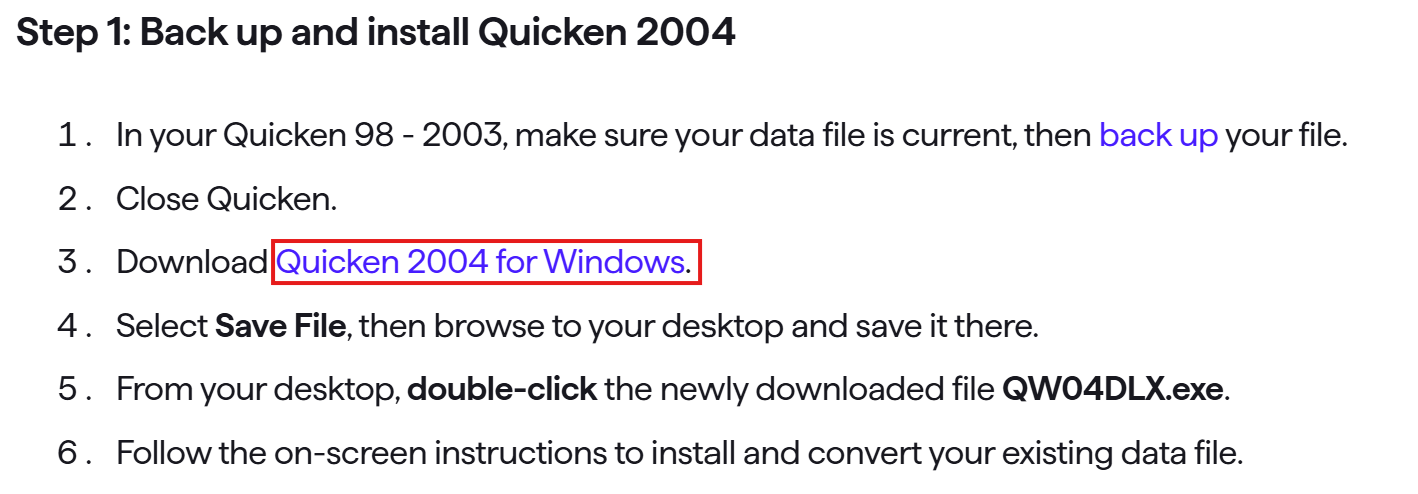
- Sélectionnez Enregistrer le fichier, puis choisissez le bureau comme emplacement de sauvegarde.
- Depuis le bureau, double-cliquez sur le fichier téléchargé QW04DLX.exe.
- Suivez les instructions à l’écran pour installer Quicken 2004 et convertir votre fichier de données existant.
Étape 2 : Sauvegarder et installer Quicken 2013
- Sauvegardez votre fichier de données dans Quicken 2004.
- Fermez Quicken.
- Téléchargez Quicken 2013 pour Windows depuis l’article de support.
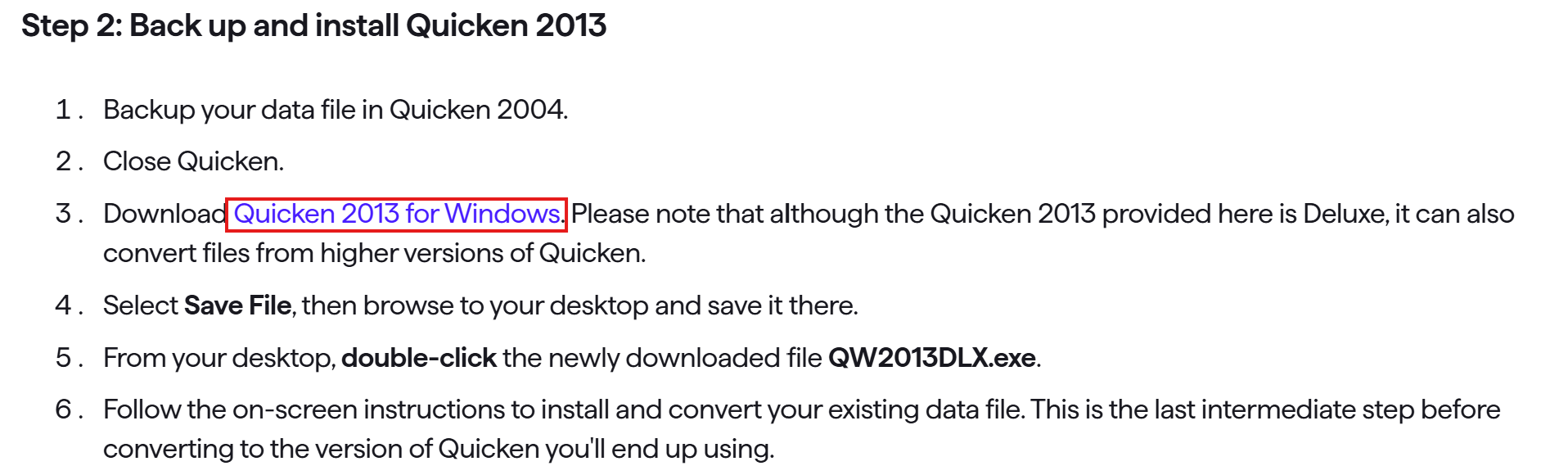 (Remarque : bien que la version fournie soit Deluxe, elle peut aussi convertir des fichiers provenant de versions supérieures de Quicken.)
 - Sélectionnez Enregistrer le fichier, puis choisissez le bureau comme emplacement de sauvegarde.
- Depuis le bureau, double-cliquez sur le fichier téléchargé QW2013DLX.exe.
- Suivez les instructions à l’écran pour installer Quicken 2013 et convertir votre fichier de données existant. Ceci est la dernière étape intermédiaire avant de passer à votre version finale de Quicken.
Étape 3 : Installer votre version actuelle de Quicken
- Sauvegardez votre fichier de données dans Quicken 2013.
- Fermez Quicken.
- Installez votre version actuelle de Quicken pour Windows.
Nous espérons que ces instructions vous aideront à débloquer la situation. N’hésitez pas à revenir vers nous si vous avez d’autres questions ou besoin d’assistance supplémentaire.
——English Translation:
Hello @PIERREPAUL,
Thank you for reaching out.
Yes, you will need to first convert your Quicken 98 file to Quicken 2004 before transferring it to Quicken 2013.
You can download Quicken 2004 from this support article (the instructions are in English, as we do not have a French article).
Context and instructions:
Quicken 2004 has been tested and will install on Windows 7, 8, and 8.1 (32- or 64-bit) to perform the conversion from Quicken 98–2003. It has not been tested on Windows 10 or 11.Here are the relevant steps to convert your file from Quicken 98 to Quicken 2004:
Step 1: Back up and install Quicken 2004
- In Quicken 98–2003, make sure your data file is current, then back it up.
- Close Quicken.
- Download Quicken 2004 for Windows from the article.
- Select Save File, then choose your desktop as the save location.
- From your desktop, double-click the downloaded file QW04DLX.exe.
- Follow the on-screen instructions to install Quicken 2004 and convert your existing data file.
Step 2: Back up and install Quicken 2013
- Back up your data file in Quicken 2004.
- Close Quicken.
- Download Quicken 2013 for Windows from the support article. (Note: although the provided version is Deluxe, it can also convert files from higher versions of Quicken.)
- Select Save File, then choose your desktop as the save location.
- From your desktop, double-click the downloaded file QW2013DLX.exe.
- Follow the on-screen instructions to install Quicken 2013 and convert your existing data file. This is the last intermediate step before converting to your final version of Quicken.
Step 3: Install your current version of Quicken
- Back up your data file in Quicken 2013.
- Close Quicken.
- Install your current version of Quicken for Windows.
After completing this, you can continue with the conversion to Quicken 2013 and finally to your current version.
We hope these instructions help you get unstuck. Please don’t hesitate to reach out if you have further questions or need additional assistance.
-Quicken Anja
Make sure to sign up for the email digest to see a round up of your top posts.0 -
Bonjour à nouveau,
Nous n’avons pas eu de vos nouvelles depuis un moment. Avez-vous toujours besoin d’aide?
Merci!
——
English translation:
Hello again,
We haven't heard back from you in a while. Do you still need assistance?
Thank you!
-Quicken Anja
Make sure to sign up for the email digest to see a round up of your top posts.0
