Error FPD-106 linked to PAHO Federal Credit Union

Good morning,
PAHO FCU has recently upgraded its website. I need to reset the link for my accounts to download transactions. I have followed the steps to disconnect and reconnect the account but continue receiving log on errors. It might be that the Quicken link provided in the list of financial institutions is incorrect. Appreciate any advice to resolve this.
Comments
-
Hello @Pvaubois,
Thank you for providing the details. This error typically occurs when the bank has changed the account name on their website or switched to a new account (for example, due to lost or stolen accounts).
We'd recommend reviewing this support article for FDP-106 for more information, and following the troubleshooting instructions as outlined below:
Step 1: Deactivate the account(s)
- Go to the Accounts menu and choose Hide and Show Accounts.
- Uncheck any accounts with this specific financial institution (FI) that are hidden in Lists.
- When complete, click on the account name for your account(s) in the Accounts toolbar in Quicken.
- Click the Settings icon in the bottom right corner of the screen.
- Select the Downloads tab.
- Click on Disconnect Account.
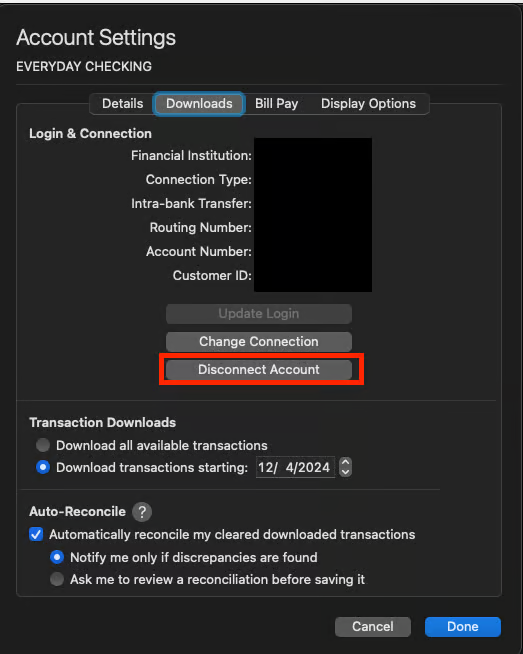
- Click Done. Do this on each account with this FI.
- Quit Quicken.
Step 2: Reactivate and link the account(s)
- Reopen Quicken.
- Go to Accounts > Add Account.
- Type the name of the financial institution, make the appropriate selection, then click Continue.
- Enter your login credentials and click Continue.
- When Quicken has returned all accounts discovered for this FI, very carefully LINK each of the found accounts to the appropriate account you already have set up in Quicken.
NOTE: This process will download 90 to 200 days of transactions, depending on your bank. If you find duplicate transactions in your account(s), you can delete these transactions from the account register.
However, since you mentioned that you have already followed these instructions, and the issue persists, the next step would be to please contact Quicken Support for further assistance. Our support agents will likely need to collect and review your log files, and escalate this further if needed.
Thank you!
-Quicken Anja
Make sure to sign up for the email digest to see a round up of your top posts.0 -
Hello again,
We haven't heard back from you in a while. Do you still need assistance?
Were you able to give the steps above a try, or contact Support?Thank you!
-Quicken Anja
Make sure to sign up for the email digest to see a round up of your top posts.0
