Tutorial for setting up a "Lending Loan" account? (reminders and deferred payments)

I'm loaning someone money. I see that I can create an Asset account, and convert it to a "Lending Loan", but the subsequent wizard is confusing me.
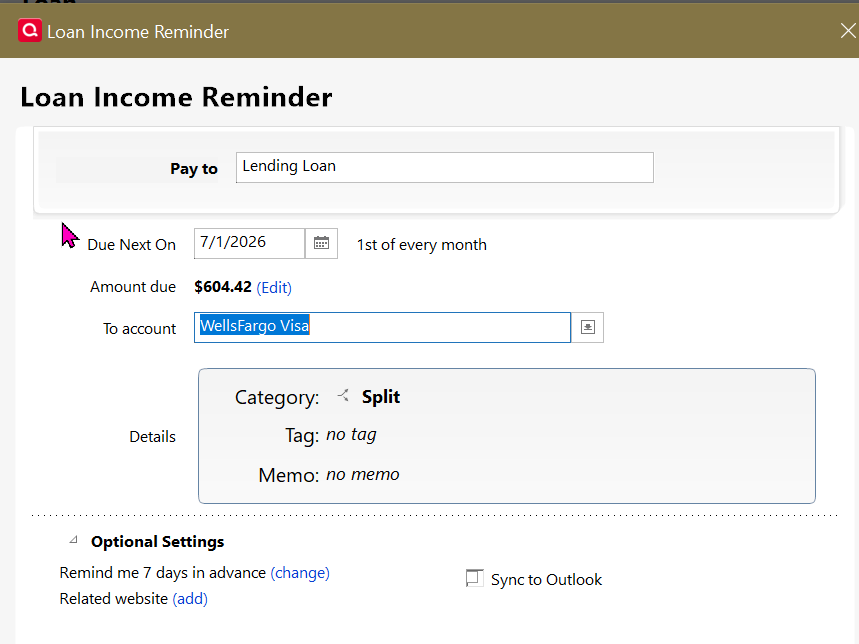
First (or last) is the reminder. It has a "To account" which doesnt offer the new loan/asset account in the list. (screenshot below) The 'split' however seems to look OK. Do I just pick any account and pretty much ignore that (letting the split do it's work)? Or is that the account into which I plan to deposit payments from the borrower?
Second, and perhaps bigger question: How would I set this up with the first few payments deferred? Loan is $20K at 5% funded on April 1st. First of 36 equal monthly payments due on July 1, with accrued interest. The loan will be fully paid off by June 1st, 2029. Here's the first bit of the payment table to illustrate:
Amortization Schedule: April 2026 - June 2029
Date | Payment | Interest | Principal | Remaining Balance |
|---|---|---|---|---|
Apr 1, 2026 | - | - | - | $20,000.00 |
May 1, 2026 | $0.00 | $83.33 | $0.00 | $20,083.33 |
Jun 1, 2026 | $0.00 | $83.68 | $0.00 | $20,167.01 |
Jul 1, 2026 (Pmt 1) | **$604.42** | $84.03 | $520.39 | $19,646.62 |
Aug 1, 2026 | $604.42 | $81.86 | $522.56 | $19,124.06 |
Sep 1, 2026 | $604.42 | $79.68 | $524.74 | $18,599.32 |
Should I set up 39 payments, and "skip" the first 3, or 36 payments starting July 1? Should I just make manual entries the first few months to adjust the "remaining balance" as shown in the table? Other suggestions?
Many thanks,
Quicken Classic Business & Personal (R66.28) on Win10 (with ELS)
Comments
-
My wife & I made a loan to her terribly negligent son. We just track the amortization in a spreadsheet because he's so inattentive to making the payments. In fact, because we demanded and are holding collateral, we're almost ready to declare the loan in default, write-it off and confiscate the collateral.
In your case, I'd be inclined to just record those 1st 2 payments manually … and start the Loan Wizard a/o 7/1, as you've shown and as you calculated the payment.
Q user since February, 1990. DOS Version 4
Now running Quicken Windows Subscription, Business & Personal
Retired "Certified Information Systems Auditor" & Bank Audit VP1 -
Thanks @NotACPA ! After seeing your comments, I'm thinking of just waiving interest for the first couple months, and start it at July 1. Seems simpler, and it's just that much less "interest income" I have to worry about on my own taxes. Reduces borrower's payments to $599.42 so I'm sure they'd be happy to see that.
But, if someone has an idea how to set up this Lender's note in order to match the terms already agreed to by both parties, please chime in!
0 -
How about setting up this loan as if it was an interest-only loan with a balloon payment at the end, with a $0.00 total payment.
Let interest accrue for the first two payments.
After the 6/1 payment was recorded, update the loan to a $604.42 total monthly payment and let Quicken recalculate the payment schedule. That should do what you were looking for.1 -
@Patrick Larkin I'm not aware of any way to "defer payments, yet still accrue interest" in the Loan Wizard other than recording those deferred interest accruals manually, and starting the loan on 7/1.
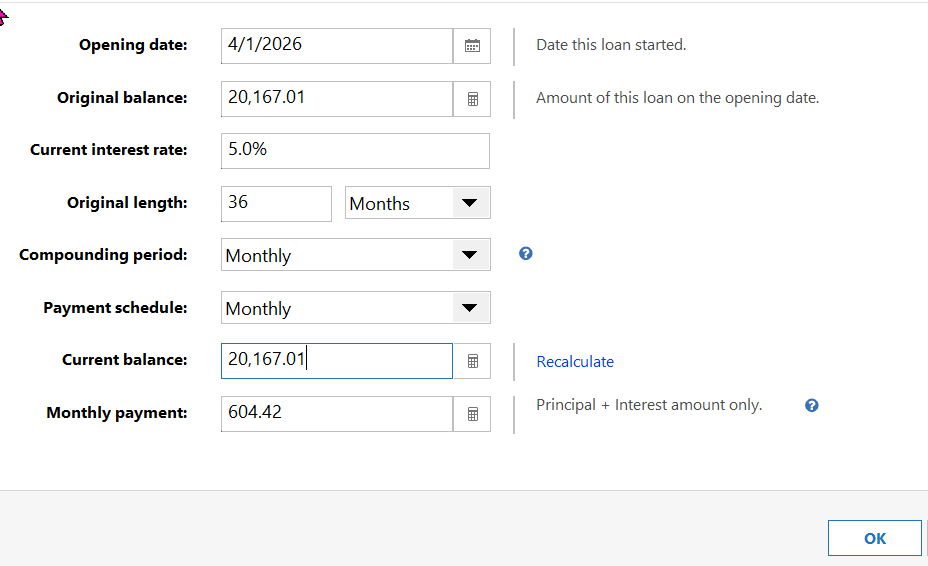
If you manually post those 1st 2 interest accruals, possibly using either _IntInc (or a special income category that you create) it will work. Just show the initial loan amount, in the Wizard, as $20,167.01 as you've apparently already done to achieve the "Amount Due" that you're showing in the Loan Income Reminder.
And, as I understand it, there are 36 payments due on the loan even though it's for 39 months.
Q user since February, 1990. DOS Version 4
Now running Quicken Windows Subscription, Business & Personal
Retired "Certified Information Systems Auditor" & Bank Audit VP1 -
Thank you both. You inspired me. Here's how I ended up doing it:
First, create an asset account, and code the $20,000 check to that account. Next convert it to a lending loan. In the terms, set it like this:
On the next screen, set the first payment as July 1st.
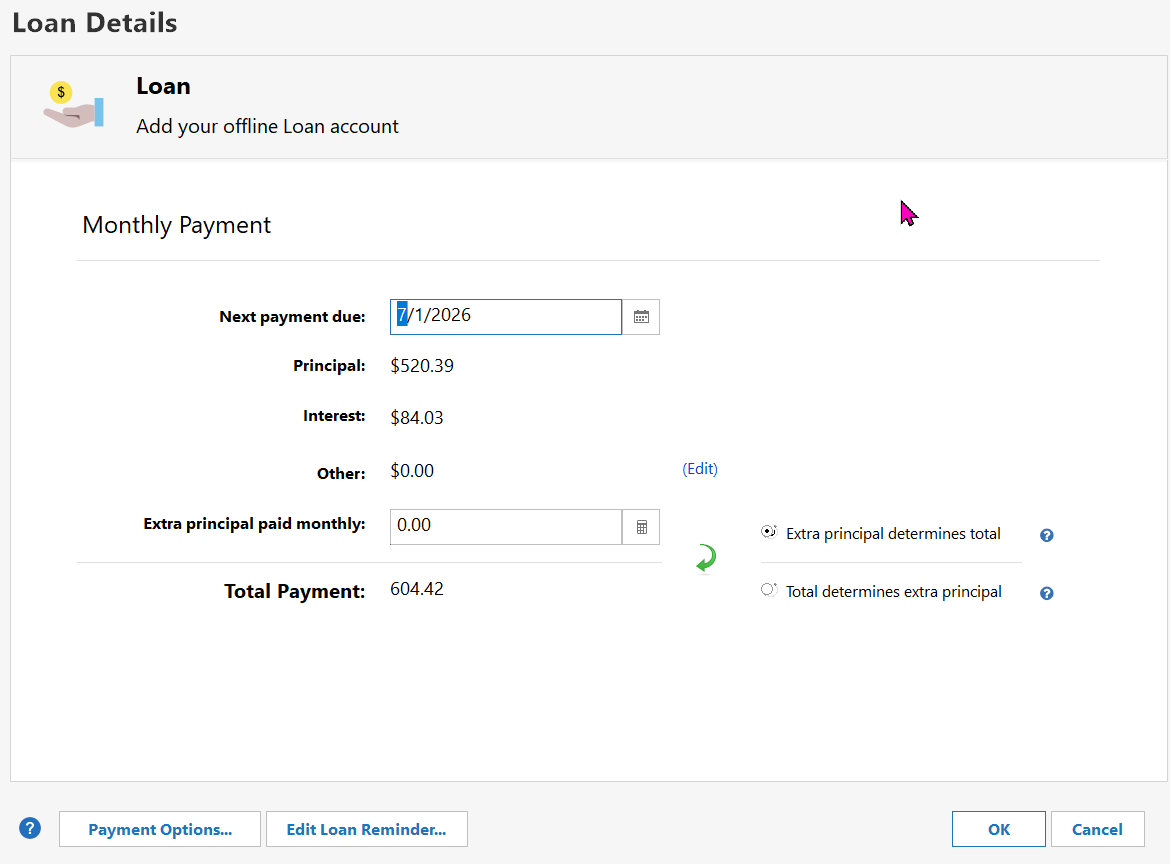
As a result, in the "Payment Details" screen of the loan, you'll see 3 transactions: +$20,000 from the initial check, an Opening Balance increase of $20,167.01, and a balance adjustment decrease of $20,000. I checked my future reminders and they are there for July 1, Aug 1, Sept 1, etc. I do notice that the split in August and later reminders is the same has July 1st with $520.39 to principal and 84.03 to Interest. I have to assume those will auto-adjust over time to reflect the breakdown in the loan schedule:
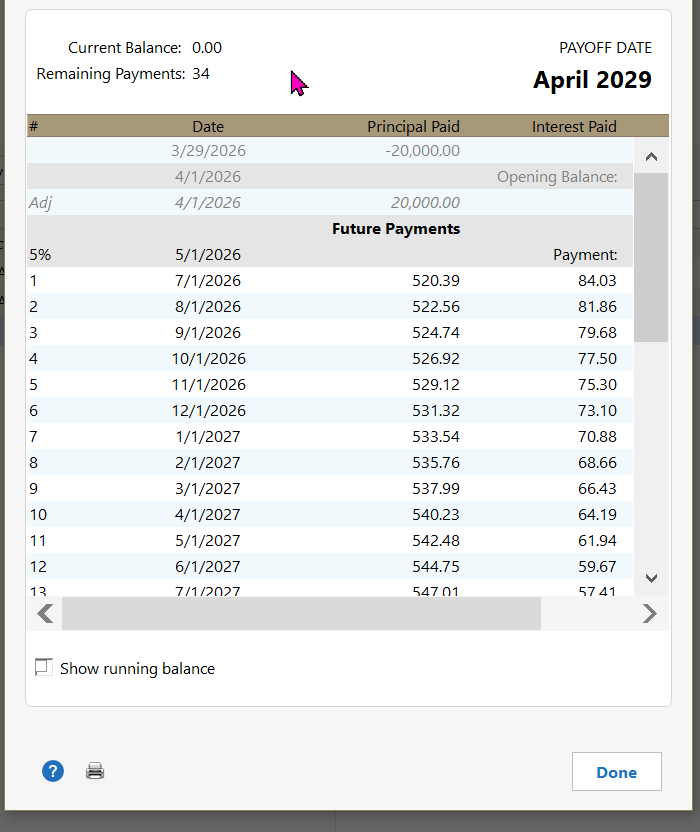
This leaves a balloon payment on April 1, 2029 of $1805.89. At that time, we'll figure out how to record the remaining payments, if there actually is a remaining balance, or the borrower hasn't defaulted.
0 -
In the "Loan Details", yes the amounts will auto-adjust as payments are made.
BUT, I'm uncertain what's going to happen in 3 years when the 36 months are concluded but there's more payments to be made … since it's actually a 39 month loan amortized over 36 months.
I'm also uncomfortable about that "Remaining Payments: 34" when no payments have been made.
Have you scrolled to the bottom of that 3rd graphic to make sure of events in those final months?
Q user since February, 1990. DOS Version 4
Now running Quicken Windows Subscription, Business & Personal
Retired "Certified Information Systems Auditor" & Bank Audit VP0

