Income reports that include Sub-Categories?

I am new to Quicken. I have a consulting business that is a single-member LLC, so just filing on a Schedule C. I am trying to run a report in Quicken to show income by month. I want to include subcategories to break out each of my clients. How do I do that? I am running the Business & Personal subscription in Quicken Classic.
Answers
-
Hi @JDW in ATL,
Thank you for reaching out! I’d be happy to help.
A Spending by Categories report will show your categories and sub-categories. Here’s how to create and customize it:
Steps to create a Spending by Categories report:
- Go to Reports → Spending → By Categories.
- Click Customize in the upper-right corner of the report.
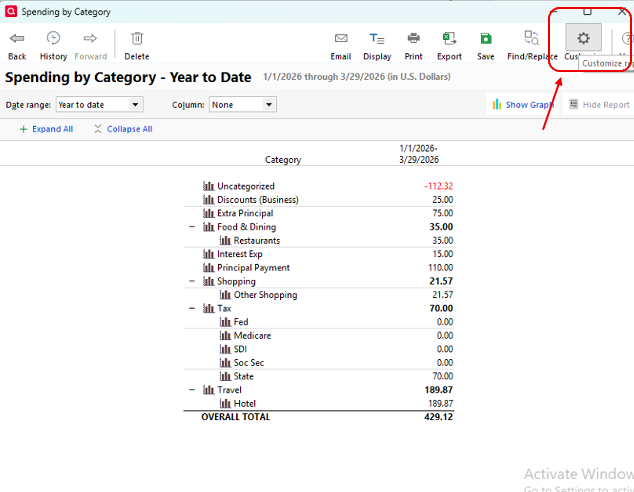
Steps to customize the report:
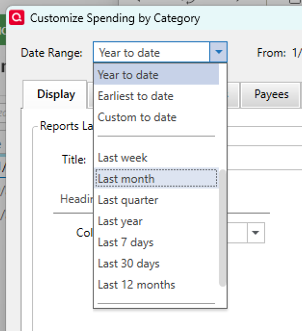
- Select your desired date range.
- Go to the Categories tab.
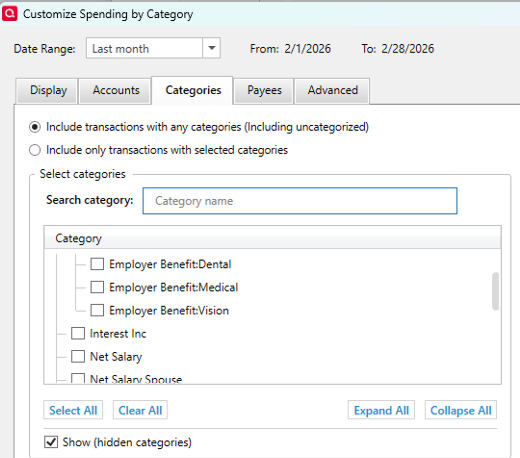
- Clear all categories, then select only the income categories you want to include.
You can also explore other spending reports to see which one best fits your needs.
I hope this helps!
Quicken Laura
Make sure to sign up for the email digest to see a round up of your top posts.
0 -
Oh, I found it. The subaccounts were not designated as Schedule C.
0 -
@JDW in ATL Great news!
If you have additional questions, please let me know.
Quicken Laura
Make sure to sign up for the email digest to see a round up of your top posts.
0
