Deposits not shown in register

CCOHughes
Quicken Windows 2017 Member
All of a sudden, my register does not show deposits. I have changed nothing, and my register preferences still indicate to show deposits. What happened and how to fix it? I tried using the chat, but it says to "reset." That "reset" does not appear anywhere.
[Edited Readability]
Tagged:
0
Answers
-
Hi @CCOHughes,
Thank you for reaching out! It sounds like the chat support was referring to the Reset button in the filters menu at the top of the register.
Steps to review your account register:
- Click the Reset button at the top of the register to ensure no filters are applied.
- Confirm that the Sort Order is set to Date by clicking the top of the Date column.
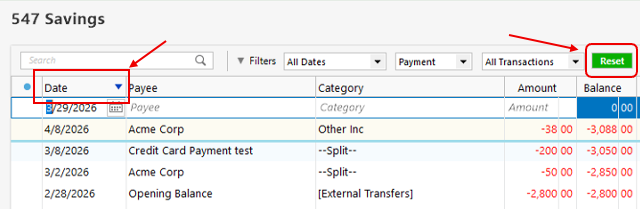
It’s likely that your transactions are in the register; they may just be displayed in a different order than expected.
Please let me know if that works!
Quicken Laura
Make sure to sign up for the email digest to see a round up of your top posts.
0

Categories
- All Categories
- 6 Product Ideas
- 34 Announcements
- 249 Alerts, Online Banking & Known Product Issues
- 19 Product Alerts
- 266 Welcome to the Community!
- 301 Before you Buy
- 1.5K Product Ideas
- 55.8K Quicken Classic for Windows
- 16.9K Quicken Classic for Mac
- 1K Quicken Mobile
- 834 Quicken on the Web
- 129 Quicken LifeHub