Barclays Credit Card - Account Access and Download

Started last week… Got connection / download error when doing One Step Update for my Barclays Credit Card account. Tried to fix it / reactivate and it takes me to login screen and when I enter userid and password, I get the CC-503 error that says my login ID and / or password are incorrect. I logged on manually to the Barclays site with my credentials successfully and can manually download into Quicken my transactions, but still can't re-set up Web Connect. Tried changing userid and password on Barclays site and then using that in Quicken, but same errors. Something tells me that it's an issue on the Barclays end but nothing communicated. Help? Thanks!
Comments
-
Hello @wyosafat,
Thank you for letting us know you're seeing this issue. To troubleshoot, since you've already done many of the recommended steps, please backup your file and follow these steps from our article on CC-503 errors:
Try Deactivating and Reactivating the affected accounts:
- Choose Tools > Account List.
- Click the Edit button next to the account you want to change the login ID for.
- In the Account Details window, click the Online Services tab.
- Click Deactivate, and then click Yes to deactivate online services.
- Click Yes again, if necessary, to confirm your choice.
- Repeat these steps to deactivate all accounts at this same bank.
- Navigate to Tools>Add Account.
- Select the financial institution and follow the on-screen prompts to activate your account.
- Make sure to carefully link the accounts to the correct nickname in Quicken.
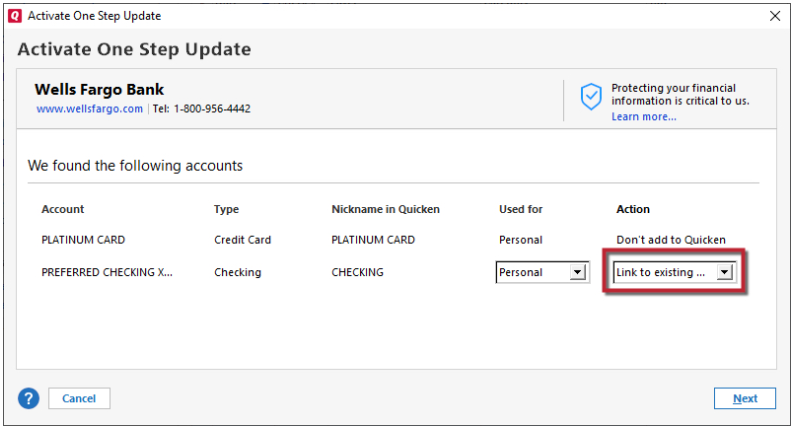
Please let me know how it goes!
Quicken Kristina
Make sure to sign up for the email digest to see a round up of your top posts.
0
