America First Credit Union - OL-295-A [Edited]
Comments
-
Hi @clufster,
Thank you for sharing the updated error message. I recommend waiting 24 hours before attempting to reconnect your accounts. Before doing so, please confirm that you’re able to sign in to your bank’s website using the same credentials.
If your password includes any of the following special characters: ampersand (&), left angle bracket (<), right angle bracket (>), backslash (\), or forward slash (/), please update it, then try connecting your accounts in Quicken again.
If the issue continues, I suggest reaching out to Quicken Support for further assistance. They can guide you through troubleshooting steps in real time or escalate the issue if necessary.
Please don’t hesitate to reach out if you have any additional questions.
Quicken Laura
Make sure to sign up for the email digest to see a round up of your top posts.
0 -
Since February I have been experiencing this same problem. I have Version R66.28 and Build 27.1.66.28. Every time I try to download my transactions from America First Credit Union, I get error OL-295-A. I have followed this thread for the last couple weeks, and I've tried all of the solutions proposed, but none have worked. I am convinced this is a problem that Quicken needs to work out with American First Credit Union. The main reason I continue to pay an annual subscription fee for Quicken software is for this ability to automatically download transactions into my Quicken software. Without this functionality, the Quicken software is not worth the price of the subscription. Quicken - when are you going to get this fixed?
0 -
Hi @QuickenUserSince1999,
Thank you for your response. We completely understand how frustrating this situation can be.Our team is actively working to resolve the issue as quickly as possible. While we don’t have an estimated timeframe.
We appreciate your patience and understanding as we work through this.Thank you!
Quicken Carlos
Make sure to sign up for the email digest to see a round up of your top posts.
0 -
Almost a month since posting about this problem, and all we have gotten is lip service with no solution in sight. None of the responses to our comments have worked, and you have no time frame for a solution.
[Removed-Rant]
0 -
Well, the problem has not gone away or been fixed. Tried again to setup a New Quicken File to connect with America First. Tried both Express Web and Direct Connect. Both failed immediatly. No error code just a message that said it was having a problem connecting. I was getting a CC-502 on my original Quicken file which is a Direct Connect. Have already deactivated and switch to Express Web on existing file.
[Removed-Rant]0 -
Hi @Terry520,
Thanks for joining this thread. We currently have an alert open for this error, FDP-102/CC-502. I recommend monitoring the alert, as it will be updated when new information becomes available.
Quicken Carlos
Make sure to sign up for the email digest to see a round up of your top posts.
0 -
I have tried multiple times to Deactivate and Reconnect Online Services only to encounter another problem.
Under the Link to Existing Account option, the appropriate accounts are not in the list for me to choose from.
If I can't Link to and existing account, then Quicken will create a new account, and all previous data is lost. (I know this from prior experience).
Why does Quicken not list the correct account options to link to?
0 -
Hi @clufster,
Thanks for reaching out to the Quicken Community and for bringing this to our attention!
Before starting any troubleshooting, we recommend creating a backup of your file.
Next, please check the Account List to confirm whether the accounts were properly deactivated. Here’s how:
- Go to Tools > Account List
- Locate the accounts you want to link to an existing account
- Click Edit next to the account name
- Select the Online Services tab
- If available, click Deactivate
- Click OK

After that, try reconnecting the accounts again.
If you continue to experience the issue during the Add Account process, review each account carefully and check the action being assigned. Make sure the accounts are not being linked to the wrong existing account. If they are, select a different account or choose Add to Quicken. Then, return to the account you’re trying to link and select the correct one.
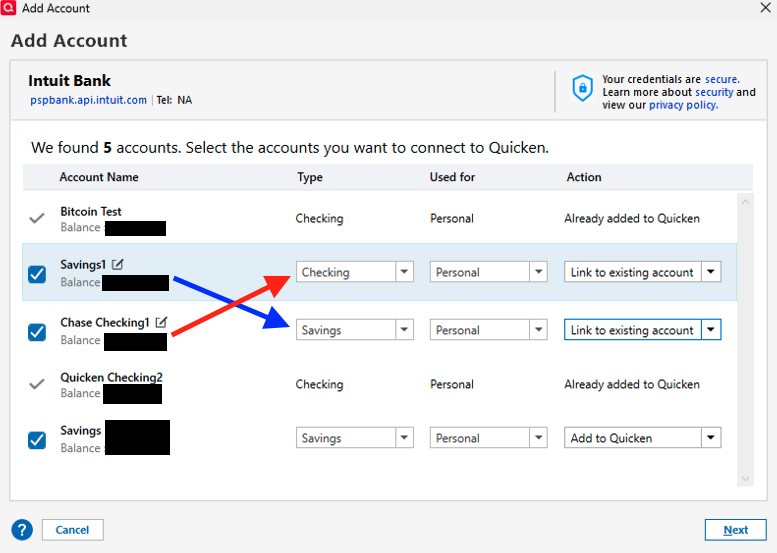
I hope this helps. Let me know how it goes!
Quicken Carlos
Make sure to sign up for the email digest to see a round up of your top posts.
-1 -
[Removed-Rant]
You are creating needless work for people. This issue has been going on for over a month, and no one seems to be solving it.It is hit or miss if the downloading works for me day to day.
[Removed-Disruptive]
1 -
Carlos,
I don't think you understood my question. The account types line up ok. It's the Link to Existing Account that is not working (after deactivating and reactivating). The Existing Account list does not show the corresponding existing account I have already established. This is true for 8 out of 9 accounts I have with AFCU.
I can't tell you how many dozens of times I've tried to reactivate online connection with AFCU in the last 6 weeks, but the frustration level I have with Quicken is beyond description. And judging from the litany of comments on this thread, others feel the same way.
Quicken owes its loyal customers an extended explanation and renumeration for fees charged for a non-functional product. I have used Quicken for almost 30 years and have never been this angry and dissatisfied.
If no solution is in sight, then might I suggest suspending your monthly fees until you provide a solution if you don't want customers moving on to a service that actually works and is easy to use.
In addition to the topic of this thread, I have noticed a progressive slowing (not due to WiFi connection speed) of everything, from downloading transactions, online quotes, and backing up online when closing the program.
Right now my satisfaction with your product rates a 1 out of 10.
3 -
Hi @clufster,
I’m really sorry you’re running into this issue. I understand how frustrating it must be, especially when some accounts are working while others are not connecting properly.
After checking on our end, I can see that one account is connecting successfully, while others are returning an error or not connecting at all.
To help us narrow this down, could you please let me know:
- Do you have more than one login for America First Credit Union?
- If so, is the issue happening with a specific group of accounts tied to one set of credentials?
- Are you seeing any error message or error code when you try to update the accounts? If yes, please share the exact details.
Once I have this information, I’ll be able to look into this further and assist you more effectively.
Quicken Laura
Make sure to sign up for the email digest to see a round up of your top posts.
0 -
I have 2 AFCU accounts, personal and business, each with checking, savings, money market savings, lines of credit, credit cards, a home equity loan, and a CD.
On the personal accounts, only my current checking account is on the list of accounts I can Add to Existing. None of the other accounts are listed on Add to Existing, so I cannot reset them.
On the business accounts, none of the existing accounts are listed in Add to Existing.
Attached is a screenshot today of the error messages for One Step Update.
When I tried to Deactivate my personal accounts this evening, the pop up window locks up the screen and I cannot select the OK button. I have to CTRL-ALT-DELETE, End the program and relaunch Quicken. I cannot get a screen shot of this window.
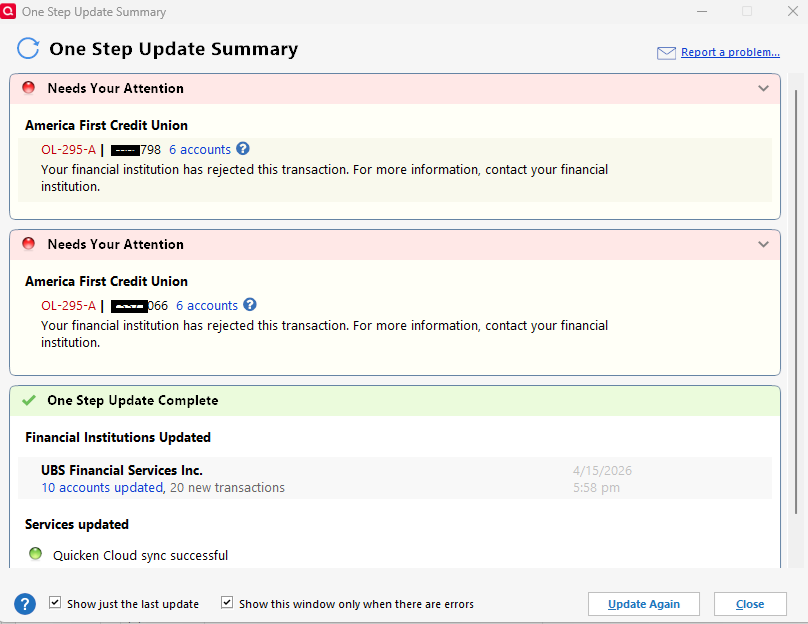 0
0 -
…. continued from above:
After relaunching Quicken, I reactivated my personal accounts. This time, I only had to Link to Existing my checking account, which appeared in the list. The other accounts now showed, Already Linked.
So then I tried the same process with my business accounts. Once again, I was able to link my checking account, but all the other accounts couldn't be reactivated because they were not listed in the Link to Existing choices.
I closed Quicken, and re-updated my personal accounts successfully. If history repeats itself, within a day or two I can expect an error message similar to that screen shot above.
Repeating this process, I re-updated my business (checking only) account successfully. I still cannot update the other business accounts.
0 -
… and just as I predicted, this morning, not 12 hours later, the same OL-295A error shows up for both accounts again!
1 -
Hi @clufster,
Thank you for outlining all the steps you’ve taken to troubleshoot the issue; this is very helpful.
The OL-295-A error is a known issue that our team is currently investigating, which is why you may still be encountering it.
I’ll be sure to keep you updated as soon as any new information or progress becomes available.
[CTP-16670]
Quicken Laura
Make sure to sign up for the email digest to see a round up of your top posts.
1 -
I'm here to chime in that I'm also experiencing the intermittent OL-295-A errors via OSU to America First CU. It's broken far more often than working, and this is becoming a big problem for me.
I suspect that this is something on the AFCU side which is broken, since all other financial institutions are working. If this is the case, the Quicken support staff need to tell us, so that we can push on America First to address it.
0 -
I am still getting the error on and off. I try at different times during the day and usually can get one successful among many OL-295-A errors.
This morning I got an odd error when I even tried to go to the website. I was being blocked by their CloudFlare. I had to call in and get them to clear me. They tried to suggest I was on VPN or didn't have cache cleared but that was not the case. I am now suspecting they have some mal-configured firewall that may be blocking Quicken and even users.
1 -
Both my accounts synced yesterday for the first time in over a week. Today, OL-301-A. I use Quicken because it's a timesaver, but certainly isn't if I run it and still need to sign into my accounts online to reconcile transactions.😕 All my accounts at other financial institutions are updating like they should. Version R66.28, Build 27-1.66.28, Windows 11
0 -
Quicken Laura,
It is quite frustrating to hear you reiterate the same thing your associates have been echoing for the last 6 weeks, that "you are aware of it, and looking into it."
This thread has been going on and on with Quicken customers repeating similar connection issues involving AFCU account update failures, yet every one of you keep offering platitudes that are worthless. Not one of you have said exactly what you are doing to rectify this issue.
You simply are stringing along your customers, ostensibly to keep up from discontinuing our subscriptions to Quicken. What it appears to us is that you have no idea how to fix this problem and no one is doing a thing about it.
Who exactly in your organization have you escalated this issue to?
What conversations have you had with America First Credit Union?
Why are you not being transparent with your loyal clients?
Do you honestly think your platitudes are effective in giving us some hope or are you just a mouthpiece for a company that doesn't give a cr&p about it's clients?
0 -
Today (4/18), for the first time in a long time, I experienced the OL-295-A error while trying to update my America First Credit Union (AFCU) accounts. I typically do a OSU for all my Quicken accounts weekly and I experienced no issues recently with AFCU prior to today. After reading all the above posts, I'll wait for 24 hours before trying again to update my AFCU accounts. Will post here if successful/unsuccessful along with any other pertinent info.
UPDATE: I decided to not wait a full 24 hours and tried another update on my 2 Quicken AFCU accounts after a few hours. My first attempt at 5:30AM MST resulted in an UNSUCCESSFUL online update of my primary AFCU Quicken account which contains 5 individual AFCU accounts (checking, savings, HELOC, overdraft, credit card) and my secondary AFCU Quicken account which has 1 acccount (savings). FYI I did not make any changes to my AFCU accounts in Quicken (deactivate, reactivate, reset, etc.) after the failed first attempt to update.
At 11:00AM MST (5-1/2 hours after the first failed updates) I tried to update both accounts again. This time, the primary AFCU Quicken account updated successfully while the secondary Quicken AFCU account still resulted in a OL-295-A error.
Certainly it appears the AFCU servers are perhaps randomly rejecting Quicken's attempt to update the accounts. I'll make another attempt later today to update the 1 still-failed AFCU Quicken account and report back if it is successful or not (FYI).
UPDATE #2: Waited 2 hours and attempted another update on the 1 remaining failed AFCU Quicken account. It updated successfully this time.
Since nothing has changed on my end, it has to be something with the AFCU servers that Quicken has access to. I have to echo proudfit's comment below - Let's get this fixed, folks (AFCU & Quicken)!
0 -
Just want to mention that this issue is still open. It has been on and off for a week or two, occasionally working, but mostly off. Let's get this fixed, folks! Your goto response seems to be disconnect/reconnect accounts, but that's not really a viable solution. It takes lots of time, is error prone, and does not solve the problem. The mobile app also will not connect with Am 1st.
0 -
It would seem that Quicken team could get together with America First team to identify the cause of the connection and updating problems. I did notice that two of my accounts that have only a couple of CD's seem to connect and update. The two accounts having issues have many CD's, could it be a timeout issue? Just thinking out loud.
0 -
Hello everyone,
Thank you for taking the time to report this issue and share your experiences. Our team is actively working with America First Credit Union to resolve the matter. At this time, we are awaiting updates on their end, and while we do not yet have an estimated completion timeline, I will keep you informed as soon as new information becomes available.
In the meantime, if you notice any changes or improvements on your end, we would greatly appreciate your sharing those updates with us.
Please don’t hesitate to reach out if you have any additional questions or concerns.
(CTP-16670)
Quicken Laura
Make sure to sign up for the email digest to see a round up of your top posts.
0 -
I have been able to sync for the past couple of days with no issue. Hopefully they have found the problem.
0 -
Hi @JedWare,
I’m glad to hear it is working for you!
Please continue to monitor how the connection goes. As we mentioned previously, this issue is still under investigation, and we are awaiting further updates. As soon as new information becomes available, we will provide additional details.
Quicken Carlos
Make sure to sign up for the email digest to see a round up of your top posts.
0




