Reauthorization dialog I've not seen before

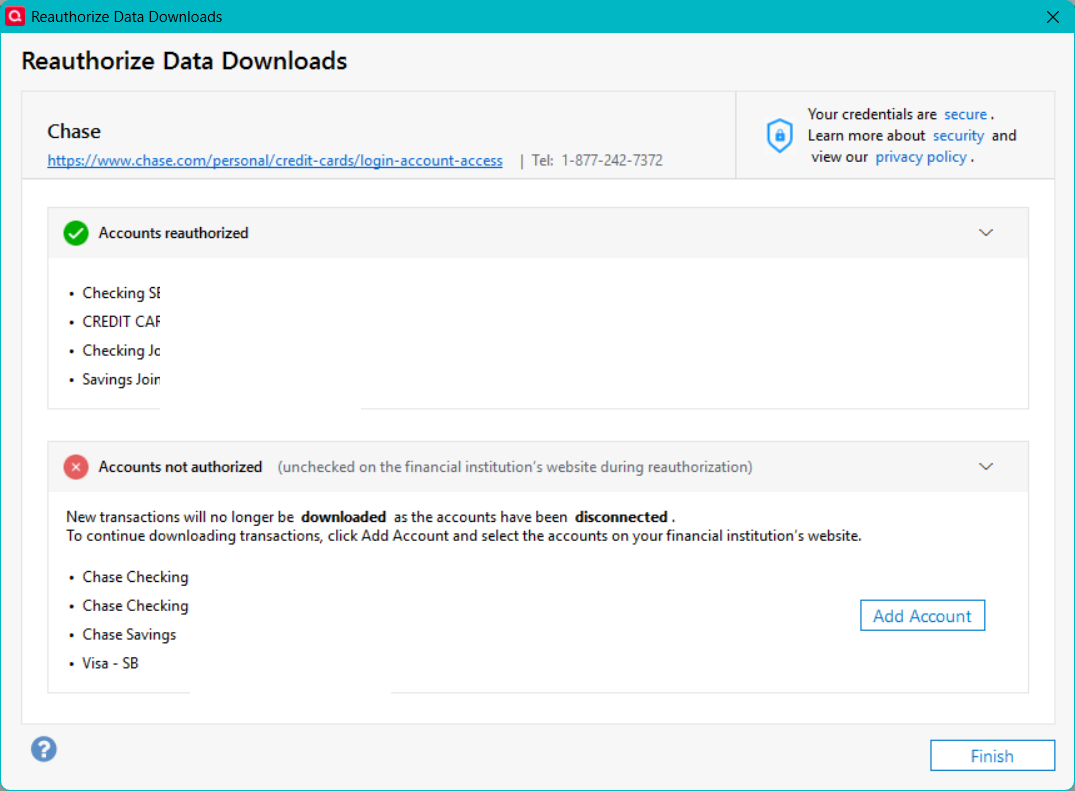
I got this when I came back from reauthorizing my accounts on the Chase website. The accounts on the top part of the screen are the accounts as they are listed on the Chase website. The accounts on the bottom half are the accounts as they are listed in Quicken. The thing is, they are the same accounts. When I click "Finish" none of the Chase accounts are set up for download so I have to "add" the accounts again to set up download. When I do this, I don't get this screen again. So far.
Is this because the accounts are not named the same on Chase as they are in Quicken? If so, is this naming restriction new? It used to work just fine.
[Edited - Removed partial account numbers]
Answers
-
Hi @Gerry Blue,
Thank you for reaching out to the Quicken Community!
Before following any troubleshooting steps, I recommend creating a backup file.
First, deactivate all accounts with the affected financial institution:
- Open Quicken.
- Select the Tools menu and select Account List....
- Click on Show Hidden Accounts.
- In the Account List, select the account you want to deactivate, and then click Edit.
- In the Account Details window, click the Online Services tab.
- Click Deactivate next to the service you want to disable.

- Click Yes to the message confirming if you want to disable this service.
Next, reactivate the account(s):
- Go to Tools > Add Account.
- Select the bank for the deactivated account(s). If prompted, choose the connection method.
- Enter your credentials and click Connect.
- During the authorization process, make sure all accounts are selected to prevent this issue in the future.
- When the list of located accounts appears, click LINK next to each account you want to reactivate.
- Click Next, then Done on the final prompt.
During the authorization process, make sure all accounts are selected to prevent this issue in the future.
Please let us know how it goes! I’ll be looking forward to your reply.
Quicken Carlos
Make sure to sign up for the email digest to see a round up of your top posts.
0 -
Carlos, thank you for the reply. I did as you recommend and it seems to have worked. For now. For reasons that are not worth going into right now, I have to reauthorize both Chase and Fidelity fairly often. A couple of notes: On the Chase site, I do not check all of the accounts as a couple of them are a family member's accounts and I do not want them in my Quicken file. Also, I've seen the screen I posted above a number of times and it always results in my accounts being deactivated for download. I do not understand what that screen is supposed to accomplish. I'll let you know when it happens again as I'm fairly confident that it will happen again.
Gerry
0 -
Hi @Gerry Blue,
Thanks for your reply and for providing more details about this window. I’m glad to hear it’s working now after following the steps above.
I understand how frustrating this can be, so if the issue comes up again, please don’t hesitate to reach out to us.
Quicken Carlos
Make sure to sign up for the email digest to see a round up of your top posts.
0
