One Step Update (OSU) Hanging (Edited)

Once Again, OSU hangs after running for over an hour. And of course I had to kill Quicken using task manager.
[Edited-Readability]
Quicken Classic - R66.28, Windows 11 PRO current on updates
My data file is NOT being synced nor backed up.
Comments
-
Hi @Greg Brown,
Thank you for taking the time to contact the Quicken Community. I understand how frustrating it can be when One Step Update freezes.
To help us better understand what’s happening, I have a few questions:
- Could you upload a screenshot showing the freeze during One Step Update?
- When did you first notice the issue?
- Have you restored a backup file recently? If so, please let us know the date of the backup you restored.
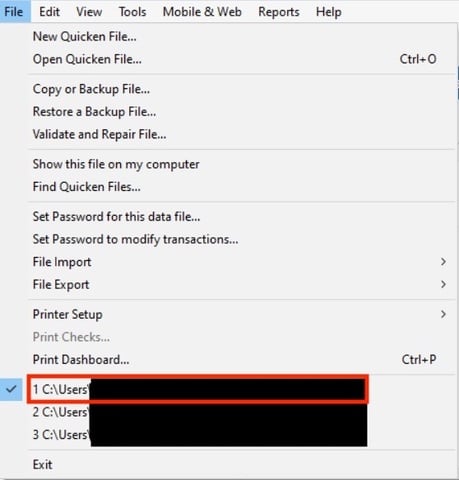
- Could you confirm where your Quicken data file is located? To check, open Quicken and go to File. At the bottom of the menu (just above the Exit option), the file with a checkmark next to it is the one currently open. Please share the full file path shown there.
If you have multiple financial institutions set up, please try updating just one of them and let us know the outcome.
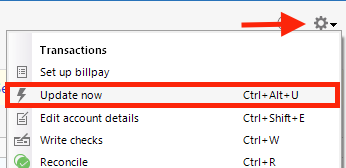
To update only one financial institution, go to an account, click the Gear icon, and select Update Now.
If the issue persists, please send a report to Quicken. We will also need a sanitized version of your file. A sanitized file removes sensitive information, so it is safe to share with Quicken Support.
To send the report, go to Help > Report a Problem.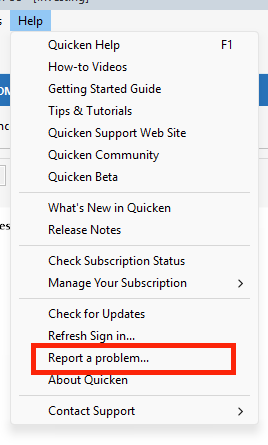
I look forward to your reply.
Quicken Carlos
Make sure to sign up for the email digest to see a round up of your top posts.
0
