When setting up my first Connected Account, Quicken switches to Offline Account

I am a new user of Quicken Classic. From my research, I believe that Quicken could access my bank accounts online, saving me the trouble of downloading transactions and uploading them into Quicken. I read that Quicken could automatically synchronize with my bank accounts once per day. However, when I attempted to set up a new account in Quicken, I was not given the option to connect online. I started in the "Connected Account" tab of the "Add Account" dialogue. I selected my bank (TD Canada Trust) and hit "Next". But the next dialogue boxes specifically states: "Adding your OFFLINE chequing account". A subsequent dialogue instructs me to log in to my online banking, download transactions, and import them into Quicken. I was hoping to avoid that. How can I connect Quicken to access my online bank accounts? The attached PDF file contains screenshots as I step through the dialogues. Thanks for any help in advance.
Comments
-
Hi @Cyclemark,
I’m sorry to hear that you’ve been unable to connect to your accounts. I’d be happy to help.
I just have a couple of questions to better understand the issue:
- What is the bank’s website URL you use to sign in online?
- Have you tried connecting the account using TD Canada Trust instead of TD Canada Trust – Français? The option you’re currently using supports Web Connect only, which requires manual updates.
I look forward to your response!
Quicken Laura
Make sure to sign up for the email digest to see a round up of your top posts.
0 -
Laura — Thank you for your response. For online banking, I normally log onto the bank website at
As the screenshots in the PDF file show, when I enter the text "TD Canada Trust", the only bank that shows up is TD Canada Trust - Francais. It's a bit strange that TD Canada Trust does not pop up right away, even before entering the name. It's one of Canada's top 5 banks. Only 2 of Canada's top 5 banks show up right away, by default: Scotiabank and CIBC. What about the other 3 top banks: Royal Bank, Bank of Montreal, and TD Canada Trust? Why don't they show up?
You said that "the option you’re currently using supports Web Connect only, which requires manual updates". How can I use a different option? How can I use Web Connect Plus or Direct Connect instead?Mark Lewiecki
[Removed personal information]
0 -
Hi @Cyclemark,
Thank you for providing those additional details; they’re very helpful.
It’s interesting that not all available options are appearing. As a workaround, you can try searching for your bank using the direct URL: tdcanadatrust.com.
Before attempting to add the account again, please refresh your sign-in session by following these steps:
- Go to Help > Refresh Sign In
- Complete the login process
Once that’s done, please try adding the account again.
The screen should look similar to the example below:
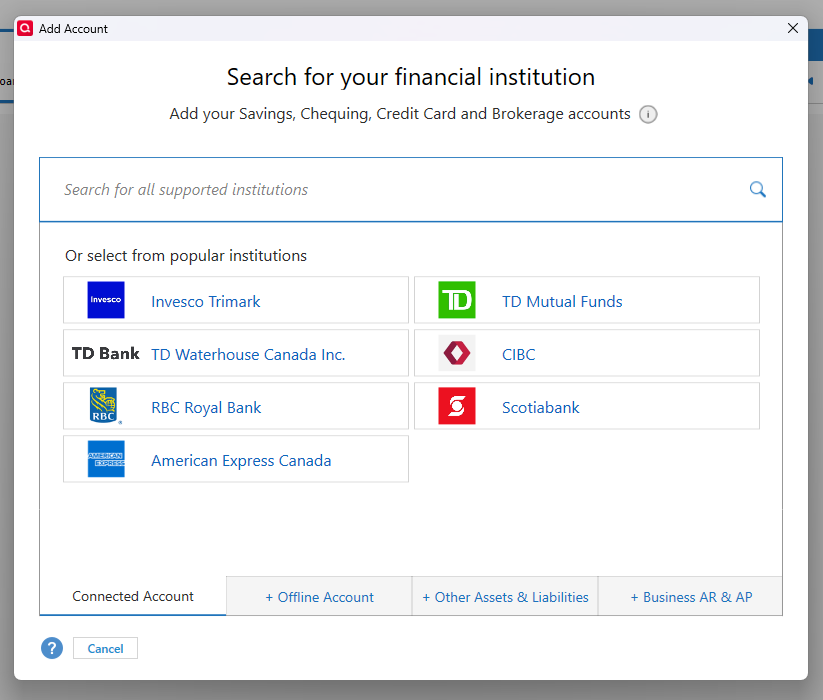
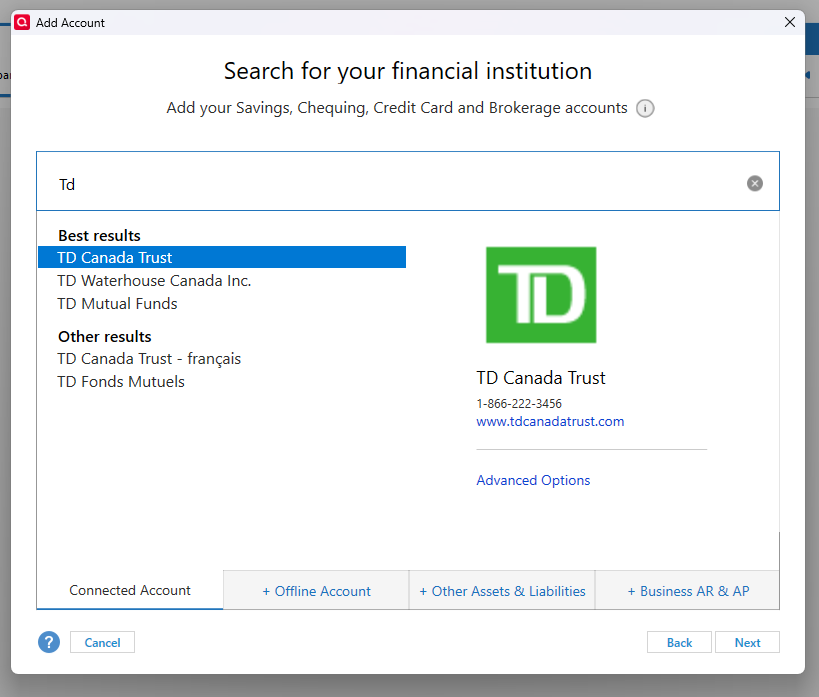
Please let me know how it goes.
Quicken Laura
Make sure to sign up for the email digest to see a round up of your top posts.
0 -
Thanks Laura, much appreciated. Your 2nd screenshot is exactly what I hoped to see. However, when I paste the URL, I get no results. When I type "Td" I get nothing. But if I type "Td[space]", then I see one entry under Other results: "TD Canada Trust — francais". Same result if I enter www.td.com. In both cases, no "Best results" are shown. I don't even mind the francais part. So I highlight it, and click on "Next". But that takes me to a dialogue box titled: "Add your OFFLINE chequing account."
Could it be something in my Windows system? I am NOT on a VPN. Maybe we should have a live session.
I really want to get going on Quicken. But, so far, it's not working for me.
Mark
0 -
Hi @Cyclemark,
After reviewing your subscription tier, it appears the issue may be related to feature availability, as certain options are only available on higher-tier plans.
I recommend contacting Quicken Support directly for further assistance. They can guide you through additional troubleshooting steps in real time and escalate the issue if needed.
You can find the Quicken Support phone number here: Support Home | Quicken (Canadian toll-free: 1-888-311-7276). Phone support is available Monday through Friday, from 5:00 AM PT to 5:00 PM PT.
I apologize that I could not provide a more direct solution, but please don’t hesitate to reach out again if you have any other questions.
Quicken Laura
Make sure to sign up for the email digest to see a round up of your top posts.
0
