American Southwest Credit Union - CC-508 started 3/18/2026

Quicken Classic R66.28 on Windows 11 - transaction download from American Southwest Credit Union (ASCU) has been working fine since June/25 up to 3/17/2026. 3/18/2026 - started receiving CC-508 error. Logging into the institution web site did not show any pop-ups or any other issue that needed attention - pop-ups are enabled for the site in the browser. Account was reset in Quicken and now requires activation of one step update. All attempts to activate one step update result in CC-508.
The only thing I see that is a problem is on the ASCU web site under Security, there is a list of registered devices and there is a device named "Mac OS - Intuit" with a status of "Device Blocked". The only option available for the "device" is to rename it. No option to unblock or to delete.
ASCU Support indicates that since Quicken is a 3rd-party product, there is nothing they can do.
Is anyone else running into a similar problem or have any suggestions on how to get transaction downloads working again?
Comments
-
Hello @ForeverUser,
Thank you for the detailed information.
A CC-508 error typically occurs when the financial institution is presenting something on their website that requires your attention before Quicken can proceed. This can include things like security prompts, terms acceptance, or other pages that must be acknowledged first.
In your case, the “Mac OS - Intuit (Device Blocked)” entry you’re seeing may be related, as it suggests the connection being used for aggregation is being restricted on the bank’s side.
Here are some steps to try per the CC-508 article:
First, refresh your online account information in Quicken
- From your account register, select the Actions gear icon at the upper right of your register (Ctrl + Shift + N).
- Then, select Update now.
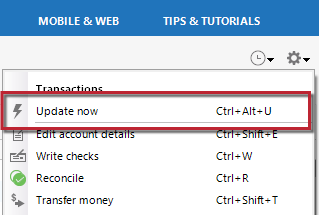
- Follow the on-screen instructions to complete the update.
- Repeat these steps for each financial institution experiencing this error.
Then, visit your bank's website
- Sign in to your financial institution's website.
- Navigate to the page you download your account information.
- When you encounter the new web page that requires your response, fill out the requested information and dismiss the screen. This could be a dialog requesting you accept terms of service or a special offer.
Important: If you have the option to not display the page or ask you again, select that option. If you do not, the error may continue to occur.
If the issue persists
- Close Quicken.
- Click the Start button and select Control Panel.
- Windows 10: the Control Panel is located in the Windows System folder in the Start menu.
- Windows 11: Go to the Start menu and select All apps.
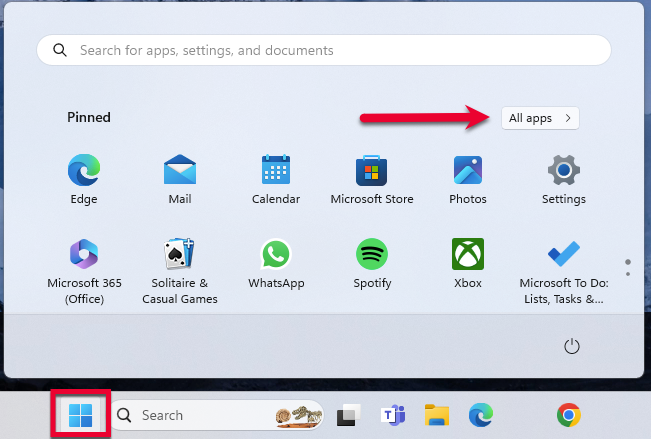 Then, go to Windows Tools and select Control Panel.
- Select Network and Internet > Internet Options.
- Under Browsing history, click Delete.
- Make sure there is a check next to Temporary Internet Files. The other checkmarks are optional.
- Click Delete.
- Then click OK when done.
- Log in to your financial institution's website and accept Cookies and any security measures, as requested by the site.
- Open Quicken and try your update again.
Note: If the Security level is set too high, it may prevent your system from storing the cookies and security necessary to continue functioning with your financial institution. Medium security level should be sufficient to store the cookies and security. You can re-elevate the security level after a successful connection with your financial institution. If the financial institution uses expiring (session) cookies or expiring security, you may have to repeat these steps each time the cookies/security expire.
If the issue continues after these steps, the next step would be to contact Quicken Support so they can review your logs and connection attempts in more detail and escalate if needed.
Thank you!
-Quicken Anja
Make sure to sign up for the email digest to see a round up of your top posts.0 -
Hello @ForeverUser,
We haven't heard back from you in a while. Do you still need assistance?
Were you able to give the steps above a try and/or contact support?Thank you!
-Quicken Anja
Make sure to sign up for the email digest to see a round up of your top posts.0 -
Hello again,
Checking in once more before this thread is closed.
Let us know if you still need assistance.Thank you!
-Quicken Anja
Make sure to sign up for the email digest to see a round up of your top posts.0 -
Hello again,
Due to the lack of response, I went ahead and closed this post.
If you still require assistance, please feel free to start a new post.
Thank you!
-Quicken Anja
Make sure to sign up for the email digest to see a round up of your top posts.0
