0/0/1900

Two of my Fidelity accounts now show a 0/0/1900 date when I reconcile. The date does not show up in my register. And I also get this box:
Comments
-
Hi @John J,
Thank you for reaching out to the Quicken Community.To better understand the issue, I would appreciate it if you could provide a bit more information:
- When did you first notice this issue?
- Where is your Quicken data file currently located? To check, please open Quicken, go to File, and look at the bottom of the menu (above the Exit option). The file with the check mark next to it is the one currently open. Please share the full file path shown there.
- Is your file being backed up or synchronized by any third-party services, such as Carbonite, OneDrive, or Backblaze?
- Have you tried validating the file?
To validate your file, please follow these steps:
- Go to File > Validate and Repair File…
- Select the Validate file option
- Click OK
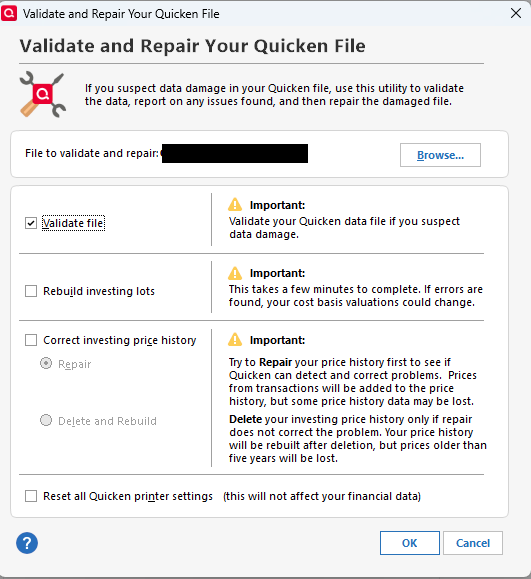
- A data log will appear. Once it does, you may close it and try again.
Please let me know how it goes!
Quicken Carlos
Make sure to sign up for the email digest to see a round up of your top posts.
0 -
@John J, let's go back a bit.
I don't recognize the dialog that you're showing. How did you get to it?
And, the disk error that you're showing, and the fictitious date, could easily be related issues … and could be a hardware issue rather than a Q issue, OR could be a corrupted Q data file, OR (if your file isn't stored on the hard drive of your PC) could be a connectivity issue.
So the questions that @Quicken Carlos and I have asked are necessary to diagnosing the issue.
Q user since February, 1990. DOS Version 4
Now running Quicken Windows Subscription, Business & Personal
Retired "Certified Information Systems Auditor" & Bank Audit VP0


