Scheduled Income: posted deposit includes zero dollar Split Amount Adjustment

Several of my Scheduled Income transactions are now showing a split item in the amount of $0.00 with a description of Split Amount Adjustment. (Related: These deposits also show up as Uncategorized transactions in the Home Screen Dashboard.) These scheduled items are existing scheduled income transactions that have existed for over a year. So I believe this is a bug that came in with the most recent update.
Version 8.5.1 (Build 805.60122.100)
Today, I reported this issue through the Report a Problem feature.
Comments
-
Hi @R1456,
Thanks for sharing what you’re experiencing. I’d appreciate a bit more information to help us better understand the cause of the issue:
- When did you first notice the issue?
- Were those income reminders split before the adjustment appeared?
- Are only split income reminders affected?
- For the uncategorized deposits shown in the dashboard, are they properly categorized in the register, or has the category disappeared there as well?
- Have you tried restoring a backup from before the issue started?
Your answers will help us narrow this down. I look forward to your response!
Quicken Laura
Make sure to sign up for the email digest to see a round up of your top posts.
0 -
Hi, @R1456
I am now seeing some uncategorized split amounts in long existing Split bill reminders. Is this what you are seeing?
I know in my case, it isn't a bug, but a byproduct of the new feature that allows us to set the Amount for bill reminders to now be One Year Prior, Average of payments, etc. instead of the older, single "Fixed Amount" option.
Since the program has no way of correctly re-calculating the total of each split child line when the amount varies, it puts in the Uncategorized line to make up the difference. Does that sound like what is happening to you?
1 -
@John_in_NC
I'm not seeing the uncategorized splits in the existing income reminders. I checked just now and those income reminders are setup with the "Fixed" option.The issue appears when those scheduled income reminders are posted to Quicken. Those posted transactions have a zero-dollar uncategorized item [that is not present in the bill/income reminder].
So I could believe that the behavior is a side effect of the new feature for scheduling reminders, but in this case I'd call it a bug not a feature. 😁
0 -
- When did you first notice the issue?
I've observed this recently, at the start-of-month when income arrives. - Were those income reminders split before the adjustment appeared?
Yes there were split into the income and a tax category. But there was no amount Uncategorized. - Are only split income reminders affected?
Yes but I don't have any Bill reminders that are split, so can't attest to those. - For the uncategorized deposits shown in the dashboard, are they properly categorized in the register, or has the category disappeared there as well?
The categories in the register are correct, plus the additional Uncategorized zero-dollar split. - Have you tried restoring a backup from before the issue started?
No. The issue is in the annoyance level, so restoring from backup seems a bit extreme in this case.
Thank you.
0 - When did you first notice the issue?
-
Hi @R1456,
Thank you for providing more details. I just want to make sure we’re on the same page; do those income transactions look like this?
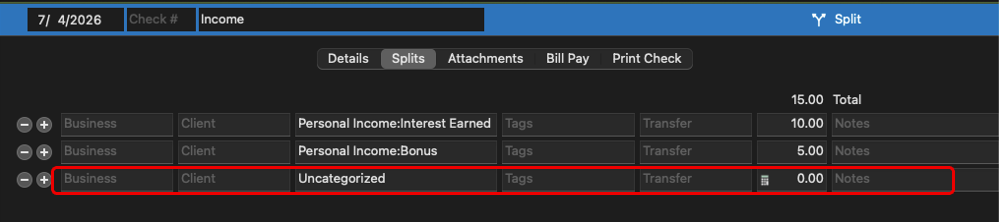
Have you noticed any pattern that triggers this behavior? For example, does it happen after an update or after closing and reopening Quicken?
Would you be able to test how the income split transactions behave in a test file? This could help determine whether the issue is related to the file or the application itself.
I’ll be looking forward to your response. Thanks for your cooperation!
Quicken Laura
Make sure to sign up for the email digest to see a round up of your top posts.
0 -
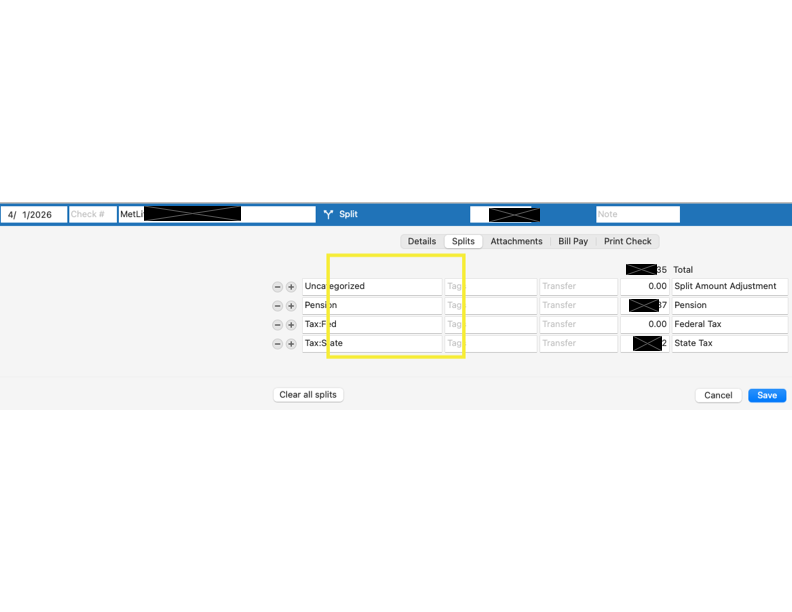
Here's a screenshot from the register. Ignore the yellow box, that was unintentionally added. :-)
The transaction includes income (positive) and then two tax items (negative).
It affected three monthly scheduled income transactions, and it's only happened once.
I've tried to replicate this problem with test transactions, but unable to reproduce the behavior.
I'll watch for it again and report back if it comes around again.
 0
0 -
Hi @R1456,
Thank you for providing the additional details. I really appreciate it. I’ll keep an eye out for your update after the next scheduled income and look forward to hearing how it goes.
Quicken Laura
Make sure to sign up for the email digest to see a round up of your top posts.
0

