Account re-linking issue with Unify Credit Union

Hi All,
Having an issue with Unify Credit Union accounts. Initially, the escrow account was having an issue connecting, and I know the possible problem. When trying to disconnect it, it would give me the message that the login was already in another account, and it wouldn't let me disconnect it. So I had to disconnect all the Unify accounts, and then I was able to disconnect the escrow account.
Now I'm trying to reconnect all the accounts, except the escrow account. I've tried connecting from each account's preferences and also from the add new account menu. Quicken finds all the accounts at the bank, except the escrow account, and this is expected. When trying to re-link to the existing accounts, savings, credit card, HELOC1, HELOC2, and auto loan, the Quicken list of accounts offered only has the savings and the credit card. Both HELOC's and the auto loan are missing from the list of accounts offered to re-link.
All these accounts have been linked and working for a while. Nothing has changed within my Quicken setup. I have also deleted the passwords from the Mac OS keychain to see if that could be it, but I guess not. And all my other accounts, around 28 of them, and a mix of loans, checking, savings, and investments with other banks are connecting and updating without a problem.
Any ideas?
Quicken Classic Version 8.5.1
Mac OS 26.4
[Edited-Readability]
Answers
-
Hello @in2ndo,
Thank you for sharing your experience.
After checking your connections internally, I don't see any errors, so that's good news.
If the accounts are not showing up to link to, that usually means they are still connected in Quicken. So I would double-check that they are disconnected first. If they are disconnected, the next thing to do would be to check for any old or hidden accounts that might still be connected, and disconnect them if you find any.
To do that:
- In Quicken, choose Accounts > Hide and Show Accounts.
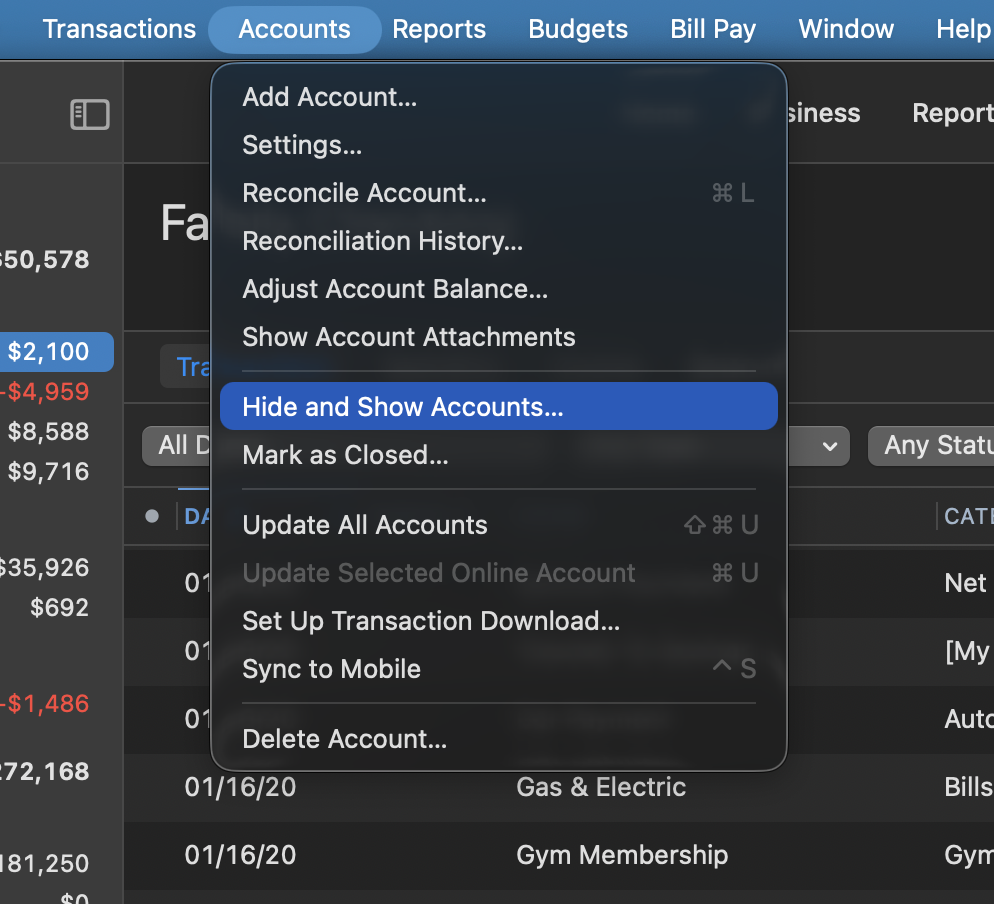
2. For the account you'd like to unhide, uncheck the Hide in Lists checkbox.
3. Click OK.
Then, if needed, use the article linked above for steps on disconnecting the accounts. After completing those steps, you would use the same article for instructions on reconnecting the accounts.
Note: Loan accounts, like auto loans and mortgages, cannot be reconnected once disconnected; they will need to be added as new. Any other account should link just fine.
Let us know how it goes!
Quicken Alyssa
Make sure to sign up for the email digest to see a round up of your top posts.
1
