FIXED Need help deleting a transfer transaction Quicken thinks exists in another account but doesn't

I am trying to delete a transaction originally created as a transfer from another account. But that transaction no longer exists in the account from where the funds came as I edited it to a regular withdrawal on a different date. Quicken doesn't know this and won't delete it because it thinks it is linked to a transfer that no longer exists. Is there a fix?
Comments
-

Please help. There is no matching transfer.
0 -
Despite lots of trials and errors, when I edited the transaction to a DEPOSIT, Quicken accepted it and I was able to delete the transaction.
0 -
Hi @varlene,
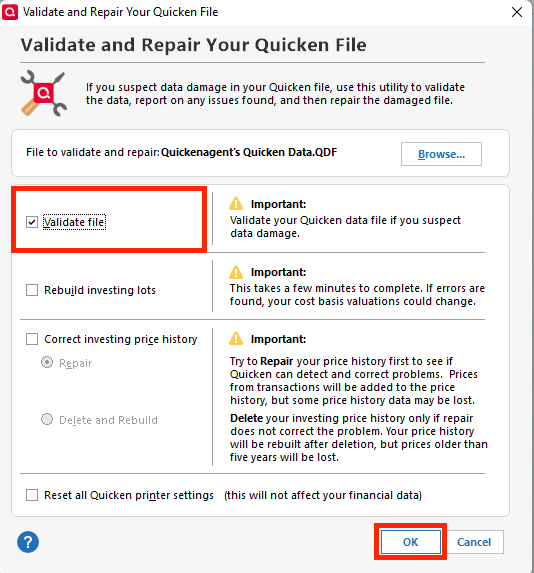
Thank you for reaching out. The behavior you’re seeing with the file does seem unusual. I recommend validating your data file first, and then trying to locate the matching transfer (make sure to save a backup first).
To validate your file:
- Go to File
- Select Validate and Repair File
- Choose Validate File
- Click OK
To handle the transaction:
- Right-click the transaction you want to delete
- Select Go to Matching Transfer

This will highlight the corresponding split transaction in the other account. From there, you can recategorize it, which will effectively remove the transfer from the linked account.
Please let me know if this works for you. If not, I’d be happy to guide you further!
Quicken Laura
Make sure to sign up for the email digest to see a round up of your top posts.
0 -
Hi @varlene,
I just wanted to follow up since I haven’t heard back from you. I’m checking in to see if you still need assistance.
Quicken Laura
Make sure to sign up for the email digest to see a round up of your top posts.
0 -
Hi, Laura. You must have missed seeing that I fixed the issue. It probably came in at the same time you posted your reply. You can take a look at it now. I appreciate your taking the time to follow up.
0 -
You are right, I missed that. Thank you for letting me know.
Quicken Laura
Make sure to sign up for the email digest to see a round up of your top posts.
0 -
I really should have worded it better, for instance:
AFTER lots of trials and errors, when I edited the transaction to a DEPOSIT, Quicken FINALLY accepted it WITHOUT AN ERROR MESSAGE, and I was able to delete the transaction.
0
