Bank account download for first time. Wrong balance

Mac. I just connected my bank account to Quicken for the first time, and the balance is way off. I clicked reconcile and then chose 'use online balance' -which was correct.
I then clicked finished, and Quicken wanted me to add an adjustment, which ended up showing a wrong balance again.
I'm not sure what to do or how to start off with a balance the same as my bank balance. Can I just do a manual adjustment? Any thoughts will be appreciated.
[Edited Readability]
Best Answers
-
This is likely because the initial download does not contain the complete account transaction history going back to the beginning of the account. (Normally only 90 days of transactions are downloaded, depending on the bank.) A one time balance adjustment using any of the above methods should solve the problem. I would make the date of that adjustment just before the first downloaded transaction in the register.
Quicken Mac Subscription; Quicken Mac user since the early 90s0 -
That did it for me. Thank you for your quick and easy to understand response!!!
0
Answers
-
Hi @suecheat,
Thank you for sharing what you’re experiencing. It is a bit unusual for a brand-new account to have an incorrect balance, but there are a couple of ways to resolve it.
If the account does not have an opening balance entered, that could explain the discrepancy. In that case, you can simply add an opening balance transaction to correct it.
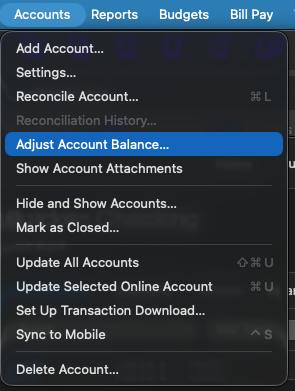
Alternatively, you can use the Adjust Account Balance option:
- Go to Accounts in the Quicken toolbar at the top
- Select Adjust Account Balance
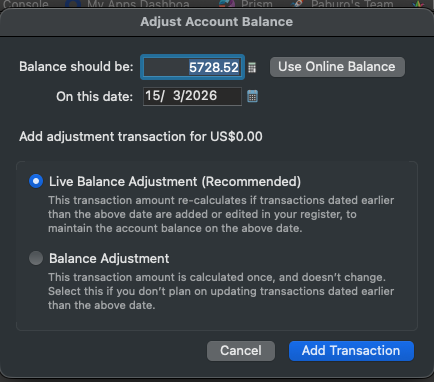
- Choose to use the online balance or enter the correct amount manually
- Create either a Live Balance Adjustment (recommended) or a regular Balance Adjustment
You may also choose to enter a manual transaction for the difference if that’s more convenient.
If the issue persists after trying these steps, please let me know. I’ll be happy to assist further!
Quicken Laura
Make sure to sign up for the email digest to see a round up of your top posts.
0 -
This is likely because the initial download does not contain the complete account transaction history going back to the beginning of the account. (Normally only 90 days of transactions are downloaded, depending on the bank.) A one time balance adjustment using any of the above methods should solve the problem. I would make the date of that adjustment just before the first downloaded transaction in the register.
Quicken Mac Subscription; Quicken Mac user since the early 90s0 -
That did it for me. Thank you for your quick and easy to understand response!!!
0 -
That’s great to hear. I’m glad the issue has been resolved!
Please feel free to reach out if you have additional questions!
Quicken Laura
Make sure to sign up for the email digest to see a round up of your top posts.
0
