This discussion was created from comments split from:
Issues with FZDXX Money Market and Cash in Fidelity Investment Accounts
.
There is something wrong in my working QDF file that again is incorrectly characterizing core MMF transactions as a security, for some but not all of the accounts. The problem resurfaced in early March.
I say it's in the QDF file because a clean test.qdf file generated yesterday for one of the accounts is properly handling the core transactions, including new ones today (4/1).
The core MMFs are SPAXX, FDRXX and CASH. I'm running R66.28 on Windows 11.
I did a Validate yesterday on the working QDF, but it didn't help. Today's update included two new dividends that correctly went to the cash balance in the test file. In the working file there was a Buy CASH transaction.
I will now go delete some three dozen bogus core MMF transactions and hope this gets fixed (again) promptly.
Hi @Toolworker,
Thank you for reaching out and for detailing the steps you’ve already taken; that’s very helpful.
Since this behavior is not occurring across all of your accounts, it may indicate that the cash is configured differently in the affected account. I recommend comparing the cash settings with a working account and updating the problematic one accordingly (make sure to save a backup first):
Please follow these steps:
Once completed, update the account again.
Please let me know how it goes!
Thanks for your reply, @Quicken Laura.
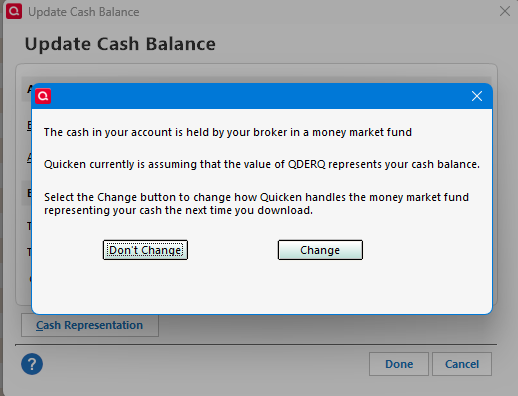
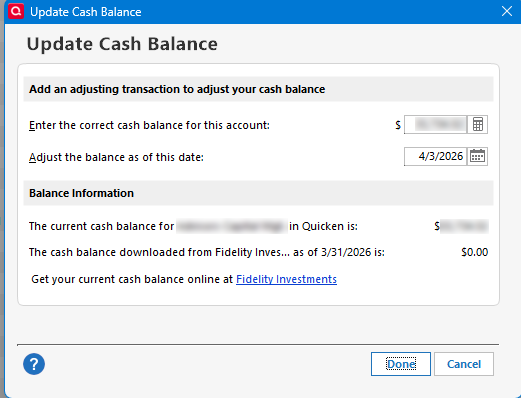
The Update Cash Balance in all but one of the accounts does not show the Cash Representation button.
The account that does show the Cash Representation says correctly that SPAXX is the cash account.
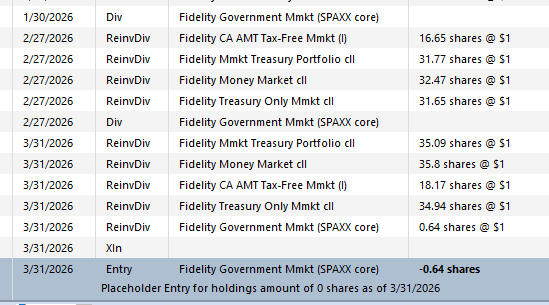
That account, like the others, was handling cash transactions correctly through February. However at the end of March it treated the SPAXX dividend as ReinvDiv; it should have been Div as before.
Note that the 1/30 and 2/27 dividends from SPAXX were properly shown as additions to the cash balance. But on 3/31 - after the issue reappeared mid-March - Quicken shows it as a ReinvDiv, treating SPAXX as a security.
I don't know if this is a clue or noise, but I'll report it. When I did the validate - which didn't help - the error log showed (only) two transactions that were incorrectly categorized:
In the second account (which has a linked cash account), there was only one such core account transaction. However, in the first account, the Bought CASH on 3/10 was the first transaction to treat CASH as a security. But there were 8 more such transactions after that in that account. In fact, 3/10 was the first date for bogus security transactions in CASH or SPAXX in any account.
Those transactions might have poisoned the well, so to speak, for core fund transactions. However, in three other accounts the core account was changed on 3/3 from SPAXX to FDRXX, and subsequent transactions in FDRXX were treated as a security.
Update: I rolled back to a qdata file from Feb. 23, before the bogus core security transactions started, and updated. The problem did not occur.
So - as I already determined from a one account test file the other day - there's something in the qdata file that's causing this. At some point it got the wrong idea about the core funds - probably in something sent from Fidelity. And although Fidelity's not still sending that, the flags are still in the qdata file.
Let me know if I can help track this down further. Otherwise I'll drop it and start cleaning up the debris from the rollback and update.
Thank you for keeping me updated.
We did experience a connectivity issue with Fidelity around that time, which has since been resolved and may have been the cause of the behavior you encountered. Since the issue did not occur when using the backup file, I recommend updating that file and continuing to use it as your primary working file moving forward.
Please don’t hesitate to reach out if you have any additional questions!
This issue with FZDXX continues and we are not at April 6, 2026 — with no resolution in sight?
Hi @Nirvana,
Thank you for joining us!
The issue you mentioned is currently specific to Quicken for Mac users, and the alert remains open. If you are experiencing this issue, we recommend contacting Quicken Support for further assistance.
You may also want to bookmark the Community Alert to stay updated with any new information.
Thank you!
@Quicken Laura I posted this on the other FZDXX thread but thought it was pertinent here…
Fidelity gives you options for how you keep cash. You can keep it as cash or you can select from a defined set of money market funds (I believe 2 - SPAXX and FZFXX). Fidelity also has a list of 29 other mutual funds that you can invest in. You really need the ability to mimic what Fidelity does. Most money market funds are traded as securities. The option you implement for Quicken for Mac needs to accommodate all of these scenarios and should only affect cash, SPAXX, and FZFXX as all the other money markets are always treated as securities. I provided a list of all 31 money markets above. You should be able to verify with Fidelity which ones are treated as cash options. Of course, other financial institutions are likely to have different scenarios.
As a software engineer of 40 years I spent a significant amount of time analyzing data from external sources and how to map it to internal data structures and processes. It would seem that not enough thought was given to how Fidelity handles cash and money market funds. I would hate to see you get it wrong in your revised implementation.
Hi @jblevy01,
Thank you for providing the additional information; it’s greatly appreciated. I’ll make sure it gets passed along to the appropriate team.
Thanks again!
Update: I now see the Cash Representation button in all my Fidelity accounts. Its disappearance was probably another symptom of corruption in my QDF file's Fidelity accounts around March 10. Now that I've rolled back to an earlier QDF file, Cash Representation is back.
That’s great news! I’m glad to hear you can see the Cash Representation now. Thank you for sharing your update.
@Quicken Laura I notice that some users @names show the Quicken version they use and others do not. It has become apparent that some issues are version (Windows vs Mac) specific. It would be helpful if all users posts included the version they use.
@Quicken Laura Following @jblevy01 's suggestion, I see that the list of Quicken versions in the profile hasn't been updated in eight years.
Hello @jblevy01 & @Toolworker,
To clarify, are you recommending that the Quicken version field should be a mandatory field?
It was updated relatively recently to add the Quicken LifeHub option. There hasn't been any need to update the Windows and Mac options because the Subscription version is the current version. The versions with years by the name refer to pre-subscription versions. Are there other options you were hoping to see added?
I look forward to your reply!
@Quicken Kristina I may be wrong but I thought I saw posts from users that didn't indicate what version they use. Perhaps require the version be entered when entering a new post or question.
Thank you for your reply,
It's an optional field in user profiles. That is why you see some people post without a version by their name. However, the Community has separate sections. It's typically assumed that if you're posting in the Windows section that you use Windows, Mac section if you use Mac, etc.
If you would like to see that changed, you can create an Idea post to suggest changes/improvements on the Community. For more information, please review the discussion linked below: