How do I get Personal Expenses to show up

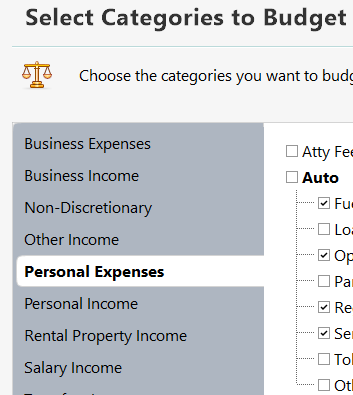
I can add or subtract any category in the list shown EXCEPT Personal Expenses and they appear in the budget. All the others will show up or not in both Graph or Annual view if I choose then however nothing I have been able to do will enable Personal Expenses to show up. What am I missing or doing wrong that it won't show up? Thanks.
Win10, Quicken Classic R66.28 - 27.1.66.28
Answers
-
Just out of curiousity, what happens if you check that Main "auto" category?
Q user since February, 1990. DOS Version 4
Now running Quicken Windows Subscription, Business & Personal
Retired "Certified Information Systems Auditor" & Bank Audit VP0 -
That "Auto" was for Automobile categories but selecting it didn't do anything different, still no personal Expenses get shown.
I started a new budget from scratch with no categories to start with and only added a few Personal Expense items and it still doesn't show up. Frustrating!
0 -
If you click on Budget Actions at the top right and then choose Select accounts…, are the accounts where you are recording these expenses included in the budget?
QWin Premier subscription0 -
Yes they are; the items ones I put into Non-Discretionary show up fine. It's appearing like I'll have to create a Discretionary type and move a whole lot of things there. What a pain and shouldn't be necessary.
0 -
Before you go to that trouble, I'd suggest that you contact Q Support, via the link at the top of this page NOT by Googling, and let them share (look, but don't touch) your screen to see if they can figure this out.
Q user since February, 1990. DOS Version 4
Now running Quicken Windows Subscription, Business & Personal
Retired "Certified Information Systems Auditor" & Bank Audit VP0

