WELLS FARGO - TRYING TO ADD ACCOUNT

I'm not able to add my Wells Fargo accounts. Quicken doesn't recognize the username and password. Same USERNAME/PASSWORD do work when connecting to Wells Fargo's website. I was able to import transactions using the .qfx download. There are no circumstances by which I can setup automatic downloads though, due to the username/password error.
Using Quicken since it was DOS based……
Best Answer
-
Just checking in, we haven't heard back from you in a while.
Do you still need assistance?
Thank you!
Quicken Alyssa
Make sure to sign up for the email digest to see a round up of your top posts.
1


Answers
-
Hello @mike_damico,
Thank you for sharing your experience.
I have some follow-up questions for you:
- How long have you been getting this error?
- Were these accounts previously connected, or are they being added for the first time?
- Are you trying to use the Direct Connect connection method when adding these accounts?
- If so, is there a reason you prefer this connection method?
- If not, you can try using a different method.
- If so, is there a reason you prefer this connection method?
- Did you use the URL in the screenshot you shared before adding these accounts?
- If not, that would be a good first step.
Looking forward to your response!
Quicken Alyssa
Make sure to sign up for the email digest to see a round up of your top posts.
1 -
I've only been trying to add these accounts for the first time within the last several days. I successfully added two other accounts from a different bank.
No, I was not trying to use the Direct Connect method. I was using the Express Web Connect mode.
- Yes, I did use the URL as a first step. Not a whole lot happened.
[Edited-Readability]
Using Quicken since it was DOS based……
0 -
Thank you for following up with additional information.
I am not seeing any errors internally. We do have a Support Article on adding accounts to Quicken.
To add accounts (such as checking, savings, and credit cards):
- At the top of the Account Bar, click the + (plus sign) button.
- Type in the name of your financial institution.
- Select your financial institution from the results list and click Advanced Options.
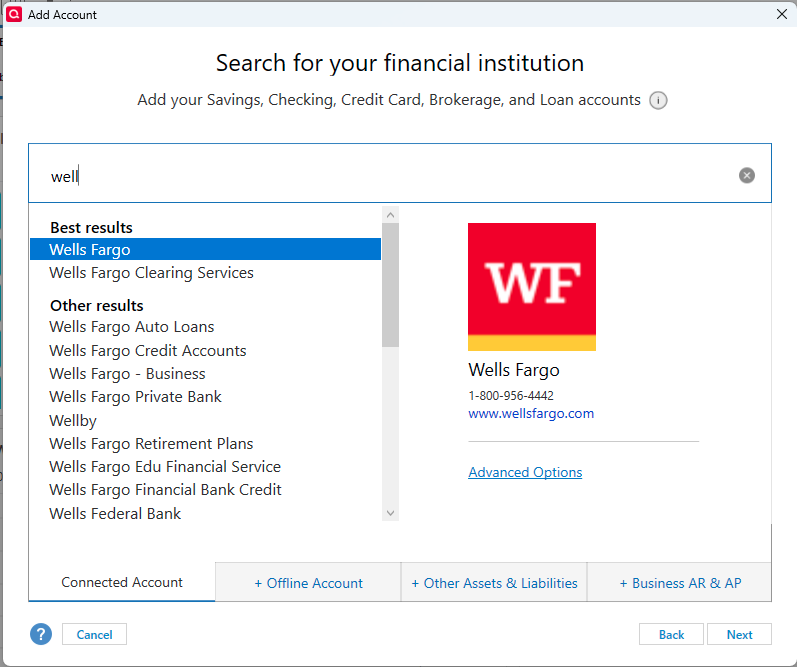
- Click Continue. Then select Express Web Connect and click Next.
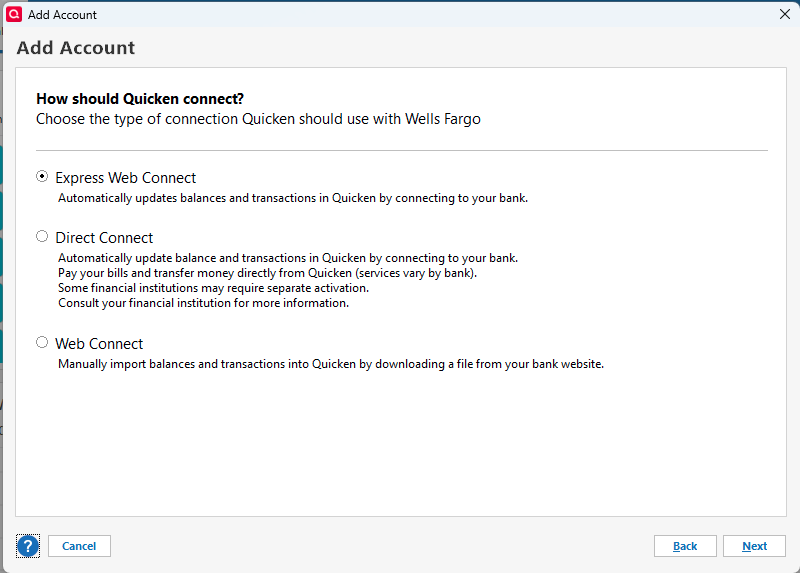
- Follow the on-screen instructions. You will be redirected to the Wells Fargo website to authorize your accounts for use in Quicken.
- Once you have authorized the accounts, you will be redirected back to Quicken, where you can complete the process of adding the accounts.
Note: Some account types are not available in all versions of Quicken. To view which account types are supported in your Quicken product, visit this comparison page. For more information on this, view the article linked above.
Let us know how it goes!
Quicken Alyssa
Make sure to sign up for the email digest to see a round up of your top posts.
1 -
Just checking in, we haven't heard back from you in a while.
Do you still need assistance?
Thank you!
Quicken Alyssa
Make sure to sign up for the email digest to see a round up of your top posts.
1 -
Hello again,
Checking in once more before this thread is closed.
Let us know if you still need assistance.
Thank you!
Quicken Alyssa
Make sure to sign up for the email digest to see a round up of your top posts.
0