Quicken add Fidelity acct stuck on "bank hosted sign-in page"

Still the same old problem, too many people are still talking about...
I disconnected my Fidelity account as told by Quicken due to the change in connecting method, yet now I cannot add back the accounts to download transactions from Fidelity; every time, it just gets stuck on the screen "sign in through bank-hosted sign-in page". Quicken basically told me it is "User Error", although I have used it for 20+ years, now paying monthly, but it has stopped working.
AT this point, I would appreciate it if anyone could offer any suggestions. Thanks in advance.
Background: My .QDF is local, no VPN, use windows 11, I have tried, Edge, Chrome, turning off Avast virus program, allow only Fidelity.com popup…...nothing works.
[Edited-Readability]
Comments
-
Hello @vlee194546,
Thank you for sharing your experience, though I am sorry to hear you have been unable to resolve this.
After checking your profile internally, I am unable to see connection attempts to any banks at all. Normally, I would be able to see that. This usually indicates the use of a VPN or other protection software. I understand you said you have disabled these things, but based on what we see from our end, this is something to look into first.
I have some follow-up questions for you:
- You get stuck on the window that tells you it will redirect you to Fidelity. You never actually get redirected there, correct?
- Do you have accounts with other banks added to Quicken?
- If so, are those updating without issue?
- Are you using the internet on a restricted network?
- Examples include schools, workplaces, and even some home networks are set up this way.
- Do you have another computer you can try this on?
- This would rule out if something is preventing Quicken from connecting on the current computer.
- Have you tried creating a new admin profile on your computer and then attempting to do this from there?
- If not, this is another thing you can try to rule out if it's a settings issue with the current profile you are using.
Looking forward to your response!
Quicken Alyssa
Make sure to sign up for the email digest to see a round up of your top posts.
0 -
Have you tried a different browser? I have found that Quicken and Edge don't get along. So, when I encounter connection problems I switch my default browser from Edge to Firefox.
Hope this helps.
0 -
Thanks.
I have tried Edge and Chrome, setting it as default browser, neither resolved the issue. Did Firefox work for you?
0 -
In a recent issue with connecting to Fidelity, I was able to get it to work by switching my default browser from Edge to Firefox.
Same thing with a connection issue with Bank of America. Had to change my default browser from Edge to Firefox.
From my perspective: Quicken and Edge don't play nice.
Don't know about Chrome.
Hoping this works for you.
0 -
hI, Quicken Alyssa:
First, thank you; second, bear with me, I am not that computer savy…. Now to respond to your comments:
- Correct. Every time when I tried to add/reset the Fideity account, I could never pass the "bank hosted sign-in page"; never redirected to anywhere else. Quicken just kept spinning, I had to force shut down my PC.
- I also have Wells Fargo brokerage and Vanguard, both are still updating the transactions without problem. Downloading from Fidelity stopped on me perhaps around 8 months ago, after I was informed by Quicken that Fidelity updated thier connection method and all Fidelity accounts need to be disconnect and reset.
- No, just my AT&T home wifi. I also don't use VPN, and I have Avast virus program.
- I can try, but if Quicken is downloading my other accounts without issue, Quicken connection to my computer should be fine, right?
- Honestly, I never know what an Admin account is, my first PC used MS-DOS, ha.. Now, if my vanguard account works, things like profile should not be an issue, right? If need to, please let me know how and I can try. Also, I have years of data on my Quicken so I try not risk losing it.
Thanks again…. Sorry, I don't know how to put these repond directly under your comment.
0 -
I have found these step to work…
Step 1) Log into your Fidelity account and navigate to "Profile" (upper right-hand corner). Click on "Security." Click on the arrow under "External data sharing." At this point you should be on a screen title "Your data sharing." Make sure you are on the "Fidelity Access" tab. If you see Quicken listed, click on "Manage Account Access" and then click on the button "Remove all Quicken access."
Step 2) Change your default browser to Firefox (or maybe Chrome). Firefox works for me. I don't know about Chrome.
Step 3) Open Quicken and click on one of your Fidelity accounts. (I'm assuming you have more than one Fidelity account.) Click on the settings button (upper right-hand corner). Click on "Account Details." Click on the "Online Services" tab. Click on the "Deactivate" button. Next, click on the "General" tab and clear the "Account Number" field (or delete the account number).
Repeat Step 3 for all your Fidelity accounts.
Step 4) Close Quicken.
Step 5) Reopen Quicken and click on one of your Fidelity accounts. Click on the settings button (upper right-hand corner). Click on "Account Details." Click on the "Online Services" tab. Click on the "Set Up now..." button. If all is right with the world, you should be able to follow the screen prompts, log into your Fidelity account, grant Quicken access and then link your accounts.
Step 6) Reset your default browser back to Edge.
Please let the Community know how it goes.
0 -
gtgetbo,
Thanks, here is what I did ..:( unfortunately, did not get the results I was hoping for)
Step 1, did all, Quicken was not listed on my Fidelity Access.
Step 2. Firefox is my default browser for the whole process.
Step 3. All my Fidelity accounts were already deactivated, I blanked out every account number.
Step 4 and 5. Quicken off and on. To add the accounts, I used Tool-Account list-Edit-Online Service-Set Up now. Again, the program spins on the page saying “.. use sign-in page hosted by the financial institute”. I had to force shut down my computer. I also repeated with my virus program off and internet temporary files/cookie cleared, none helped.
Instinctively, I think somewhere there is a switch that prevented the Fidelity sign-in page from happening for me; it could be browser, virus program, wifi stability/speed (I have 5/45 mbps), internet security setting or just something I missed. I recall a few years back when I first set up everything, this process was very smooth. I guess I will have to keep trying and hope somehow someday Quicken and Fidelity can shake hands and resolve this frustrating problem. Am I the only unlucky one here? If Vanguard account works with Quicken, why can't Fidelity?
0 -
Another test that does not appear to have been suggested, try creating a brand new Quicken datafile and add the Fidelity accounts there. If that works, then it suggests something with your original datafile. Backup your original datafile. You could try Validating the original datafile and try activating the Fidelity accounts. If it still doesn't work, try Super Validating the original datafile (control-shift Validate and Repair) and then activating the Fidelity accounts.
0 -
Thanks for the great suggestions. Good news , bad news…
Validating and Super Validating (just hold control-shift and hit Validating button?) fixed a category but signing into Fidelity still hung up on the " financial institute hosted sign-in page". HOWEVER, crating a new Quicken file with two of my Fidelity accounts was able to go beyond that dreadful sign-in page and download the transactions from Fidelity, so problem is not at "Quicken talking to Fidelity". Later, I tried again hoping now that the "door has been kicked open", but still no good.
Since the problem might be at my data file, I am thinking tomorrow try again with a restored/backed file. Does it make sense? anything else? Thanks so much.,
0 -
Restoring from a back-up file might work.
However, there might be a downside - you may end up having to reconnect all your other accounts (you non-Fidelity accounts). Depending on how many you have it could be time consuming and perhaps painful.
Good luck.
0 -
0
-
Thanks again….. I use Quicken Classic Deluxe, R66.28, built 27.1.66.28, Window 11, currently, using Firefox.
I used the complete backup option but the restored file still no help. Also, looks like there is no connection problem when I tried with One Step Update for my other bank and brokerage accounts.
The most recent Validation cleared both the QDF and QEL files.
I do have a few old and obsolete accounts, they are either closed or separated, their Transaction download status shown in the Account List is Not Available. That should be okay, I guess.
0 -
Have you tried uninstalling and reinstalling Quicken?
0 -
@gtgerbo ..
No, I thought about it but was scare to do that because I don't want to risk losing my data and history. All theses concerns is because ever since we don't have the hard program disk in hand like the old days. Well, I see that internet detailed the steps to remove and reinstall Quicken, I need to take a good look before I dive in… I hope as long as I have my QDF file, I have all my data and history….. Will post what happens again here.
At the beginning this string, Quicken Alyssa (moderator) was able to see my profile "internally", that person seems to have some special insight and access, can he/she offer some insight? With your good help, I feel like I am closing in… Just still wish I did not have to go through this walk around because Quicken should at least tell me where the problem is and not let their program just keep spinning in the cyber sea…. ,
0 -
The uninstall/reinstall process is fairly straight forward. But before you do this, I highly recommend that you create a back-up copy of you Quicken data files - files named *.QDF, *_SyncLog.dat, and *FXLOG.DAT.
Good luck.
Please let the community know how it goes.
0 -
Thanks. I backed up the file before everything. I was gonna update you after I get over the final obstacle but since you reached out, I will update and maybe you can help me get over my last obstacle, or I hope it is the final.
The Quicken reinstallation was a struggle until I found that I needed to reinstall Quicken with the .EXE file compatibility turned off. Apparently, it was due to Windows 11, otherwise you will get HTTP Status 400 error.
The newly installed Quicken with my old data file finally get me over the Fidelity hosted sign-in page, your suggestion was totally good, thanks again. I got it done after a few trials while switched to Chrome from Firefox, again, some suggestions from internet.
The old data and history were all there without problem. I tuned off sync with Quicken web just because I want to minimize complexity, an idea from internet again.
When tried to activate the account download from Quicken account list-Internet service, I chose “link” the Fidelity to existing Quicken account, rather than “add-to” option, I pray I made the right choice, time will tell.
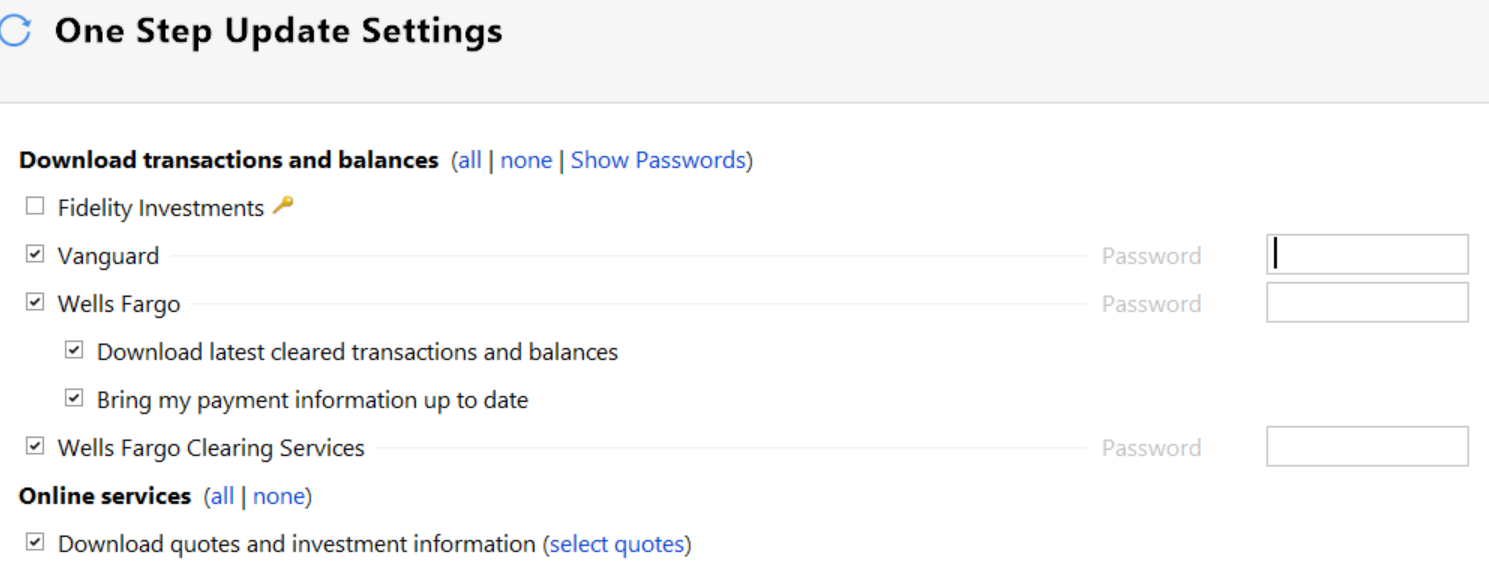
The activate download process STILL hangs, Quicken stuck, and I had to force shutdown the computer for the Nth time. However, once restarted, on the Quicken Account list-transaction download screen, the status now shows “Yes, express web connect+”, looks all good from there, BUT the One Step Update still shows a key under Fidelity, and no where can I fill in the password to initiate download. Clicking on the “key”, it says “… Fidelity requires you to sign using their system…”. Even though I did authorized the Quicken to access Fidelity on Th Fidelity Profile site.
That is where I am now, trying to resolve the “key”. Thanks for your patience and guidance, wherever you are.
The screen shot, the yellow key next to Fidelity..
 0
0 -
Oh,, looks like the yellow key just mean that no password is required because it is stored on the Fidelity site. that would also explain why there is no box for password input…. I will look into it tomorrow.
0 -
Sounds like you are getting closer to getting this fixed.
Looking at your screen shot of One Step Update Setting screen, Fidelity Investments is not selected - i.e., no check mark in the little box to the left. At some point, you will want to select Fidelity Investments and click the "Apply' button in the lower left had corner of the One Step Update Setting screen. With it being selected, Fidelity Investments will not get updated.
Please keep the community posted.
0 -
Looks like my Quicken is now downloading Fidelity transaction via Fidelity Express Web Connect+ (EWC+). I appreciate all your guidance throughout this ordeal.
I have posted my random thoughts in the past week, but to share my story with my follow members, here is the summary of what I learned, with Windows 11 and Quicken classic deluxe, on migrating to the new Fidelity connect method EWC+.
After deactivating the existing Quicken accounts, Firefox is better for reconnecting with Fidelity. If the process not going through, use Quicken validate and repair feature to clean up the Quicken QDF file, if the process persistently stuck, consider remove and reinstall Quicken program (if this is necessary, Windows 11 users are advised to turn off the Compatibility mode in the property of the installer file, Quicken.exe). Also, log into Fidelity, under profile, security and access, allow Quicken access to each account.
In some cases, Chrome is better than Firefox to download transactions from Fidelity to Quicken. When download/merging with the data in Quicken, I believe “Link To” is a more appropriate option than “Add To”. I used “Link To”. This could be crucial.
On the One Step Update screen, there will no longer be the box for password, instead there will be a symbol of yellow key. If there is no other error or warning, the reconnecting to Fidelity is complete.
After new transactions are downloaded, look over the transactions and compare account balance and stock share quantities. It can be a very cumbersome task, as there could be duplication and whatever, this is a totally different subject by itself, and there are already many discussions in the community on that. Good Lock.
0
