Reconnecting HSA to Financial Service Provider

I have multiple accounts with one financial service provider. To clear up HSA issues, I deactivated it and am now trying to reconnect it. During the reconnect process, I am transferred to the financial service provider and asked to authorize my accounts. Do I have to Reauthorize ALL of my accounts or just the HSA I am trying to reconnect? The others appear to work fine.
Thanks
J
[Edited-Readability]
Answers
-
Hi @jc321,
Thank you for taking the time to reach out to the Quicken Community.
I recommend authorizing only the account you’re trying to reconnect (your HSA account). Once the authorization is complete, you can link it to your existing account to help prevent any duplicate accounts from being created.
Reactivate and link the accounts- Go to Tools > Add Account.
- Search for and select your Financial Institution.
- If prompted, choose the appropriate connection method.
- Follow the on-screen instructions to sign in.
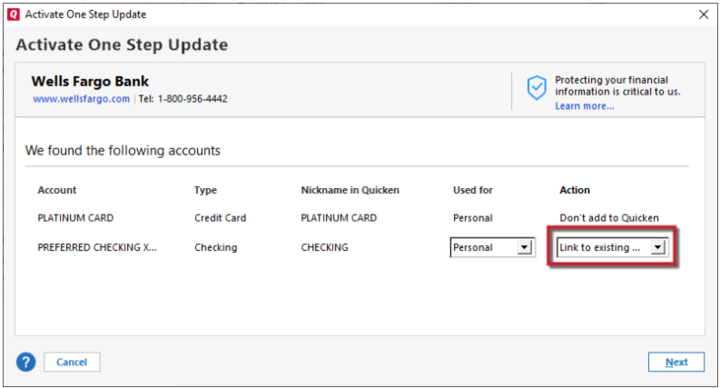
- When the list of found accounts appears, make sure to select Link to connect them to your existing accounts.
Please let me know how it goes. I’ll be here and happy to assist further if needed.
Quicken Carlos
Make sure to sign up for the email digest to see a round up of your top posts.
0 -
Hi @jc321,
I just wanted to follow up since I haven’t heard back from you. I’m checking in to see if you still need assistance.Quicken Carlos
Make sure to sign up for the email digest to see a round up of your top posts.
0 -
Thx for follow up. As it turns out, I do have to reauthorize ALL the accounts - even if only one is Off.
A few weeks have passed since above and now a New issue! Quicken is now telling me it can not update my accounts and I have add them all back. Full disclosure my subscription is expiring tomorrow. Thoughts?
0 -
Hi @jc321,
Thanks for your reply and for letting me know.
After further internal research, I found that this error (CP_ACCOUNT_NOT_FOUND) may affect all accounts associated with the financial institution and is also related to the CC-800 error.
I recommend creating a backup file before proceeding with any troubleshooting steps.
If you haven’t tried this yet, I suggest deactivating all accounts associated with this financial institution, including hidden or closed accounts.
To deactivate accounts:- Go to the Tools menu and select Account List.
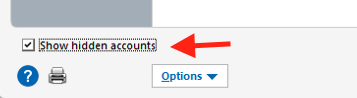
- In the Account List, click Show Hidden Accounts (lower left corner, if applicable).
- Select the account you want to deactivate, then click Edit.
- In the Account Details window, select the Online Services tab.
- Click Deactivate next to the service you want to disable.
- Click Yes to confirm.

- Repeat the same process for all accounts, including closed or hidden accounts associated with that financial institution.
Once all accounts with that financial institution have been deactivated:
- Go to Tools > Add Account.
- Select the bank for the deactivated account(s).
- If prompted, choose the connection method.
- Enter your credentials and click Connect.
- When the list of accounts appears, select Link next to each account you want to reactivate.
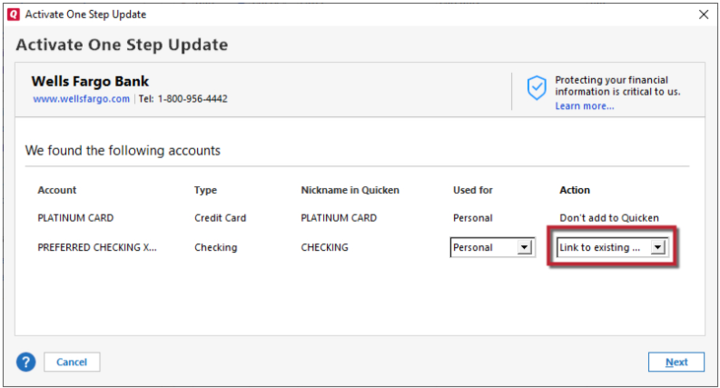
- Click Next, then Done on the final prompt.
I hope this helps! Let me know how it goes.
Quicken Carlos
Make sure to sign up for the email digest to see a round up of your top posts.
0 -
Thx Carlos - I should have told you earlier - it is the "CC-800" error affecting multiple financial service providers Visa, BoA etc. Does this info affect your suggested remedy?
0 -
Hi @jc321,
Thanks for following up and for sharing the additional details.
No, this error will not affect the previous steps. I’ve also updated the information about the error and the related link based on what you provided. I suggest following these steps for each affected financial institution.
If you run into any issues, please let me know.
I look forward to your reply!
Quicken Carlos
Make sure to sign up for the email digest to see a round up of your top posts.
0
