American Express (AmEx) Interface

For a week, the AmEx interface has been down. I can't download new transactions through One Step Update and have to download them in batches from the AmEx website.
I've spoken to Tech Support twice. The first time, on 4/10, I was told it was a known issue, was being worked on, and that it would be resolved within "two to three hours". Today, 4/13, I was told it's still ongoing with no resolution in sight.
[Removed-Rant] This duration of outage is unacceptable. Every available programmer and/or upper-level technician should have been assigned to it, and it should have been resolved days ago.
[Removed-Threat]
[Edited-Readability]
Comments
-
Hi @brewsterbl,
Thanks for reaching out to the Quicken Community.
We understand how frustrating this situation can be. After further investigation on my end, I encountered the FDP-101 on your account. We’ve received several reports regarding this issue with American Express FDP-101/CC-601, and it has been escalated internally. At this time, we don’t have an ETA for when it will be resolved, but our team is actively working to fix it as soon as possible.
In the meantime, I recommend monitoring the alert for updates. As soon as new information becomes available, the alert will be updated accordingly:
I hope this helps.Quicken Carlos
Make sure to sign up for the email digest to see a round up of your top posts.
0 -
This the information I was given previously.
Moreover, I just tried to run an update for my other accounts, having deselected American Express, and was unable to. The pointer kept going back and forth to the hourglass. This went on for ten minutes; I finally had to get into Windows Task Manager and terminate the program.0 -
@brewsterbl Thank you for your reply and for providing additional details.
To better understand why this is happening, I’d like to ask a few questions:- When the issue occurred, did you happen to restore a backup? If so, could you let us know when the backup was restored?
- Is your file being backed up or synced by any third-party services such as Carbonite, OneDrive, or Backblaze?
- What happens if you try to update only one financial institution?
- Where is your Quicken data file located? To check, please open Quicken and go to File. At the bottom of the menu (above the Exit button), the file with the check mark next to it is the one currently open. Please share the full file path shown there.
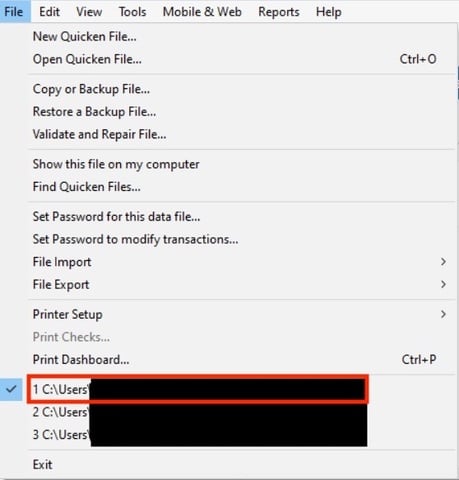
I look forward to your response!Quicken Carlos
Make sure to sign up for the email digest to see a round up of your top posts.
0 -
Everything but American Express is back to working now. AmEx is still not updating; I have to download the transactions from AmEx's website.
0 -
I am also having similar issues in downloading data from AmEx accounts so it seems to be an ongoing issue. I've deactivated/reactivated, etc. and it still is not connecting properly to any of my AmEx accounts/logins.
1 -
Hello @DisplacedHoosier & @brewsterbl,
Thank you both for adding to this discussion.
After reviewing both of your connections internally, I can confirm you are both getting the FDP-101/CC-601 error outlined in our Open Alert for this bank.
Please ensure you have the linked alert bookmarked to stay up to date on the latest progress/changes to this situation. We do not have an ETA as to when this will be fully resolved, and we apologize for the inconvenience.
Thank you for your patience!
Quicken Alyssa
Make sure to sign up for the email digest to see a round up of your top posts.
0 -
Thanks for the update and confirmation.
0 -
Quicken Alyssa
Make sure to sign up for the email digest to see a round up of your top posts.
0 -
I am experiencing a "connection" issue as well with Amex, but it may be slightly different. Today when I went to update my Amex credit card account, Quicken came up saying I had to "reauthorize" Quicken access to Amex. However, Quicken could not access my Amex credit card account to complete the "reauthorization" process. The error that comes up is CC-901 in connection with the OSU process. In addition, there is no way to add Quicken as an "authorized" entity on the Amex website to allow transactions to be downloaded by Quicken. So right now I am not able to download Amex transactions. I am using Quicken Classic Premier for Windows with version R.66.28. Anybody else experienced this yet???
PGAVON
Quicken Premier - Windows Subscription
2 -
@pgavon <raising hand> me too. Been getting the CC-901 for a couple of days. I deactivated the account in Quicken, then I logged into the AMEX account from their web page and removed all third party permissions (there were 4 of them listed for Quicken—perhaps an indication of the many tries I made to reauthorize). The reauthorization completed, but without any kind of confirmation message, but in account details, Quicken says the account is set up for transaction downloads. I'm still not sure it's been properly reauthorized until I have transactions to download on that card. We'll see in a day or two when my card payment processes.
It's odd that my other AMEX delegate card has been downloading without problem. It's just one of them with the issues.
2 -
I was hesitant to "deactivate" the account as I feared getting a large number of transactions downloaded again in connection with "activating" the account. But I after reading your comment, I did deactivate the Amex account and then "Activated" it again. It worked and took me through the normal reactivation process. Fortunately, only a couple of transactions downloaded (none of which were duplicates) so I am now back up and running with Amex downloading my credit card transactions like before. Thanks for your help!!
PGAVON
Quicken Premier - Windows Subscription
1


