CIT Bank - cc-503

I'm running Quicken Classic Premier R66.28 for Windows.
Quicken offers two links to add bank accounts at www.cit.com:
1) CIT Bank N.A New Login
2) CIT Bank Online.
Both options return error CC-503 when trying to Add an Account.
I first encountered this issue sometime in late October to early November. The CIT Bank Online login credentials I'm entering in Quicken are correct. I have verified them by going directly to CIT Bank's website and logged in without issue. I even tried changing my password with the same results.
Is anyone else having this issue or have you found a solution?
Thanks in advance
— Howard
Comments
-
Hello @H.Richburg,
Thank you for reporting the issues you are running into.
After checking your connections internally, I can confirm you are getting a CC-503 error on our end as well. This error occurs when your financial institution tells Quicken that your login credentials are incorrect.
It sounds like you have already tried the first steps recommended in the article. You can start here:
Step Three: Update your password(s) in Quicken
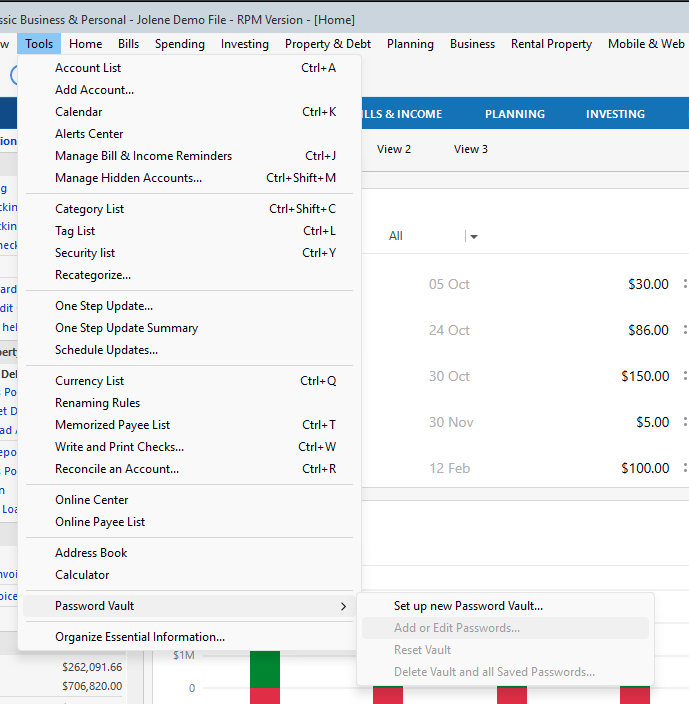
- Launch Quicken and go to Tools > Password Vault > Add/Edit Passwords.
- Click on the account in the Password Vault.
- Choose Delete Password for the account.
- Complete a One Step Update, and you will be prompted to enter the password manually.
- Type in the password (the same one used on the bank's website) and check in the box marked Save next to the password field.
- Click Update Now.
If there is no option to delete and update the password, or if the login ID/username also needs to be changed:
- Choose Tools > Account List.
- Click the Edit button next to the account you want to change the login ID for.
- In the Account Details window, click the Online Services tab.
- Click Reset Account.
- Enter the correct login ID and follow the on-screen prompts to complete the reset.
- If prompted, carefully LINK the accounts found to the existing accounts in Quicken.
After the reset process is complete, attempt your online session again.
Please follow the rest of the steps in the article linked above.
If the steps above don't resolve the issue
Please reach out to Quicken Support.
Thank you!
Quicken Alyssa
Make sure to sign up for the email digest to see a round up of your top posts.
0 - Launch Quicken and go to Tools > Password Vault > Add/Edit Passwords.
-
Just checking in, we haven't heard back from you in a while.
Do you still need assistance?
Thank you!
Quicken Alyssa
Make sure to sign up for the email digest to see a round up of your top posts.
0 -
Hello again,
Checking in once more before this thread is closed.
Let us know if you still need assistance.
Thank you!
Quicken Alyssa
Make sure to sign up for the email digest to see a round up of your top posts.
0
