Error CC-901 when reauthorizing multiple American Express credit accounts (ISSUE RESOLVED)

Just started this morning. Maybe connected. Latest Quicken Premier for Windows. Receiving CC-901, Your bank is requesting that you reauthorize your account, on both of my AMEX accounts. Click Reauthorize. I select my two accounts in my AMEX account and I receive an error. Just spinning. However, I go into my Amex account and under third party permissions it shows that I have reauthorized them but somehow that new status is not being communicated back to Quicken. The error I receive is 'This page is not working right now. If the problem continues, contact the site owner. HTTP Error 431. Refresh button displays. I click that and nothing happens. In Quicken the sign into American Express just keeps spinning. I cannot reauthorize my AMEX accounts. I revoked my authorizations for Quicken in my AMEX account and removed ability to download into Quicken. Started fresh. I can't reauthorize. I cannot download transactions into both of my AMEX accounts. Let me know if you need anything else regarding this issue.
Comments
-
Issue resolved. I cleared all cookies and browser data in Edge. I went into my American Express online account and revoked all third party permissions to Quicken for both accounts. Logged out. Launched Quicken and reauthorized my accounts successfully.
0 -
Hi @mdross171,
I’m glad to hear the issue has been resolved. Thank you for outlining the steps you took to fix it. This will be very helpful for other users who may encounter the same problem.
Please feel free to reach out if you have any additional questions.
Quicken Laura
Make sure to sign up for the email digest to see a round up of your top posts.
0 -
This is NOT the way my problem is resolved. I repeated get reauthorize AX requests, I have 3 accounts. If Quicken thinks it is a cookie problem in Edge they are betting wrong. It is Quickens problem to resolve. [Removed-Rant].
0 -
Hi @originalstarlite ,
Thank you for your reply! I’d like to ask a few questions to better understand why the error is still occurring.
- Are you using a VPN, firewall, or antivirus software? If so, please let me know which one(s).
- Have you tried using a different browser?
- Do you have any pop-up blockers enabled in your browser?
- Where is your Quicken data file located? To check, please open Quicken and go to File. At the bottom of the menu (just above the Exit option), the file with the check mark next to it is the one currently open. Please share the full file path shown there.
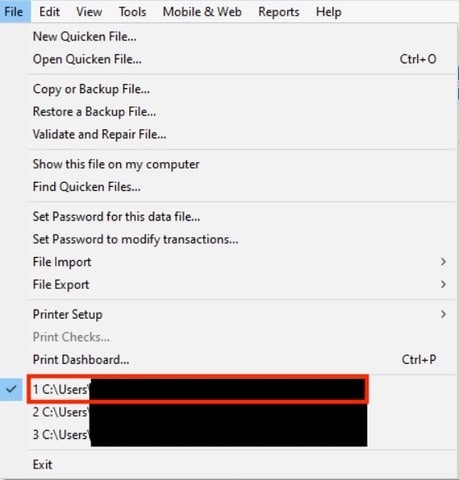
I look forward to your reply!
Quicken Carlos
Make sure to sign up for the email digest to see a round up of your top posts.
0 -
I have tried my best to overcome this situation and have lost patience with the software. I am a Quicken user for over 30 years and depend on it to maintain an interconnected weave of accounts. Losing its connectivity is not a minor inconvenience.
Answering your questions, I do not use a VPN, and the only extra Windows software used is Malwarebytes, at least 10 years. No, I do not have another browser besides Edge, and pop ups are not the problem. I have successfully completed the browser authorization everytime, and Quicken recognizes this. It goes into download syn, finds the account, shows the linking to my account. Then the next update is a repeat.
I keep daily backups with Quicken Cloud, on my hard drive, and on jump drives. I have tried each of these alternatives without success. Clearly to me, this is broken element of the Update Engine.
My current file is C:\Users\wvsta\backup\*****
0 -
Thank you for providing those additional details; they’re very helpful. I checked your accounts on our end, and it looks like only one is currently showing an error message indicating it needs to be reauthorized.
To help ensure everything is properly connected, I recommend deactivating and then reactivating all of your American Express accounts by following the steps below:
Step 1: Deactivate all affected accounts
- Go to Tools > Account List.
- In the Account List, select the account and click Edit.
- In the Account Details window, open the Online Services tab.
- Click Deactivate next to the online service.
- Confirm by clicking Yes.
- Repeat these steps for each affected account.
- Log in to your bank’s website and revoke Quicken’s third-party access (if applicable).
Step 2: Reactivate and link the accounts
- Go to Tools > Add Account.
- Search for and select the Financial Institution.
- If prompted, choose the appropriate connection method.
- Follow the on-screen instructions to sign in.
- When the list of found accounts appears, make sure to select Link to connect them to your existing accounts (do not choose Add, as that would create duplicates).

Once completed, please update your accounts.
If you encounter any additional error messages during this process, feel free to let me know. I’ll be happy to assist further.
Quicken Laura
Make sure to sign up for the email digest to see a round up of your top posts.
0 -
Hi @originalstarlite,
I just wanted to follow up since we haven’t heard back from you. I’m checking in to see if you still need assistance.Quicken Carlos
Make sure to sign up for the email digest to see a round up of your top posts.
0

