Cash double counted in Fidelity brokerage account

Quicken is tracking both my cash balance and Fidelity Money Market as a security, thus double counting my cash. This just started a month or so ago when Fidelity-in-Quicken went all whacko and started downloading phantom transactions, etc. I tried to find and remove all of the erroneously downloaded transactions (mostly involving cash) and as far as I can tell caught them all. But now Fidelity Government Money Market (SPAXX), which is my core cash account, displays as its own security and a cash balance also displays. How do I fix this? Thanks!
Answers
-
There's a setting for this in the account properties. See below.
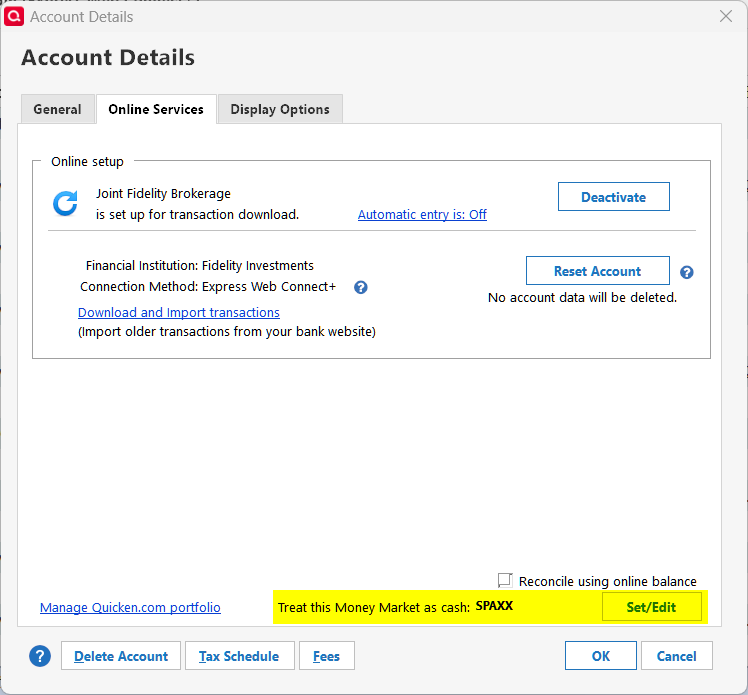
Quicken user since version 2 for DOS, as of 2025 using QWin Premier (US) on Win10 Pro & Win11 Pro on 2 PCs.
0 -
Hi @chas@,
Thank you for reaching out. As @Rocket J Squirrel mentioned, you can change the money market fund treatment in Quicken by following the steps outlined in the article below (please remember to save a backup first):
Feel free to reach out if you have additional questions!
Quicken Laura
Make sure to sign up for the email digest to see a round up of your top posts.
0 -
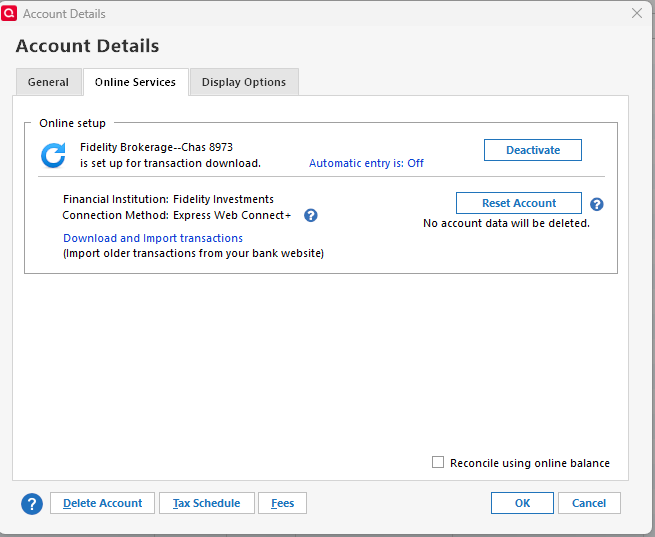
Thanks for responding! I remember that setting—I've seen it in the past—but it seems to have disappeared. See below. Not quite sure how to handle at this point.
 0
0 -
Hi @chas@,
Thank you for following up.
Do you have the option to change the money market fund treatment in other investment accounts? If so, please let me know what account type is shown in the General tab of the Account Details for the affected account.
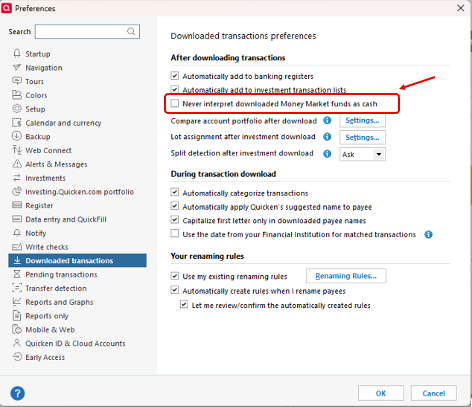
Also, please check the following global setting:
- Go to Edit
- Select Preferences
- Click on Downloaded Transactions in the left panel
- Make sure the “Never interpret downloaded money market funds as cash” option is unchecked
I look forward to your reply.
Quicken Laura
Make sure to sign up for the email digest to see a round up of your top posts.
0 -
Hi Laura,
Thanks for getting back to me. The “Never interpret downloaded money market funds as cash” box was checked; once I unchecked it, the money market treatment box under Edit Account Details reappeared. I know I had that box in the past; not sure how this happened. I have one remaining, I think related, problem. When I go to reconcile this account, it displays a prior cash balance amount that is incorrect and way too low. If I fill in the correct current cash balance in the following box, Quicken wants to make an XIn transaction (that didn't happen!), which then causes my cash amount to be way overstated. How can I fix this? I have six different Fidelity accounts that I track, and they all got a bit screwed up a month or so ago for unknown reasons. I was able to get five of them straightened out, but this one account continues to annoy me!
[Edited Readability]
0 -
Hi @chas@,
I’m glad to hear the option is now appearing. To make sure we’re on the same page, could you please confirm whether you want the cash to be treated as Cash or as a Money Market security in Quicken?
Also, when was the last time you successfully reconciled the cash balance? If you go back to that date in Quicken, do you see the correct ending balance reflected at that point?
I look forward to your response!
Quicken Laura
Make sure to sign up for the email digest to see a round up of your top posts.
0 -
Laura,
I want the cash to be treated as cash, not as a money market security. How do I determine when I last successfully reconciled the cash balance? It's been several months at least but I don't know how to find out exactly when.
0

