upload bank transactions via batch QFX file

I created QFX file from the bank statement and I imported it manually. This method worked out for the account Credit card but not for the account checking. Could you give me a suggestion how to succeed?
Answers
-
Hi @frank53,
Thanks for reaching out to the Quicken Community.
I have a few questions to help provide the best troubleshooting steps:
- During the import process, does it ask you to select two different accounts to link, or only one?
- Do you receive any error code or message when importing the QFX file for the checking account?
- Did you download two different files from the Financial Institution, or were the transactions all in a single QFX file for both accounts?
- Has the sort order been changed in your checking account register? Confirm that the Sort Order in your account is by Date; just click the top of the Date column in your account register.
- Do you have any filters set? Click the Clear Filters button to the right of the account register’s filter dropdown.
- Are these transactions still marked as "pending" on your bank's website?
I look forward to your reply!
Quicken Carlos
Make sure to sign up for the email digest to see a round up of your top posts.
0 -
I'm having the same problem
one account
single QFX
sort order not changed
not pending
When I go to import the file from downloads, the file is grey. unable to get into Quiken
Eileen Horne
0 -
Hi @Eileen02,
Thank you for joining this thread and for answering the questions above.
If you haven’t tried this yet, I recommend locating the QFX file on your computer and opening it so it can load the transactions into Quicken. The default download location for QFX files is typically the Downloads folder. Simply double-click the QFX file to open it.

You can also import the QFX file from inside the program. In Quicken, go to File > Import > Bank or Brokerage File (OFX, QFX).... Select the Downloads folder in the left panel. The file will have the .qfx extension. Select the one that matches the date and time you completed the download from the bank's website.

I hope this helps! Please let me know how it goes.
Quicken Carlos
Make sure to sign up for the email digest to see a round up of your top posts.
0 -
should have mentioned I have a MAC
when I go to QFX file in downloads it is greyed out and I cannot open it
0 -
Hi @Eileen02,
Thank you for trying the steps above. I have updated the information for Mac users.
I have a few additional questions:
- Is the QFX file showing as empty (0 KB in size)?
- Can you please confirm that the file uses the .qfx extension and not a different file type?
To verify the file extension, please follow these steps:
- Right-click the file you are trying to open
- Select Get Info
- Expand Name & Extension
- Ensure the extension is .qfx
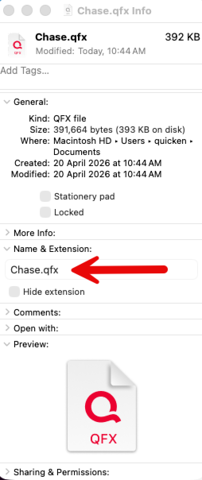
I look forward to your reply!
Quicken Carlos
Make sure to sign up for the email digest to see a round up of your top posts.
0 -
Hi @Eileen02, I just wanted to follow up since I haven’t heard back from you. I’m checking in to see if you still need assistance.
Quicken Carlos
Make sure to sign up for the email digest to see a round up of your top posts.
0 -
Hello again @Eileen02,
I am checking in once more before this thread gets closed. If you need assistance, let us know.Quicken Carlos
Make sure to sign up for the email digest to see a round up of your top posts.
0
