Scheduled Transaction Group Issue

Some time ago I set up several Scheduled Transaction Groups which I execute every month. I had no problem adding the payees to these groups by simply checking the box next to the memorized payee transactions I had previously set up. When I recently decided to add several new Payees/memorized Transactions, the new transactions do not show up in the list. What would cause them to not be shown under the existing Scheduled Transaction Group?
Comments
-
Hi @Rick4,
Thank you for reaching out! I have a few questions to make sure I fully understand what’s happening:
- Are you seeing those new payees in your memorized payee list but not in the Edit Transaction Group window?
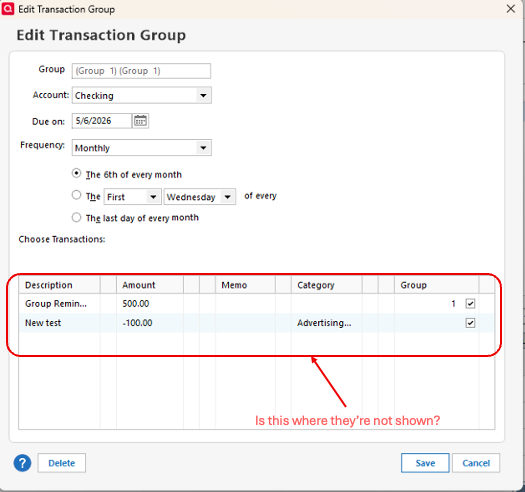
- Is this issue happening with all transaction groups or just a specific one?
I look forward to your response!
Quicken Laura
Make sure to sign up for the email digest to see a round up of your top posts.
0 - Are you seeing those new payees in your memorized payee list but not in the Edit Transaction Group window?
-
Sorry it took me so long to revisit this. To answer your question, the payees are in my Online Payee list and Memorized and I set up a memorized transaction using them. I can bring these up easily when I manually want to send a payment. But although the Payees are in my payee list and when I do a Ctl T I can find the entires there as well. But when I go to add them when I'm editing a Transaction Group, they are simply missing from the list. What's odd is that I've obviously done this in the past but for the two I want to add now, I can't. Any ideas?
0 -
Hi @Rick4,
This file behavior is a bit strange. Have you tried deleting and re-entering those payees into your memorized payee list?
Quicken Laura
Make sure to sign up for the email digest to see a round up of your top posts.
0 -
This is getting frustrating. I deleted my memorized HOPE HOUSE MISSION payee and the memorized transaction using it. I then reentered it as a memorized Payee. I then made a checking account entry using it and memorized it. I then clicked 'Manage Bills and Income Reminders' and saw my usual Groups. I then went to Group 1 (FIRST OF EACH MONTH) and scrolled down the list. I saw my usual payees but saw NO Hope House Mission payee. I even ran VALIDATE & REPAIR FILE and got no errors. Matter of fact I entered a new OP Payee (Dayton Food Bank), filling in all required fields. Again I memorized a transaction using it. Same thing. Particularly bizarre since I've got 7 transaction groups and never had any problem populating them with scheduled payments. Any other suggestions?
0 -
Hi @Rick4,
Thank you for trying that. I understand how frustrating this must be.
To help narrow this down a bit further: if you create or edit one of those transactions as an individual reminder (outside of the group), does the payee appear there as expected?
Since the transactions are showing in your Memorized Payee List and can be used manually, but do not appear when editing the Transaction Group, this does sound like it could be a file-specific issue.
As a next step, you might try restoring a backup from before the issue started to see if the payees appear correctly there. I’d recommend making a current backup first, just to be safe.
Please let me know what you find!
Quicken Laura
Make sure to sign up for the email digest to see a round up of your top posts.
0
