UBS Financial Services Inc.: OL-292-B Error

This has been a recurring problem and has returned over the last 4 days. Is Quicken aware, and what suggestion does anyone have at this point?
Comments
-
Hello @Pat Marshall,
Thank you for reporting the error you are receiving.
The OL-292-B Error is a Direct Connect error caused by an issue on the bank's server. Currently, there are no known issues with this financial institution. The linked support article suggests waiting a day and trying again. Since you have already waited several days, here are the next steps suggested:
Refresh Quicken's financial institution information
- Go to Help > Check for Updates.
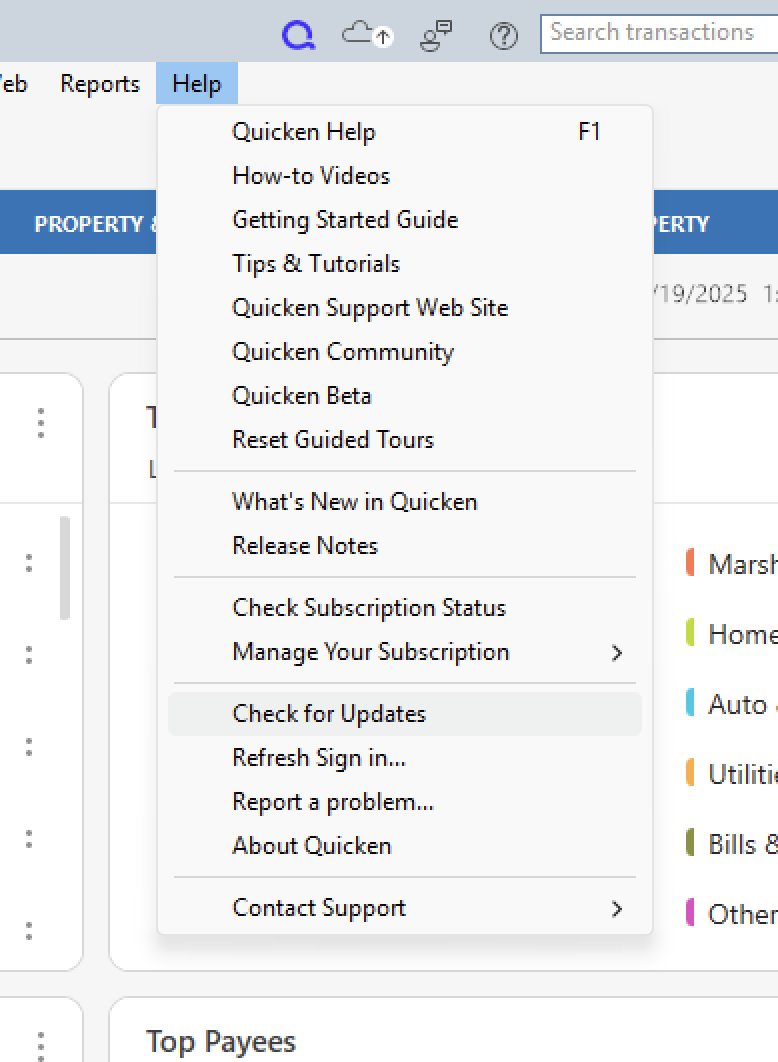
- If an update is available, a prompt will appear with the option to install it.
- Click Yes to install the update.
Note: You'll need to exit Quicken to run the update program. When you exit, all of your work is saved, and you can pick up where you left off as soon as the update is complete.
If the issue persists
You will need to contact your financial institution for assistance. Quicken Support does not have access to the financial institution's servers to be able to correct the problem.
This may require you to request to speak with an online services specialist who handles transaction download issues at the financial institution. If your financial institution states it can't assist, an escalation with them may be necessary.
Let us know how it goes!
Quicken Alyssa
Make sure to sign up for the email digest to see a round up of your top posts.
0 - Go to Help > Check for Updates.
