Entering dates in Reports' Date Range customization fields

Bring back the ability to type in dates and to use the tab key to get to the end date box. Requiring us to click on the date in the calendar box is a HUGE waste of time. This update is SO cumbersome. This is why I always chose to use the old style, but now you took that away, too.
Comments
-
Please give an example of one of the standard reports from the Reports menu that is not working correctly for you.
Please go to Help > About Quicken and let us know what version of Quicken you are running.
Is this in the report customization date range setup, or somewhere else?
This seems to be working correctly for me in R67.7.
QWin Premier subscription0 -
For example, a Transaction Report. Tab doesn't work to go from field to field. If I type a date, the / doesn't work and the field doesn't recognize the numbers as a date. I can use T for today and the + or - sign, or click on the calendar icon, but I can't type. It is extremely cumbersome to use.
Quicken Classic Business and Personal, R67.7.
Correct, the date range customization setup. I've had this issue all along, which is why I would click the box to use it the old way. I have reported this issue A LOT of times….
0 -
My Quicken Premier R67.7 works exactly as you want it to. Tab works, slashes work, typing numbers works.
So I might guess something about your particular setup is causing these problems.
Show us a screen capture of your date range customization dialog.
Quicken user since version 2 for DOS, as of 2025 using QWin Premier (US) on Win10 Pro & Win11 Pro on 2 PCs.
0 -
Thanks for trying to help. Here is my screen shot. In this pic I'm not using a saved report, I'm using the Standard report on the left… I have no idea what I could have setup differently…
0 -
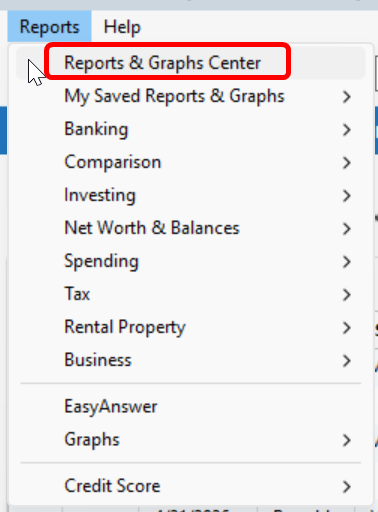
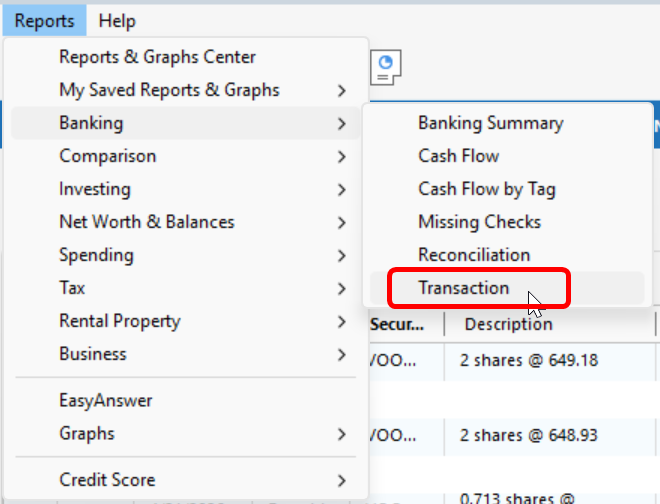
@mayoung, I was able to replicate your issue. It appears you are correctly identifying a subtle (but important to you) difference between how the Date Range customization feature behaves between Reports generated through the top level Reports and Graphs Center (top button in the Reports menu - 1st screenshot) and those generated further down in the menu, where you select the specific report type you're after (2nd screenshot). I see no good reason why the behavior is different, but it certainly is. If you use the second pathway, you get the Tab behavior you are after.
 1
1 -
@pablomiller Oh my goodness!!! I was able to duplicate what you're saying!!! Thank you so much!!!!
0 -
You might check your Edit / Preferences setting for Early Access. A quick check on my part seems to indicate a different behavior (more expected) for the Reports and Graph Center selection if the preference is set to no checkmarks for Early Access.
0 -
@q_lurker Unfortunately with R67.7 they have taken away the "Early access" settings and only the new versions of the Reports and graphs center and the report customization are available.
QWin Premier subscription0



